sdlc
Member
-
Joined
-
Last visited
-
-
hello, Efob seems to be calculated without stepclimb profile inserted. From my personnal experience the good offset is +5% Stephane
-
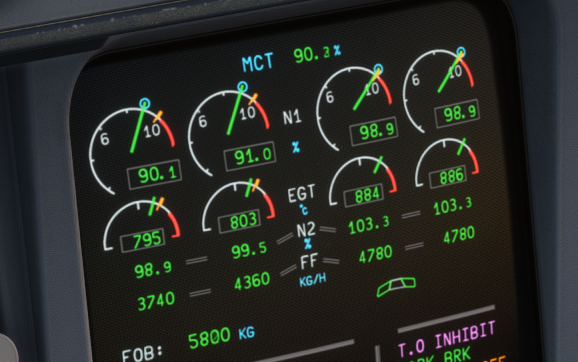
Hi Inisteven, I agree with you YT videos are not sufficient particulary in this example with significant turbulence and some parameters unknowns However i think there is a problem with N1/thrust between CLB and TOGA For TOGA and climb we have the accurate level of thrust . I don't know how gauges and flight parameters are coded in the A340 but if i take this example below : aircraft on ground N1 CLB thrust, N2 MCT, 3 and 4TOGA You can see a big FF difference between 1 and 2 for only for 0.9% N1 delta . I know Fuel flow is not linear with N1 but in this case it's not consistent with MCT to TOGA. That's remember me my long hours to customize .air files on previous fs versions with AirEd and the table 1506 and 1507.... Br Stéphane