




edaaaaaali123456
Member
-
Joined
-
Last visited
Everything posted by edaaaaaali123456
-
Hiya, Fired up the a300 for the first time post update today and had this issue again. Was flying the pax GE variant. Hope that helps
-
Thanks for all the replies, for what its worth I haven't noticed this happening recently, but when it does I'm able to re-engage FD1 after pitch trim 1 is re-engaged. I don't have any binding attached to FD1 (as far as I'm aware - I know MSFS has a thing for randomly making new bindings/changing control settings). My experience sounds exactly like what you mentioned here.
-
Hi, I'm pretty sure I was running it with v1.1.0, anyway I uninstalled it and reinstalled the latest update (v1.1.1) and it happened again just now. Any ideas what might be causing it? I'm using FSLTL, GSX and a bunch of different addon airports, would anything like that be causing it? Thanks
-
Hi all, I've recently encountered an issue where flight director 1 on the captain's side randomly disappears on the PFD and is replaced by a flag showing it is not working. At first I assumed I had accidentally clicked on something while looking around that caused it to break. I managed to complete the flight fine as the FD2 on the FO side was working fine. I just had it again and was wondering what could be the cause and how to avoid it happening, and its happened with both the GE pax and PW freighter variants. I've also noticed that the standby attitude indicator looks broken as well. Hope someone can help! Thanks

-
I just had this too, everything apart from the altimeter froze and the left fmc went blank. Happened when I was clearing waypoints as well. Hopefully there's a quick fix to it. I was using the PW engine variant.
-
I didn't turn the autopilot or any nav/heading modes on before I got in the air, so I don't think it's that. Whats weird is I tried it again earlier today and it seemed normal, I had a bit of a crosswind from the left and the aircraft yawed to the left so I inputted a bit of right rudder and it was fine, but before I definitely had a few times where the wind was coming from one way and it yawed in the opposite direction without me doing anything with the rudder which is why I thought there was something wrong. Either way I'll keep an eye on it and hopefully it's resolved itself. Thanks for the suggestions though.
-
Since update 1.04 every time I try to start my takeoff roll the aircraft yaws heavily to the right. I have to input almost maximum left rudder to counteract this until it disappears as the aircraft speeds up. I have this at a variety of different airports in different wind conditions. I don't have this with any other aircraft, and have checked my control calibrations, bindings and sensitivities so I don't think it's a problem with that. I didn't have any problems before the latest update so I'm leaning towards it being a bug, but I know I could be making a mistake somewhere along the line that could be contributing towards this! Any help would be much appreciated. Thanks
-
OK, good to know it's not something on my end, apart from that I'm really enjoying the aircraft, it's a bit of a learning curve but it's fun! Thanks
-
Thanks for the reply. Replacing the file seemed to work. Thanks for your help. On another note, since the latest update, whenever I load in the a300 for the first time after starting up the sim it always crashes to desktop when I press fly on the main menu. Then when I start up the sim a second time and select the aircraft it loads in as normal. Any idea how to fix this? Thanks
-
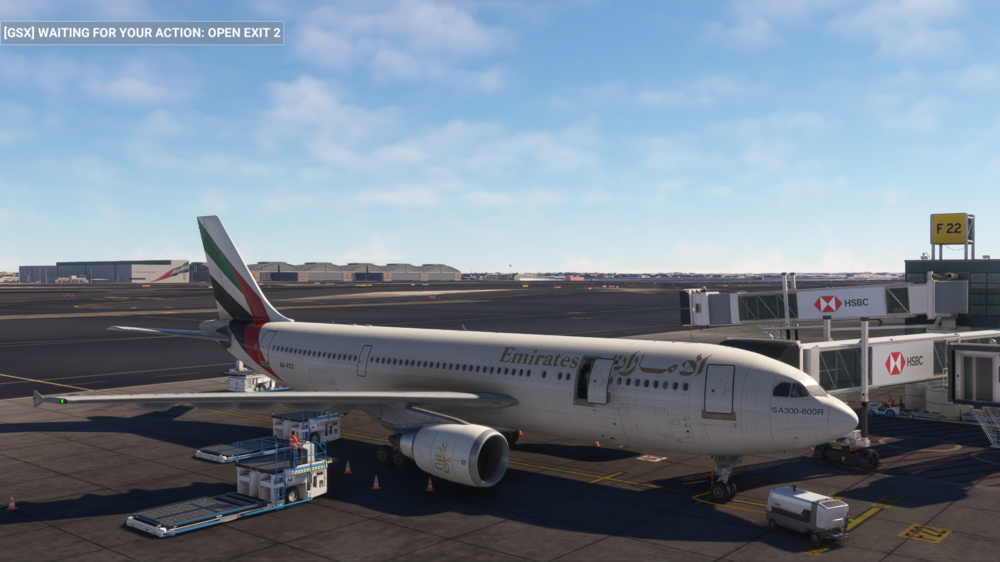
When I try to use GSX with the passenger variant of the A300, everything is mis-aligned and opening the wrong doors. I went into the GSX profile folder and there's only 1 file for the A300. I've attached a screenshot to show what I mean. GSX works fine with the freighter variant. I'm sure there's a simple fix, so if anyone could help it would be much appreciated! Thanks
-
Oh really? Weird that I've only had this with the a300, haven't noticed anything like this in the fenix or pmdg, must've just got lucky with them so far.
-
Yeah I do, had it before and after the update.
-
Bought the A300 on day 1 and really enjoying it so far, however I've had this a couple times where its been flying along nicely in autopilot but suddenly it falls out of the sky without me making any changes or control inputs I had this once soon after takeoff and another time in cruise around 59 miles or so before tod. The controls stop working even after I take out the autopilot and what I assume to be a stall horn starts sounding. No pitch or roll or engine power changes happen, it simply stops moving forwards and falls down, resulting in a crash. Hope this can be fixed because apart from this I'm really enjoying the plane. Thanks
-
Every time I load the a310 into the sim it starts up with completely black screens, even the mcp are black and none of the buttons or switches work. It doesn't matter which state I change it to, they never turn on. It was working fine yesterday and I've not changed anything about it apart from installing a livery from the inibuilds manager, so I'm not sure what's changed in the meantime. Any help would be appreciated!


