




Mantock
Member
-
Joined
-
Last visited
Everything posted by Mantock
-
Hi, I've seen in the promo video of the Belfast City scenery just recently released, that in the background of several shots, you can clearly see the big yellow H&W cranes in the docks, are they part of the scenery package? I assume they are not because I don't see them after buying the scenery, I have photogrammetry turned on in 2024. Just wondering how they appeared in the promo video - is there an extra scenery package nobodies mentioned?
-
Also, could we get the old triple mix CIVA INS on the shorter range L1011 variants as well? I believe the CIVA was used on those earlier models.
-
THanks Jamir, For reference, I'm using the RTX4070super, 12gb vram and still getting regular notices from the sim about vram being full -Peter
-
would love the short range versions as there were MANY more historic airline liveries and routes associated with them
-
Hi folks, I have found that even with the performance mode switched on in the paper tablet, that the Tristar keeps throwing up numerous 'Graphics card out of memory' notices when I get close to my payware scenery, or when switching views in the cockpit. Now, I'm not a new user, I've been at this game many a year by this point so I understand the constraints of flight simulation. But at the same time, I fly the PMDG 777/737 and the Fenix A320, and NONE of these EVER throw up graphics card vram limitation notices. Like.......ever. I was wondering if the devs could throw some light on potential performance increases for this bird that might be in the works? Many thanks, - I'm loving the aircraft otherwise!!
-
Hi, When using pounds, in cruise the fuel flow gauges show something in the region of 53.5 or something around that. But then on the gauge, it says just above 'x1000' which would be 53,500lbs per hour! Is this a bug or should the text above the readout say 'x100' instead? With the decimal point two digits in, its 53.5. If it was correct, it should be 5,350lbs per hour. Whats the story here?
-
Hi, Thanks for the correction! I assumed that the Litton would do what the CIVA does, being that its a later model and is technically more 'advanced'. My flightplan was this (from EGLL to CYVR) : UMLAT T418 WELIN T420 TNT UN57 POL UN601 RIBEL NAVSO ATSIX 62N020W 64N030W 63N040W 61N050W SAVRY RODBO YPX 60N080W 59N090W MITOB PETMA EXDEE MERYT BOOTH CANUC6 I believe I did have SID/STARS turned on in the paper tablet.
-
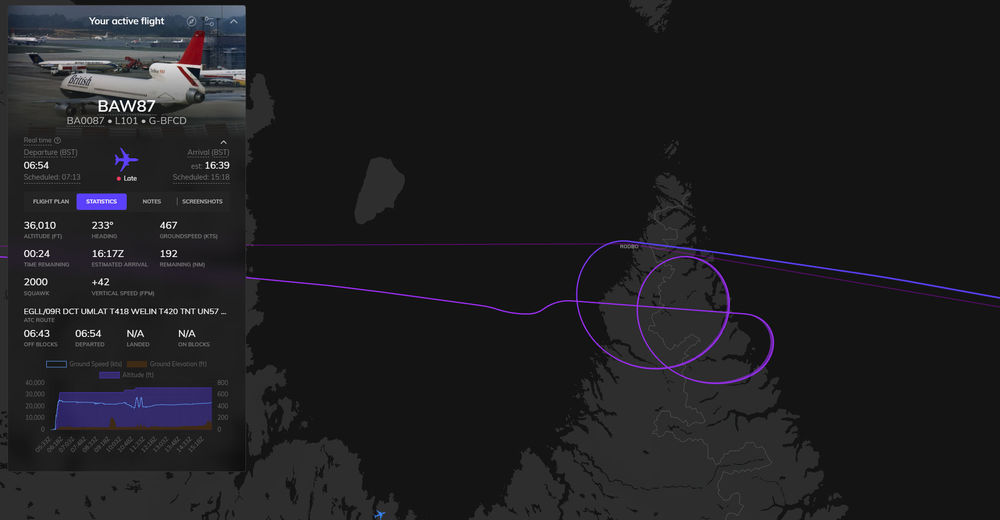
I have to be honest, in all the flying I've done so far in the Tristar, I've never come across ANY INS drift. With it turned on in the efb, the aircraft is still crossing all its navpoints with laser-like accuracy. Also, when turning any of the INS units to DSR TK/STS, I would expect to see the accuracy index gradually go from 01 back up to (eventually) 90. But it sits at 01 for hours and hours with no gradual inaccuracies being introduced as one would expect. Also, (just currently going an EGLL-CYVR longhaul) about a half to two thirds of the way through my longhaul, my ADI has become stuck and the needle now does not move to the fresh track heading when going through the waypoints, and the orange digital 'time' and 'miles' readouts above the ADI needle have also frozen. I got to a waypoint 9 and expected the aircraft to auto select and input the next 9 waypoints as it should, but this didn't happen, so that the aircraft began circling at cruise level as seen in the image below.
-
When we turn on the anti-icing systems in the Tristar, could we have the corresponding areas of the airframe that those systems are linked to, have their layer of ice disappear while that system is engaged?
-
cant find the ap disconnect, or toga bind thats on the yolk
-
As the title says, I thought it strange that the APU is left on if you are following the AI flight engineer flows in the paper tablet. Because the APU panel is right in front of his face I just assumed that as part of the flow he would turn it off once all power was drawing from the engines, I accidentally left the APU on for most of my first flight and barely had the fuel to make my destination, landed with an engine out.
-
Ah ok thanks for the correction!
-
I definitely am one who would appreciate seeing Inibuilds flesh out the other variants of the L1011 alongside the -500. So that we could have historically accurate liveries applied to their historically accurate variants. As I only like to fly historic routes, I'd also like to see some sort of a tag on each livery in the livery manager with 'historic' or 'fictional' to show which liveries were not actually historically used on the -500. Would save me some research, but its not a major deal. The earlier variants of the L1011 though, would definitely be a day one purchase from me!
-
Just noticed a small detail on the BA liveries in the inimanager. G-BFCD has 'Tristar 200' on their engine cowling at the back (it looks like it should be 'Tristar 500'. And then the G-BEAK livery doesn't have any text in that spot in the real world livery. Please correct me if I'm wrong though! Thanks.
-
So I literally just had the same exact crash happen to me, but this time it was in the Inibuilds A330-200 thats part of the base msfs2024 sim. I didn't think the A330-300 or -200 suffered from this same issue. Where in the A340 I was having the crash every other flight atempt. I've only ever had the crash once in the maybe 25 flights ive done so far in the Inibuilds A330. And to be fair, all my flights in the A330 have been in the longer -300 variant, and today was my first longhaul in the -200.
-
Just popped back to see this thread, sad that this is still happening! hopefully Inibuilds can squash this in the end. Personally I was able to get a full refund for this product through microsoft, hopefully the L1011 isn't like this!! fingers crossed, can't wait for the L1011
-
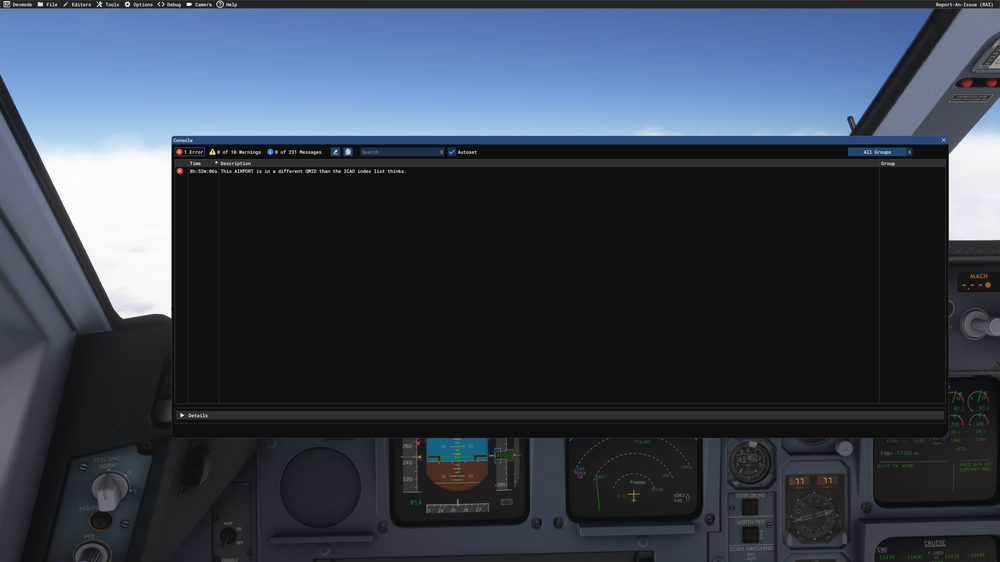
I've just had the A340 crash AGAIN. This is my second flight attempt after updating to SU4. So again, I've gone down to that 50% success rate I had before SU4. Here is the screenshot your asking for Inibuilds, the console, I only have one error to report it seems. If This doesn't get fixed soon, I'll be asking for a full refund as this aircraft has been like this since the day I first downloaded it Crash report: 'This AIRPORT is in a different QMID than the ICAO index list thinks'
-
Hi Inibuilds, In researching Tristar routes I found that PSA never actually flew the -500 (or so says chatgpt) it only flew the L1011-1. So my question is, why do you have the PSA livery on your tristar in your recent announcement? Also, you state that 'our main variant will be based off of the -500' Does that mean you are developing more than one variant of the tristar? Regards, -Peter
-
I did my first 11hr 20mins from EDDF to VHHX today all without any issues. Obviously now im on SU4 Im wondering if all these problems were SU3? Is anyone having the same issues on SU4? Ive only done one flight as of yet so still need to test more.
-
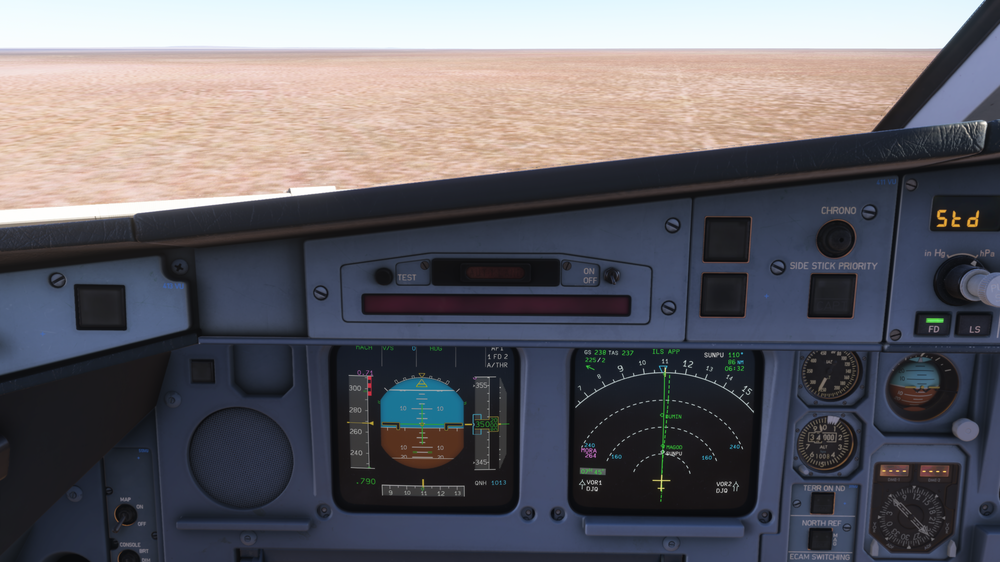
AAAAhhhhhhhhh here we are again. My very next atempt after my last atempt (which ended in failed TOD pause) I come back to the sim and the aircraft is skimming the trees, but on the PFD I'm still apparently up at FL350!!! I don't know why I try at this point. No devs seem to be caring about this thread at all. But we've been consistently showing that there are big issues still even after multiple patches. I don't have the motivation to continue trying to test it to see if it works or not, not until I see some headway from the devs in trying to address whatever bug this is!! If I don't find that its patched by the next major update, I'll be wanting my money back. Until then, I might just go and fly the Headwind Simulations 787-9....It's free.....and it gets me to my destination.
-
Can we get an answer anytime from you as to whether or not the devs have actually identified yet what this is? This issue seems to be cropping up primarily in SU3 still, not SU4.
-
Maybe all the louder people who say this plane is fine, are all on the SU4 beta at this point and so the SU3 folks are falling through the cracks? I don't know. Would love to have some clarity on what the devs are doing to try and fix this issue, as this aircraft is still not reliable for me as a longhaul aircraft. Such a shame, I was really looking forward to this one.
-
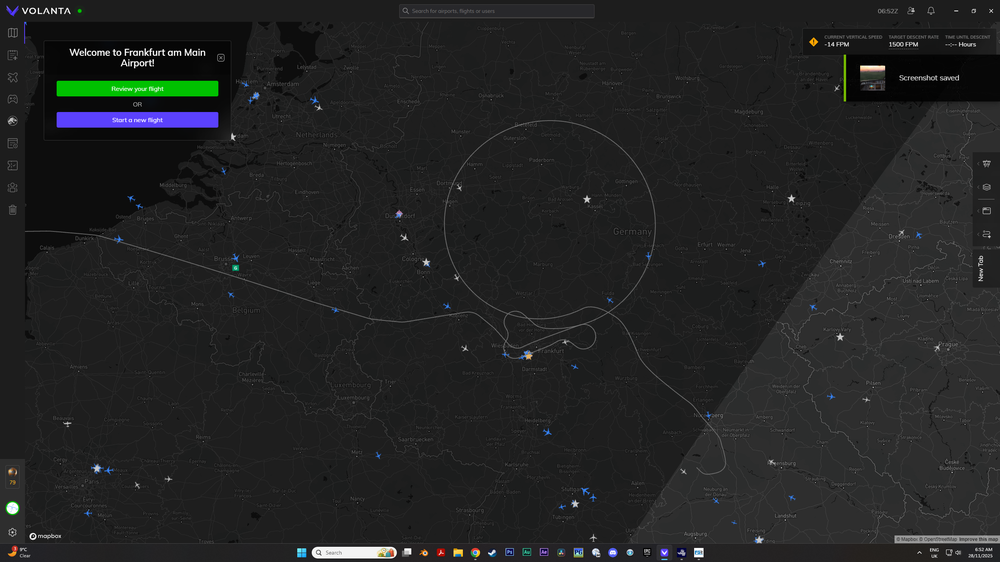
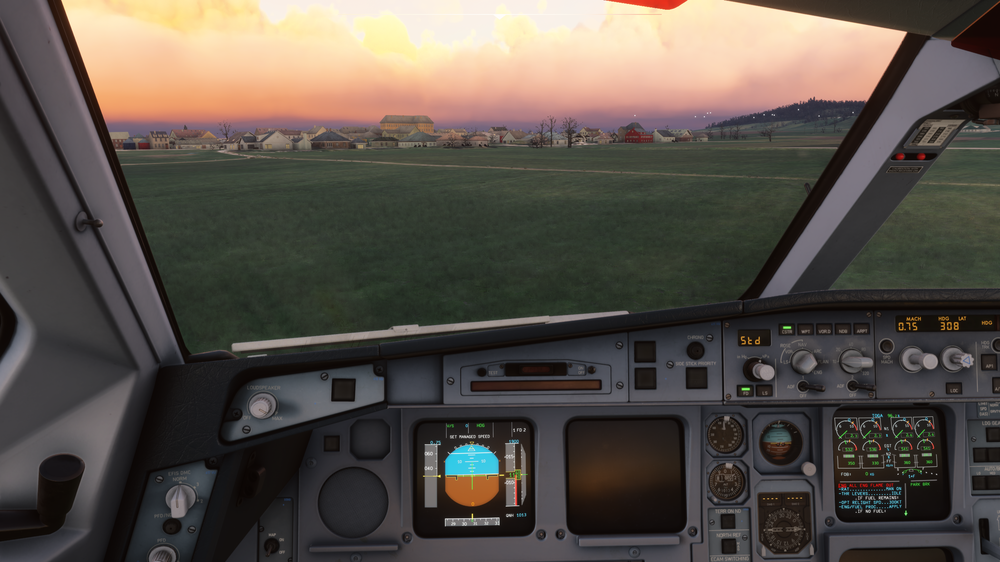
So my first atempt at doing a flight on the new update: So apparently it managed to stay on its magenta line for the entire flight until it failed to pause even though I had set it to pause at TOD in the settings. So........you can start to see how I only ever successfully complete about 50% of flights with this aircraft!!! goodness sake - I'm starting to regret my purchase decision
-
Really???! Thats crazy. So they have a multi-product bug that they've still not patched out of not one, but TWO of their major products?? People might think im over reacting, but I literally have only ever completed about 50% of the flights I've ever tried to date with the A340.
-
Inibuilds, could we get some clarity on what this bug even is? We've never heard what it actually is thats doing this. Would be very interested to hear if anyone else is getting this on the latest update.


