




LowBee
Member
-
Joined
-
Last visited
-
After creating a fresh community folder and a fresh fsuipc.ini had not helped, I finally found the culprit: I had both the Premium and (still) the Compatible version installed. Deinstalling both addons and reinstalling the Premium version saved the day. I suggest you guys add a remark on the website/iniManager like "Multiple installations not recommended" or so. Thanks for supporting.
-
Thanks Kyle, I appreciate your help. Very strange, indeed. I usually start with APU running, load the flight from Simbrief into EFB, load the a/c and wait until loading is finished. Then I import the flight, insert the SID and the load values und finally get back to the EFB to get the t/o performance data, which obviously is not working any more. I use the latest version and Navigraph data. It might be helpful to know what exactly "Calculate>>" does.
-
Affirm. Out of curiosity I have just tried another airport which I had never used with the A300F before (LIRN) and I got the same error mesage.
-
There you go.
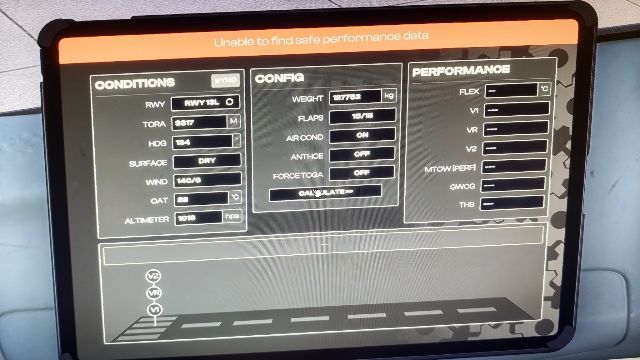
-
Hi, since a short while I always get this error message when trying to calculate takeoff performance. It has worked before. Any way to get this fixed? Landing performance calculation is working btw. Thanks
-
-
Hi, in SETTINGS sction of the EFB "MCDU Export" to "External Hardware" can be enabled. How does it work? Can it be connnected to an external computer? Regards
-
I have just tested the update. I loaded the plane and a flight. At the gate I switched from cockpit to outside view and immediatly the a/c froze, not the sim though. So this product is still unflyable for me.
-
Same here. Editing the route results in a freeze although the a/c continues to fly (uncontrolled). The displayed attitude is different from the real one. I had this also with v.1.0. What did I do? I added waypoints for the STAR assigned by ATC manually because I could NOT select it from the database as I could not scroll further down to the end of the list. FD button is the only button which can switched on and off on the MCP. BTW, some other issues, at least on my system (2020 + updated): The taxi speed on idle (!) is way too high for a fully loaded A359, you have to break hard to come to a stop. Becoming airborne the aircraft always veers slightly to the right and has a tendency to become unstable when correcting. So far I was able to only complete 1 flight, too bad!
-
Hi, I have used the autoland mode since day 1 but all of a sudden I cannot activate it anymore. The ILS is captured and the a/c is fully configured for the approach but whenever I click on Autoland the button remains dark. I have reinstalled but no change. Any idea? Best regards
-
I thought so until I found additional liveries in the download section. I had no clue they are not to be used with the manager and I guess I am not the only one.
-
Gosh, I made the same mistake and lost 2 hours trying to install an XP livery into MSFS until I found this post. I would really appreciate you guys update your download section to make clear which section belongs to which sim.
