Juanos1980
Member
-
Joined
-
Last visited
-
Appreciate the feedback. so I didn’t realise on the GARMIN GPS you had to change from GOS to L LOC. I’ve done that and with update 1.0.2 all is working. Really great aircraft by the way. Will continue to monitor things as more flights take off 🙂
-
Surely this isn’t a new thing that you’ve heard of ?
-
The A300 , A320 Neo and A340 and A330 and A350 all do it fine although it’s very different to the Tristar. from where I am. If I tune the ILS freq for x runway and set the Tristar switch to radio it should pick it up instantly. it doesn’t.
-
It’s not about capturing the localiser. on Xbox x the localiser for an ILS freq with RADIO set doesn’t even pick up the localiser
-
Appreciate the reply as it’s quite a tricky thing not to have working. Thankyou Inibuilds.
-
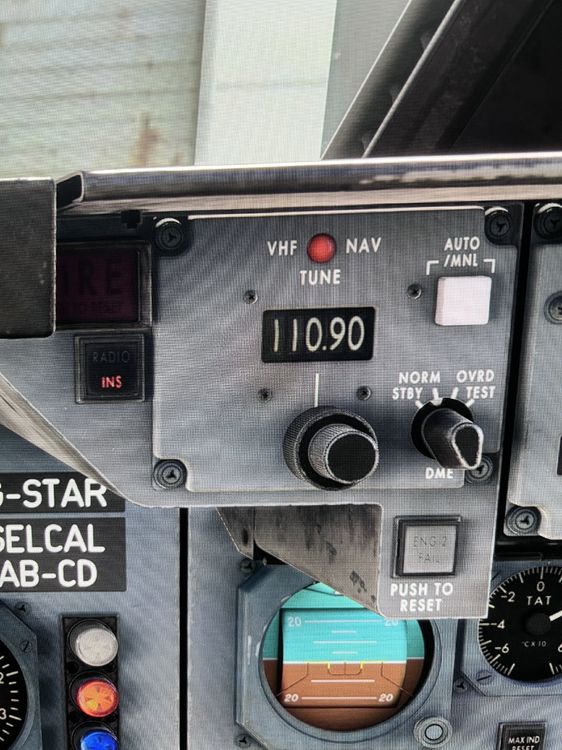
definitely something not right with the localiser on the Tristar Switching the button to radio achieves nothing hopefully this gets fixed this week Xbox x here Question about the Inibuilds Tristar. I know it’s not long out. However I’m having an issue with the ILS. So the ILS freq for Miami Rwy 09 is 110.90. Course 091. I’ve put this into the freq nav panel just left and right of the autopilot panel. I’ve also set the single gps/radio button to radio So I’m picking up the Glideslope but not the localiser. However on the stand by HSI the bars are pointing to the localiser. But not for the main HSI as per the photo. Anyone have any ideas. I’m on Xbox x Will follow a full tutorial tomorrow from YouTube as I have all day to fly 🙂
-
-
-
Evening. thought it would be best here. so I e tried two flights one on launch and now another after the latest update. however when running in the ILS freq in Miami for Rwy 09. Which is 110.90 I’m just picking up the localiser on the HSI at all. I am however clearly seeing the Glideslope on the right. I’ve select radio on the button for insgos/radio. But the localiser doesn’t appear to pop up. however on the standby hsi I’m getting the dme to the localiser and the direct of it. But on the primary hsi nothing is showing. is this still a bug as I’m trying to do some ILS app and without it working is making things quite tricky in low visibility ?