




LukeFF
Member
-
Joined
-
Last visited
Everything posted by LukeFF
-
The official GSX profile has no marshallers at the cargo ramps. Tested with Ramp 615.
-
Yep, yet another shiny new plane has been announced, so older planes like the A300 get pushed further down the list while they still have unresolved issues (add the terrible ground handling to the list above). Not happy.
-
It's automatic on the EIS2 and manual with the EIS1, per the manual.
-
-
I certainly hope the team doesn't change anything with the trim based on a few random photos. They don't convey anything about weight, fuel loaded, distance from threshold, thrust settings, prevailing winds, etc - to say nothing about the angle at which the photos were taken. To say nothing of the fact in the 1st photo we don't know if it was taking off or landing and the 2nd one was taken on the ground! 😄
-
MOZA has announced in their latest release notes that MCDU support is coming; as aside, the EFIS and FCU modules are fully functional with the 340.
-
-
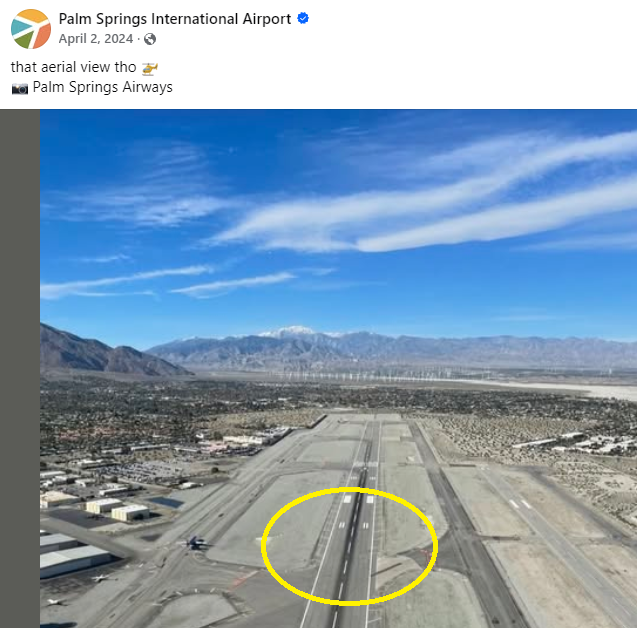
Currently, two sets of touchdown zone markings appear beyond the aiming point. But both on Google Earth and on the airport's FB page, there is only one set of markings beyond the aiming point: It seems that the second set of touchdown zone markings is from an earlier time, this photo being taken in 2006: https://www.alamy.com/stock-photo-aerial-view-above-palm-springs-international-airport-psp-runway-31l-23504559.html Needless to say, it makes for some hair-raising touchdowns when you mistakenly land beyond the touchdown zone!
-
https://www.google.com/search?q=gse+aviation+equipment&sca_esv=0761de662a08acf0&sxsrf=APpeQntETtOKbTLsoYJ8ku_cWpk2nk2MGQ%3A1789459314764&ei=cvuoaqWRLtXAkPIP1qvIkQ8&biw=2560&bih=1305&oq=GSE+av&gs_lp=Egxnd3Mtd2l6LXNlcnAiBkdTRSBhdioKCAEYgAQYFBiHAjILEC4YgAQYxwEYrwEyChAAGIAEGBQYhwIyBRAAGIAEMgUQABiABDIGEAAYFhgeMgYQABgWGB4yBhAAGBYYHjIGEAAYFhgeMgYQABgWGB4yBhAAGBYYHkiIKFC5FFisF3ABeAGQAQCYAUKgAboBqgEBM7gBAcgBAPgBAZgCBKACxQHCAgoQABhHGNYEGLADwgINEAAYgAQYigUYQxiwA8ICDhAAGOQCGNYEGLAD2AEBwgIXEC4Y3AYYuAYY2gYY2AIYyAMYsAPYAQHCAhoQLhjcBhi4BhjaBhjYAhjlBBjIAxiwA9gBAcICChAAGIAEGIoFGEPCAhAQLhiABBiKBRhDGMcBGK8BwgIQEC4YgAQYFBiHAhjHARivAZgDAIgGAZAGEboGBggBEAEYCZIHATSgB9UVsgcBM7gHwQHCBwMwLjTIBwiACAE&sclient=gws-wiz-serp
-
In the app under GSX profiles, there is a GSX profile called "iniBuilds Dallas Fort Worth (KDFW) Marshaller". What is this for?
-
Bumping this one up, since players (including myself) have received their MOZA MCDUs and EFIS/FCUs now. 🙂
-
Thanks! That fixed it. It might be worth putting that in a sticky somewhere, that it's the recommended setting for those using GSX (which, yes, I use).
-
@iniKyle, I do, however, have a complaint about this particular gate: 😄There is a static model of a tug placed right where the "real" pushback tug has to go to attach to the plane. It needs to be removed entirely or repositioned elsewhere. Thanks!
-
Yep, that option was disabled. Lesson learned!
-
Thank you, will check. I've encountered this issue with other airports (both from iniBuilds and other devs) so that does lead me to believe there's a GSX config issue here, as I always ensure I have the latest profiles installed before I fly.
-
With all the problems and missing features the A300 still has after all this time, I wouldn't be surprised if, at some point down the line, it's rebuilt from the ground up. The one we have right now is a mishmash of different build numbers and doesn't even fully represent the relatively ancient ones flown by DHL, which have an upgraded MCDU.
-
Remove any mixture axis control assignments.
-
Taxied to gate H15, and the jetway extended to the plane (Fenix 319), but instead of deplaning through the jetway, a bus showed up, and the GSX control panel said jetways were not available at this gate. 🤨
-
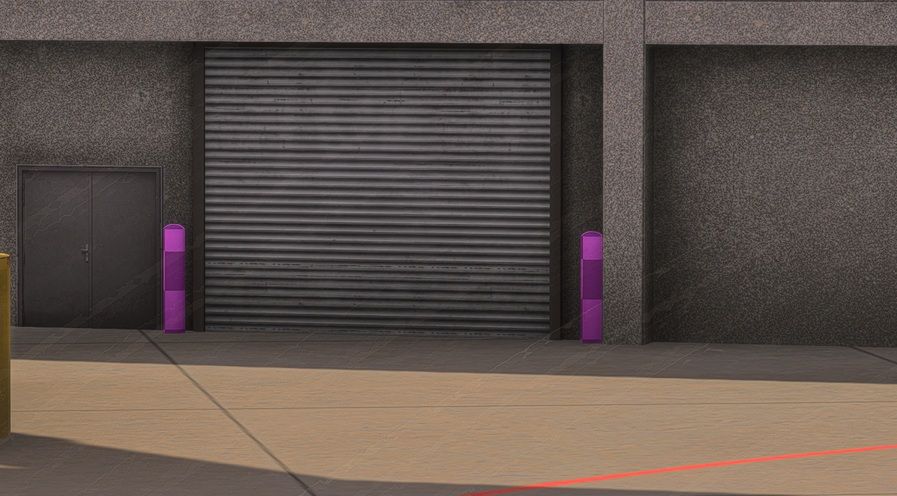
At Gate C26, I have some pink textures for the yellow bollards. I cleared the scenery indexes before starting up.
-
The AirX livery 9H-BIG on the iniManager app is out of date, as it's been repainted since then: https://www.flightradar24.com/data/aircraft/9h-big
-
Yes, and just now, I checked it again, because I am now at cruise level, and the options are grayed out.
-
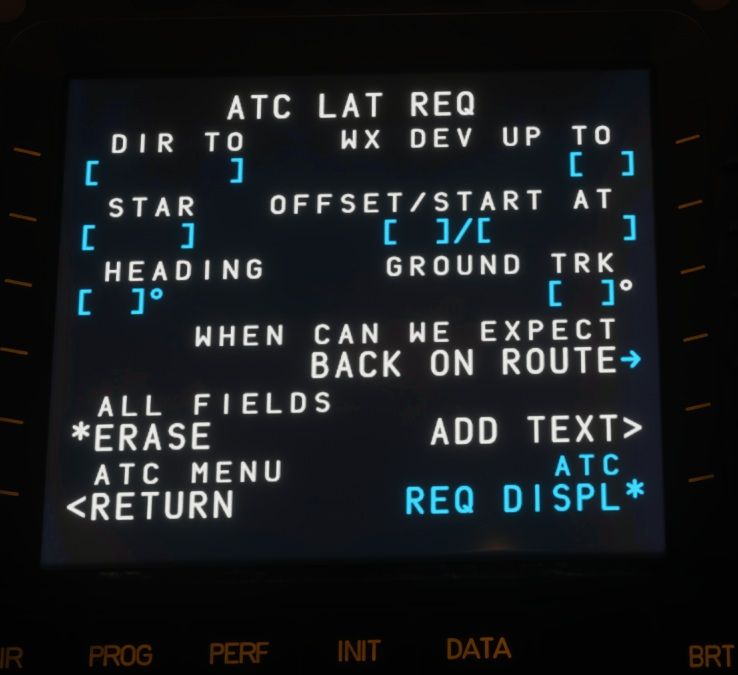
FYI, it seems to work during climbout, but once I reach cruising altitude, the options to send the message to the DCDU (ATC REQ DISPL*) gray out and cannot be selected. I'm on climbout right now from FAOR, for instance, and the option is enabled.
-
-
Hello, from what BATC has told me, this is only something that the iniBuilds development team can investigate and get working properly:
-
Unlike other scenarios, disabling the static aircraft doesn't free up these parking positions for other aircraft. Instead, they remain empty and can't be occupied by the player or injected AI aircraft.


