somiller
Member
-
Joined
-
Last visited
-
MSFS2020: I experienced the same thing on first load. I reloaded the A350 using DevMode Aircraft Selector and then it worked. Every subsequent 1st aircraft load, even after restarting MSFS2020 works fine. Must be something to do with initial WASM compile on first load after install/update of A350 - this was my first install as I just bought it since it is on sale. Just try reloading the A350 and see if that works as it did for me.
-
I was able to make it work by: 1.) deactivating inibuilds-airport-egll-heathrow in Community folder 2.) removing the dashes in the folder name "noolaero-vdgs-egll" from inibuilds-airport-egll-heathrow\SimObjects\Landmarks\ - making it instead "noolaero vdgs egll". 3.) making a backup of "layout.json" from folder inibuilds-airport-egll-heathrow 4.) generating an updated layout.json by drag-and-drop layout.json on MSFSLayoutGenerator.exe 5.) reactivating inibuilds-airport-egll-heathrow in Community folder After the above the EGLL VDGS assets are correctly scanned by nool-aero and work properly in the EGLL scenery. IF nool-aero scan is NOT set to run automatically on start of MSFS you'll need to manually scan using "Rescan devices" located in Community\noolaero-module-vdgs
-
Thank you for the info. For those of us with LittleNavMap we can see full airport view in LNM.
-
Thanks for the fast response! I had assumed the image on the world map is a stand-alone image created specifically for preview on the world map. Is it possible to create/use an image purpose-built for world map preview, as photogrammetry isn't really necessary on the world map?
-
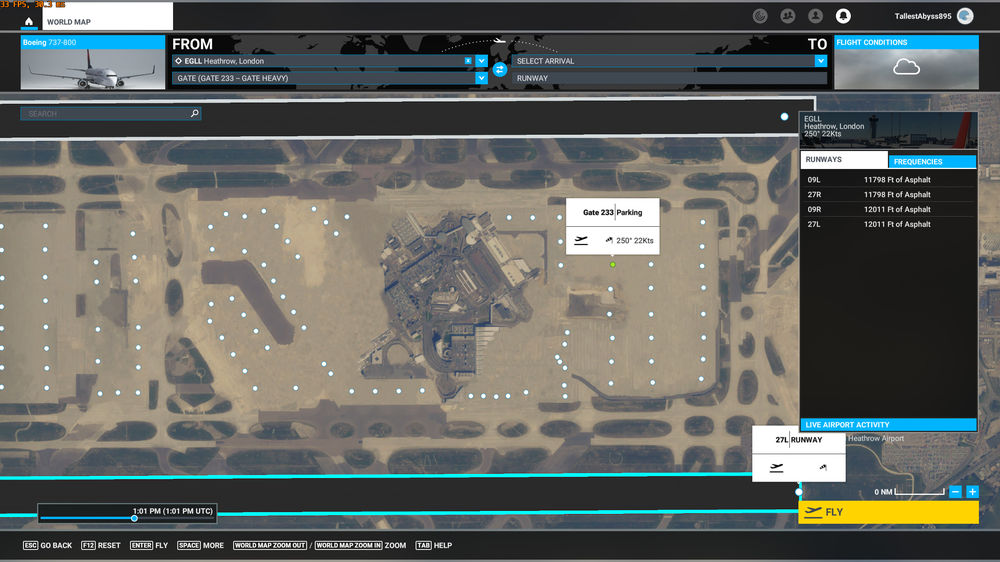
When viewing EGLL on the world map in MSFS all of the terminals are missing and I only see the dots representing gate/parking locations. Does anyone have an idea how I might fix this, as I don't have this problem with any other addon airport scenery? BTW for the size and complexity of EGLL it seems remarkably well optimized for performance with all options active, even for my meager system.