




drnick50
Member
-
Joined
-
Last visited
Everything posted by drnick50
-
Thanks, I had no idea that was a switch
-
I believe the only other tabs are on the IDG disconnect guards and they don't have a clickspot and can't be removed
-
Makes sense, the other tabs don't behave like that though. Is this intentional?
-
Here you go Label Error.mp4
-
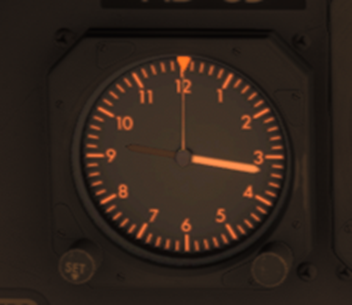
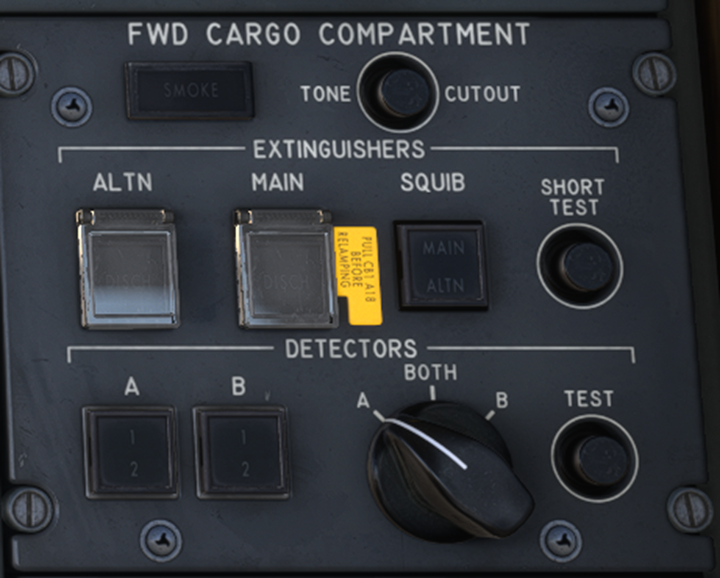
FO side clock hour hand is black under instrument light with no flood lighting And if you click by the label on the FWS CARGO COMPARTMENT extinguisher guards, the label disappears never to return. The guards work fine. Example below shows one missing after clicking. All the other guards seem fine.
-
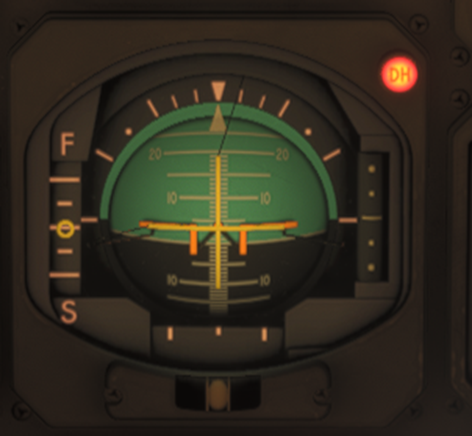
On my last flight v1.0.2 the capt side decision light was permanently on.
-
-
Hi, As requested. ACS Switch.mp4
-
I'm still getting the G-STAR/SELCAL AB-CD placard. This is with the BWIA livery.
-
Following downloading v1.0.2 I've noticed the following: 1. ACS 1 & 2 switches on the overhead panel aren't animated. They can be switched off but don't latch as they should presumably 2. TANK PUMP valves are still all showing flowbars on startup until a pump is latched when they return to LOW 3. Flight Engineer's clock is still showing LOCAL time not UTC Notwithstanding, thanks for the rapid updates to this aircraft.
-
-
-
+1 I've played around with SPAD and can get switches to move but they have no effect - as above AP Disconnect/TOGA. I also found the AP wouldn't engage.
-
-
A minor thing but the payload sliders on the EFB don't change the numbers as you slide them, which I find a bit clunky. Could this be changed such that the weight on the right hand side changes with the slider live as it were. Would make manipulating the EFB easier. Could also be my incompetence of course!
-
Hi Firstly, incredible aircraft. The level of systems for the price is awesome as is handing over the proceeds to Antonov. Are there any plans to make more systems available in line with other iniBuilds products e.g. A310? It's impressive the level to which the modelling has already been completed but air con/pressurisation would be a good addition for example. There also look to be some intriguing additional navigation systems (2 x keyboards on the nav panel?) that perhaps could be modelled, although perhaps they never worked in the actual aircraft. Don't know if they're similar to the NVU/doppler system in the Felis Tu-154, which is challenging yet rewarding to learn. Wx Radar has already been mentioned on the forum. I understand the cranky autopliot is true to life! Appreciate all this would be a lot of work but maybe could be released as 'advanced version' (don't want to get into the study level debate here!) for an additional fee to give simmers a choice? Also could we have a more detailed manual? Generally the iniBuilds manuals are fine at this level because they get you going and if you want to get more in depth you can obtain FCOMs etc. from other sources, all part the hobby imo. That's not possible in this case so would be useful to have more information. For example, what are the various gauges on the Engineers Panel for, what do the Engine heat switches above the de-ice switches do etc.? That would help us get even more from this excellent plane. Thanks again for an aircraft I didn't think we'd see in MSFS.
-
Great to see the A310 in MSFS! Could the text on the EFB be made larger, it isn't very clear? Also the weight sliders are too sensitive and very fiddly. Can we have boxes to type into and/or Simbrief integration?
-
Hi really like this aircraft, great work. Any chance of the fuel pressure gauge being tweaked in V1.1? If I've understood the real world material correctly, it should be possible to adjust the mixture by reference to the fuel pressure gauge. For example, it talks about achieving 6.5 psi at 1500ft in the Bulldog Student Guide obtained from flight manuals online. However, in my installation at least, the fuel pressure is zero (engine off) or maximum (engine on) and never in the green band. Hopefully the modern panel/GTN will be options? I really like the old school avionics. Thanks Nick


