



Skip to content
View in the app

A better way to browse. Learn more.

iniBuilds Forum

A full-screen app on your home screen with push notifications, badges and more.

To install this app on iOS and iPadOS
  1. Tap the Share icon in Safari
  2. Scroll the menu and tap Add to Home Screen.
  3. Tap Add in the top-right corner.
To install this app on Android
  1. Tap the 3-dot menu (⋮) in the top-right corner of the browser.
  2. Tap Add to Home screen or Install app.
  3. Confirm by tapping Install.

CEOof777

Member
  • Joined

  • Last visited

  1. hi there! since the new update the yoke on the cpt side shakes while on the ground. the yoke on the fo side doesnt do this.
  2. hi there! it seems like the reg on the right side of the plane is weirdly mirrored. any chance for a fix? ty!
  3. Hi there! since 1.1.8 the winglets of the a350 load in bopth configs at the same time, but only on the right side. it also sems to be independent from the livery as it happens even with ini liveries. i will post a picture below. i use msfs 2020 and it happens to all 3 aircraft variants, 900, K and ULR
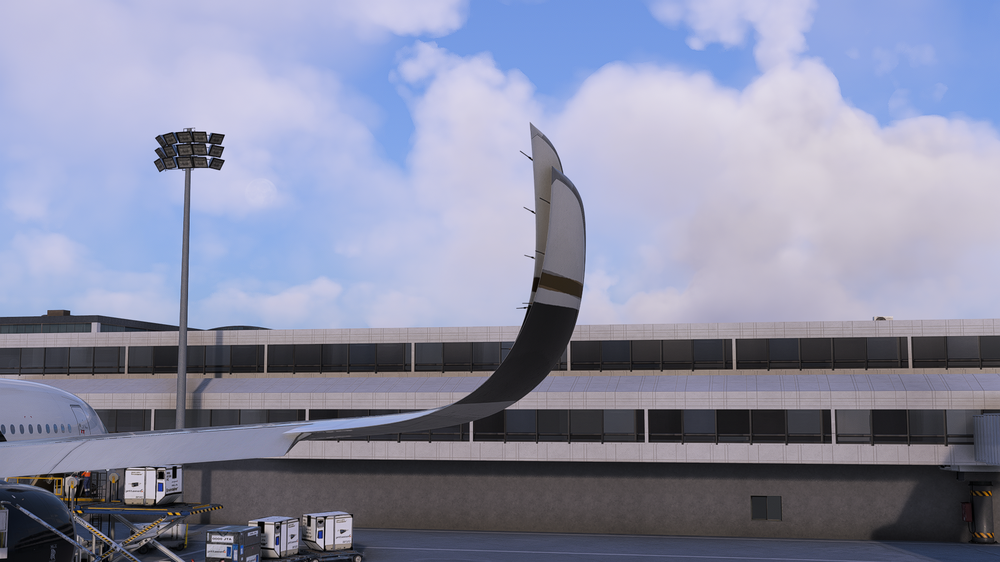
  4. Hi there! since 1.1.8 the winglets of the a350 load in bopth configs at the same time, but only on the right side. it also sems to be independent from the livery as it happens even with ini liveries. i will post a picture below. i use msfs 2020 and it happens to all 3 aircraft variants, 900, K and ULR
  5. okay! thank you for your hard work!
  6. Hi there are there any news?
  7. Hi there! thanks for answering. I have this prroblöem with both version, i use 2020 with gsx and i have automatic repositioning on.
  8. Hi there! I recently bought the A350 for MSFS 2020. Most of the times when I spawn into an airport(custom scenery and default), the plane spawns at a random position, sometimes in the airport buildings or in the grass. I also use GSX if this might help solving this problem. I will provide example Pictures. 1) The first one shows the spawned plane. 2) The second one shows gate F33/35 at Vienna, where i selected to spawn the plane. 3) The thrid one shows where it actually spawend(the custom position/benutzerdefiniert) https://imgur.com/a/6dKNRPg Best regards

Account

Navigation

Configure browser push notifications

Chrome (Android)
  1. Tap the lock icon next to the address bar.
  2. Tap Permissions → Notifications.
  3. Adjust your preference.
Chrome (Desktop)
  1. Click the padlock icon in the address bar.
  2. Select Site settings.
  3. Find Notifications and adjust your preference.