Skip to content
View in the app

A better way to browse. Learn more.

iniBuilds Forum

A full-screen app on your home screen with push notifications, badges and more.

To install this app on iOS and iPadOS
  1. Tap the Share icon in Safari
  2. Scroll the menu and tap Add to Home Screen.
  3. Tap Add in the top-right corner.
To install this app on Android
  1. Tap the 3-dot menu (โ‹ฎ) in the top-right corner of the browser.
  2. Tap Add to Home screen or Install app.
  3. Confirm by tapping Install.

F92

Member
  • Joined

  • Last visited

Everything posted by F92

  1. Hi Genista, I agree that kind of information really should be included in the documentation ๐Ÿ‘ Iโ€™m using Axis And Ohs, and 1 (>K:AUTOPILOT_OFF) works fine. This should match the same action you get when binding AUTOPILOT OFF in the control settings.
  2. F92 posted a topic in Suggestions
    Hi iniBuilds Team, it would be great if you could provide some documentation for the L:Vars and K:Events you use. Thanks ๐Ÿ™
  3. I like the idea ๐Ÿ‘ Even with thrust levers, itโ€™s hard to get the values right. Virtual flight engineer hands would help a lot.
  4. F92 replied to Jake Bunny's topic in Systems
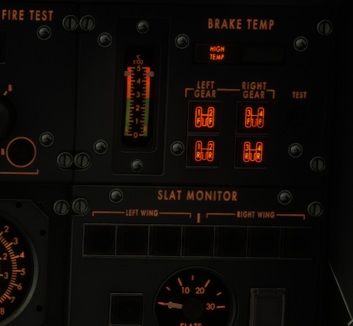
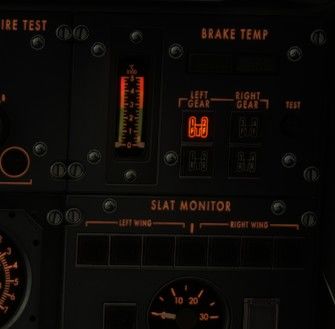
    Just loaded the aircraft, so even though the indicators aren't working, it's safe to say that the brakes are at ambient temperature. The first screenshot shows the left forward gear selected. The second screenshot shows what happens when I click the test button. Thank you @IniJamir for looking into it!
  5. Hi, the fuel used test knobs have no effect on the fuel flow or on the fuel used indicators.
  6. F92 replied to Jake Bunny's topic in Systems
    Hi, the manual says that the brake temperature test should increase the displayed temperature by 100 ยฐC, however, the temperature is shooting straight up to 450 ยฐC when pressing the test button.

Account

Navigation

Configure browser push notifications

Chrome (Android)
  1. Tap the lock icon next to the address bar.
  2. Tap Permissions โ†’ Notifications.
  3. Adjust your preference.
Chrome (Desktop)
  1. Click the padlock icon in the address bar.
  2. Select Site settings.
  3. Find Notifications and adjust your preference.