sully0808
Member
-
Joined
-
Last visited
Everything posted by sully0808
-
I could not find it in the local cache folder. I was able to find the WORK folder in the Local State folder though: AppData\Local\Packages\Microsoft.FlightSimulator_8wekyb3d8bbwe\LocalState\packages\inibuilds-aircraft-a300-600\work Hope that works...
-
I can confirm that Uninstaller left 2 folders during the uninstall: Ortho4XP_patch_KEGE_Xometry and z_KEGE_mesh_XP12. I deleted both manually and proceeded with the reinstall via IniManager. These 2 folders were not reinstalled. You can call this closed! Thank you for the support. Kevin
-
Sam - It looks like your fix resolved the issue. I now see the scenery. Thank you. I do want to bring 1 thing to your attention though. I am still getting this pop-up error: Failed to find resource 'lib/g10/terrain10/urban_cld_dry_golf.ter', referenced from scenery package 'Custom Scenery/z_KEGE_mesh_XP12/'. 0:01:15.700 E/SCN: Custom Scenery/z_KEGE_mesh_XP12/Earth nav data/+30-110/+39-107.dsf: 0:01:15.700 E/SCN: The terrain file 'lib/g10/terrain10/urban_cld_dry_golf.ter' could not be located. 0:01:15.700 E/SCN: DSF canceled due to missing art assets, file=Custom Scenery/z_KEGE_mesh_XP12/Earth nav data/+30-110/+39-107.dsf, err=15 (dsf_ErrCanceled). 0:01:15.700 E/SCN: WARNING: got error on DSF load for scenery file 39, -107, Custom Scenery/z_KEGE_mesh_XP12/ 0:01:15.700 E/SYS: MACIBM_alert: The following scenery package has a problem and will therefore not be loaded: 0:01:15.700 E/SYS: MACIBM_alert: Custom Scenery/z_KEGE_mesh_XP12/ 0:01:15.700 E/SYS: MACIBM_alert: It requires an additional library scenery package that is not installed, or it is missing some of its files. 0:01:15.700 E/SYS: MACIBM_alert: http://lookup.x-plane.com/_lookup_11_/missing_custom_scenery.html 0:01:15.700 E/SYS: MACIBM_alert: C:/jenkins/design-triggered/source_code/app/X-Plane-f/../../engine/REN/io_dsf.cpp:705 0:01:15.700 E/SYS: +------------------------------------------------------------------------------- 0:01:15.700 E/SYS: | The following scenery package has a problem and will therefore not be loaded: 0:01:15.700 E/SYS: | Custom Scenery/z_KEGE_mesh_XP12/ 0:01:15.700 E/SYS: | It requires an additional library scenery package that is not installed, or it is missing some of its files. 0:01:15.700 E/SYS: | http://lookup.x-plane.com/_lookup_11_/missing_custom_scenery.html 0:01:15.700 E/SYS: | (io_dsf.cpp:705) 0:01:15.700 E/SYS: +------------------------------------------------------------------------------- 0:01:15.700 I/SCN: DSF load time: 1519759 for file Global Scenery/X-Plane 11 Global Scenery/Earth nav data/+30-110/+39-107.dsf (197171 tris, 0 skipped for 0.0 m^2) 0:01:25.879 G64: core: Run: [OnSceneryLoaded] Log.txt
-
Thanks for the reply - I used the IniManager to install. It ran it by itself... no input from me. I did find it starnge that the XP11 version installed mesh called as XP12. Hopefully a Dev will be able to answer.
-
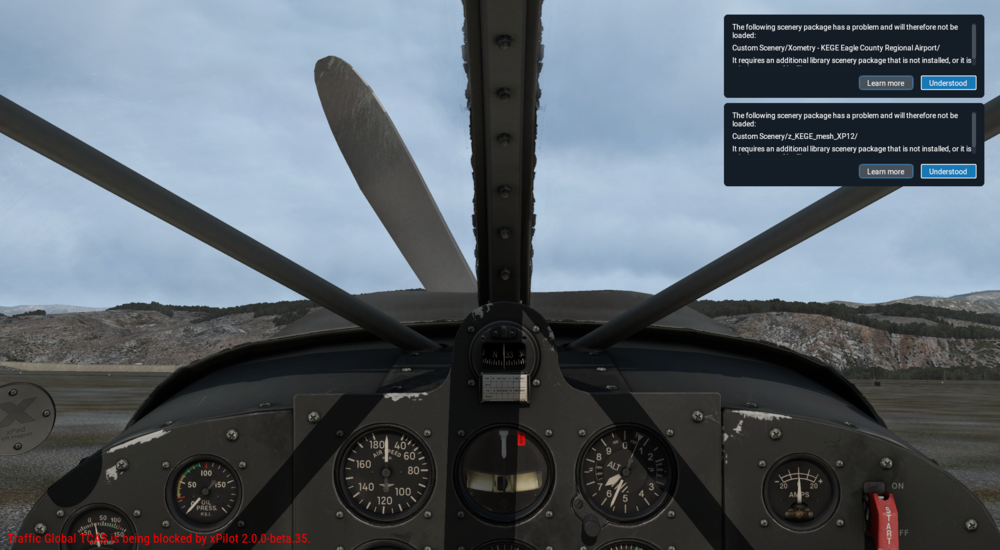
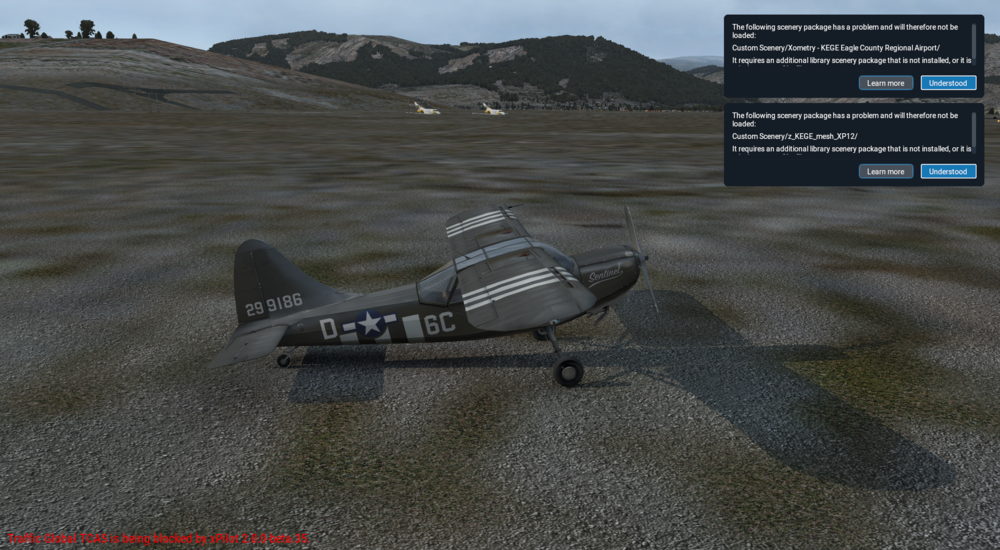
Just purchased KEGE. It works flawlessly and looks great un XP12. In XP11 I am not able to get it to load properly 😫. It appears that I am missing a vegetation Library? I have the same libraries in XP12 and am not seeing the same error. I have attached my log file and a couple screenshots to see what I am seeing. Thanks in advance, Kevin 0:00:50.741 E/SCN: Failed to find resource 'lib/vegetation/trees/deciduous/shrubs_small.for', referenced from scenery package 'Custom Scenery/Xometry - KEGE Eagle County Regional Airport/'. 0:00:50.741 E/SCN: Custom Scenery/Xometry - KEGE Eagle County Regional Airport/Earth nav data/+30-110/+39-107.dsf: 0:00:50.741 E/SCN: The art asset 'lib/vegetation/trees/deciduous/shrubs_small.for' could not be found. 0:00:50.741 E/SCN: DSF canceled due to missing art assets, file=Custom Scenery/Xometry - KEGE Eagle County Regional Airport/Earth nav data/+30-110/+39-107.dsf, err=15 (dsf_ErrCanceled). 0:00:50.741 E/SCN: WARNING: got error on DSF load for scenery file 39, -107, Custom Scenery/Xometry - KEGE Eagle County Regional Airport/ 0:00:50.741 I/SCN: DSF load time: 261576 for file Custom Scenery/Global Airports/Earth nav data/+30-110/+39-107.dsf (0 tris, 0 skipped for 0.0 m^2) 0:00:50.741 I/SCN: DSF load time: 16471 for file Custom Scenery/EXT_colorado-lights/Earth nav data/+30-110/+39-107.dsf (0 tris, 0 skipped for 0.0 m^2) 0:00:50.741 I/SCN: DSF load time: 119565 for file Custom Scenery/us-forests/Earth nav data/+30-110/+39-107.dsf (0 tris, 0 skipped for 0.0 m^2) 0:00:50.741 E/SYS: MACIBM_alert: The following scenery package has a problem and will therefore not be loaded: 0:00:50.741 E/SYS: MACIBM_alert: Custom Scenery/Xometry - KEGE Eagle County Regional Airport/ 0:00:50.741 E/SYS: MACIBM_alert: It requires an additional library scenery package that is not installed, or it is missing some of its files. 0:00:50.741 E/SYS: MACIBM_alert: http://lookup.x-plane.com/_lookup_11_/missing_custom_scenery.html 0:00:50.741 E/SYS: MACIBM_alert: C:/jenkins/design-triggered/source_code/app/X-Plane-f/../../engine/REN/io_dsf.cpp:886 0:00:50.741 E/SYS: +------------------------------------------------------------------------------- 0:00:50.741 E/SYS: | The following scenery package has a problem and will therefore not be loaded: 0:00:50.741 E/SYS: | Custom Scenery/Xometry - KEGE Eagle County Regional Airport/ 0:00:50.741 E/SYS: | It requires an additional library scenery package that is not installed, or it is missing some of its files. 0:00:50.741 E/SYS: | http://lookup.x-plane.com/_lookup_11_/missing_custom_scenery.html 0:00:50.741 E/SYS: | (io_dsf.cpp:886) 0:00:50.741 E/SYS: +------------------------------------------------------------------------------- 0:00:50.741 E/SCN: Failed to find resource 'lib/g10/terrain10/urban_cld_dry_golf.ter', referenced from scenery package 'Custom Scenery/z_KEGE_mesh_XP12/'. 0:00:50.741 E/SCN: Custom Scenery/z_KEGE_mesh_XP12/Earth nav data/+30-110/+39-107.dsf: 0:00:50.741 E/SCN: The terrain file 'lib/g10/terrain10/urban_cld_dry_golf.ter' could not be located. 0:00:50.741 E/SCN: DSF canceled due to missing art assets, file=Custom Scenery/z_KEGE_mesh_XP12/Earth nav data/+30-110/+39-107.dsf, err=15 (dsf_ErrCanceled). 0:00:50.741 E/SCN: WARNING: got error on DSF load for scenery file 39, -107, Custom Scenery/z_KEGE_mesh_XP12/ 0:00:50.741 E/SYS: MACIBM_alert: The following scenery package has a problem and will therefore not be loaded: 0:00:50.741 E/SYS: MACIBM_alert: Custom Scenery/z_KEGE_mesh_XP12/ 0:00:50.741 E/SYS: MACIBM_alert: It requires an additional library scenery package that is not installed, or it is missing some of its files. 0:00:50.741 E/SYS: MACIBM_alert: http://lookup.x-plane.com/_lookup_11_/missing_custom_scenery.html 0:00:50.741 E/SYS: MACIBM_alert: C:/jenkins/design-triggered/source_code/app/X-Plane-f/../../engine/REN/io_dsf.cpp:705 0:00:50.741 E/SYS: +------------------------------------------------------------------------------- 0:00:50.741 E/SYS: | The following scenery package has a problem and will therefore not be loaded: 0:00:50.741 E/SYS: | Custom Scenery/z_KEGE_mesh_XP12/ 0:00:50.741 E/SYS: | It requires an additional library scenery package that is not installed, or it is missing some of its files. 0:00:50.741 E/SYS: | http://lookup.x-plane.com/_lookup_11_/missing_custom_scenery.html 0:00:50.741 E/SYS: | (io_dsf.cpp:705) 0:00:50.741 E/SYS: +------------------------------------------------------------------------------- 0:00:50.741 I/SCN: DSF load time: 1467179 for file Global Scenery/X-Plane 11 Global Scenery/Earth nav data/+30-110/+39-107.dsf (197171 tris, 0 skipped for 0.0 m^2) Log.txt