




SkyKlop
Member
-
Joined
-
Last visited
Everything posted by SkyKlop
-
Attached is a pdf of all my VelocityOneFlightStick mappings. Some are mine but most are the defaults of which I haven't tested yet. I haven't really paid much attention to the collective response. IMO, it seems like the it is not very responsive to dropping the speed and altitude very fast. Not sure if you have to go to idle or lockout to land or there is some other trick. Hunter Helicopter-Velocity1Flightstick.pdf
-
Agree, this would be quite helpful.
-
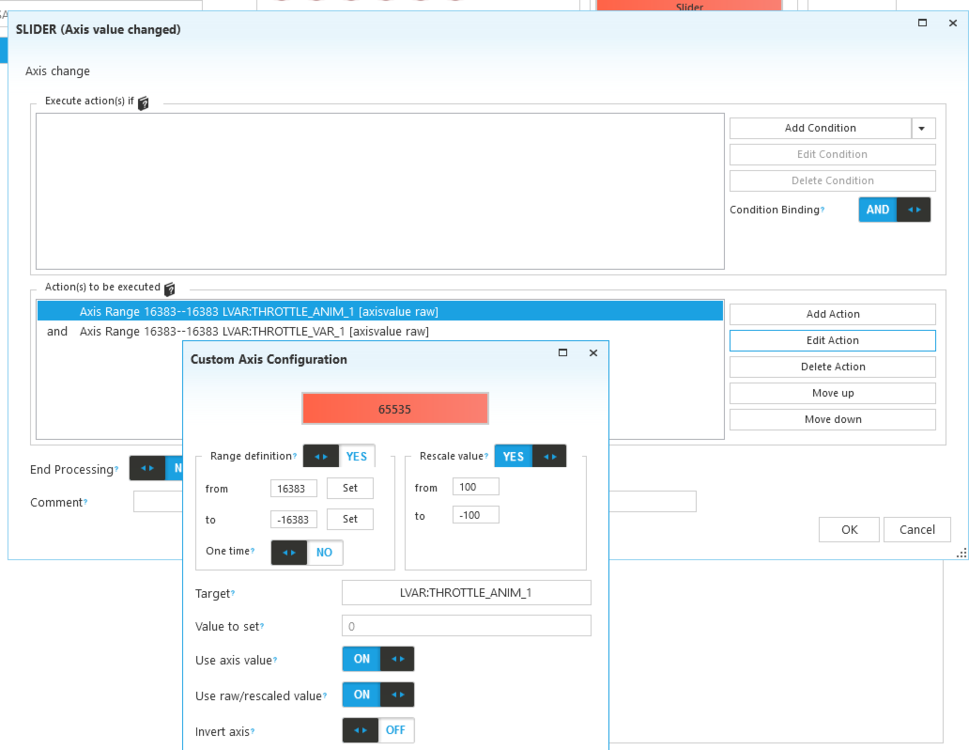
FYI, I was finally able to map the Throttle Lever using Spad.NeXt to my Velocity One FlightStick. There appears to be no way to map it without doing LVAR commands.
-
Same problem with me. Only tried in MsFs 2024, The manual doesn’t make sense. There is no Master Throttle control setting in 2024. Nothing but the mouse can move that throttle level to OFF, Idle, Fly, and Lockout. Can this only be done with SPAD.NEXT or Axis and OHs?

