




ool
Member
-
Joined
-
Last visited
Everything posted by ool
-
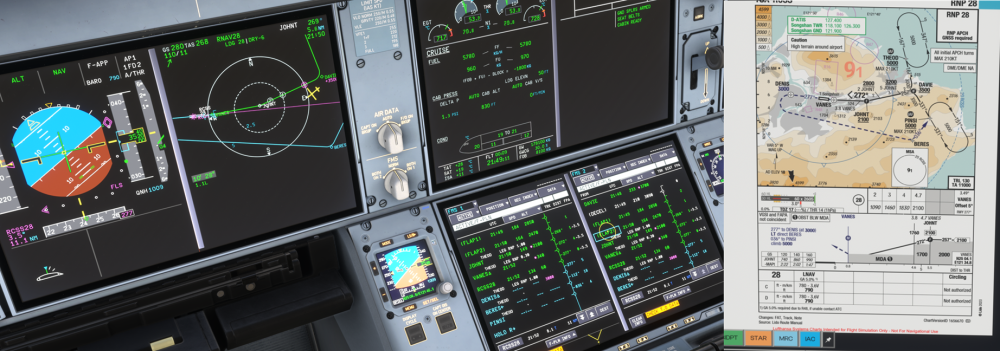
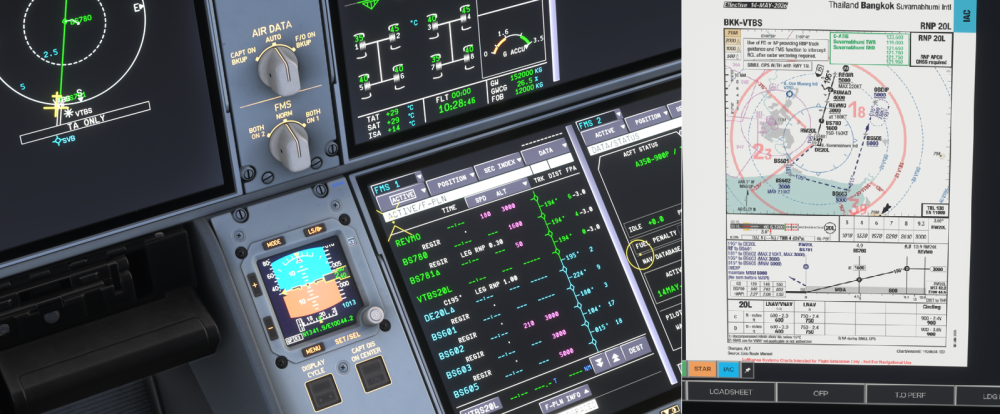
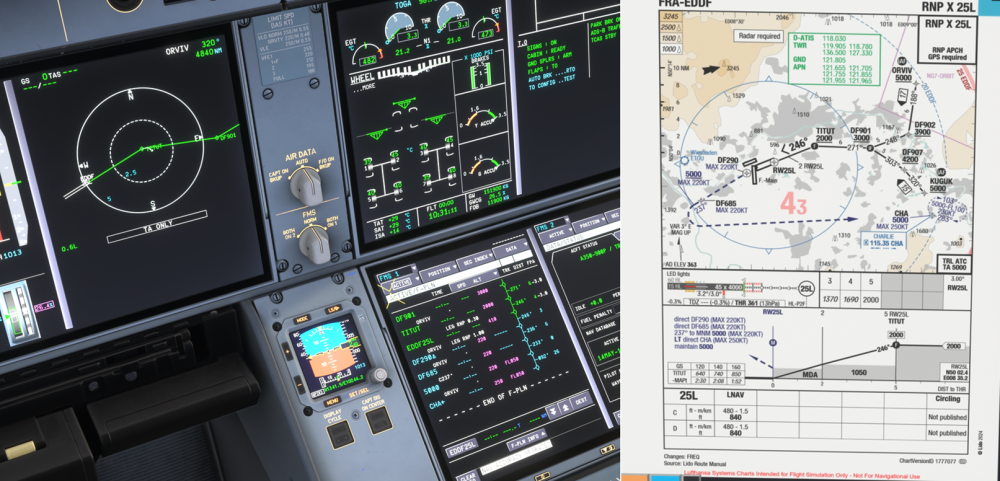
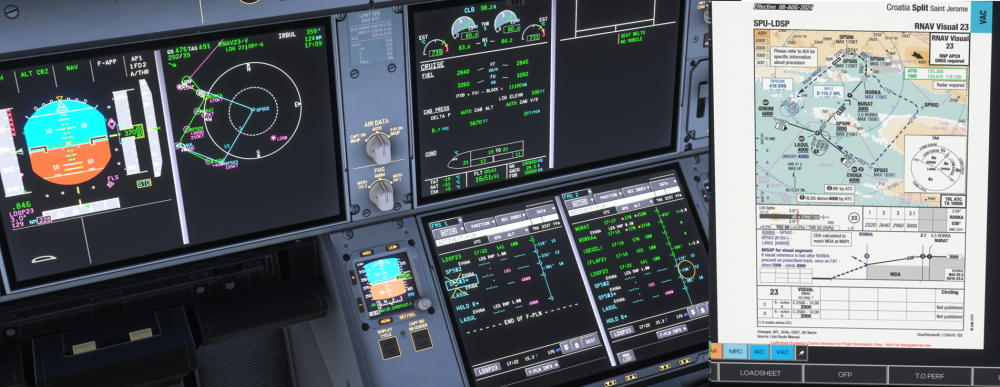
I think this is part of the same issue that is described here: https://forum.inibuilds.com/topic/36854-a350-fls-course-is-incorrect-with-rnpldavor-offset-approaches-show-runway-course-instead/ I checked few approaches in the sim and there were a couple of issues in the Inibuilds aircraft. I tried to make detailed examples, so it would be easier to see and fix the problems. 1. For the approaches using FLS that have a Missed Approach Point (MAP) before the runway threshold, the course for the FLS beam should be the course that leads to Missed Approach Point (MAP) (FCOM: "the course that is stored with the MAP in the navigation database"), not the runway track. 2. The runway waypoint (waypoint named according to runway, e.g. "EGLL27R") is added even if it should not be part of the approach procedure. I think this is partially the reason for the issue number 1. See examples below. Here is Taipei RCSS RNP 28, the same approach as described in the link above. According to the procedure, there should be no runway waypoint RCSS28. The correct sequence should be JOHNT - VANES (MAP) - DENIS and then rest of the missed approach procedure. Since MAP is located before runway threshold, the final approach course for the FLS should be the course leading to VANES = 272, not the runway track 277. I think this is an issue with the Inibuilds A350 and not with the navigation database, since some other add-ons are able to show the same approach correctly. Here is Bangkok VTBS RNP 20L. In this approach, the missed approach point is named as "BS781", which is located at the runway threshold (+-0.14NM), and it is also the anchor point for the FLS beam. In the Inibuilds A350, BS781 is correctly the missed approach point. However, there is also a "VTBS20L" waypoint, which shouldn't be there, since MAP in the procedure is not defined in format "ICAO code + rwy ident", but as a waypoint. The correct sequence for the waypoints would be BS780 - BS781 - DE20L - BS601 etc. As the MAP is located on the runway threshold, the correct FLS beam course is the course of the final-approach flight leg. In this case it is the same as runway track, but in Adrian's example of KSFO 10L LPV approach, there is a difference, and that is probably the reason the approach path is incorrect. As a last example, Frankfurt EDDF RNP X 25L. In this approach procedure, the Missed Approach Point is on the runway threshold and it is named by the ICAO code and runway ident "EDDF25L". So in this case, the runway waypoint is correctly there and the waypoint sequence is fully correct. 3. FLS should not be available, if: Missed Approach Point (MAP) is before runway threshold, AND The difference between final approach course and the runway course is more than 50 degrees. In this case, there should also be a "NO FLS FOR THIS APPR" message in the FMS message area. Example: Split LDSP RNAV Visual 23 the difference between final approach course and runway track is 169 degrees and missed approach is before runway threshold, so the FLS should not be available for this approach. See also the final approach course for FLS, which is according to the runway track (see point 1) and the "LDSP23" waypoint, which should not be part of the procedure and it messes up the whole missed approach procedure (see point 2, the correct sequence would be RORKA - SP502).
-
I think the brake temperature is behaving quite realistically in the current version (1.26). It is quite normal to have a BRAKES HOT ECAM after landing/parking. It's a heavy aircraft and those brakes have to absorb a lot of energy, which will eventually turn into heat. It could well take 5-10 minutes after landing before they reach their highest temperature. Also make sure you use the correct technique when braking: You should avoid multiple brake applications and instead prefer one smooth brake application to bring the speed down.
-
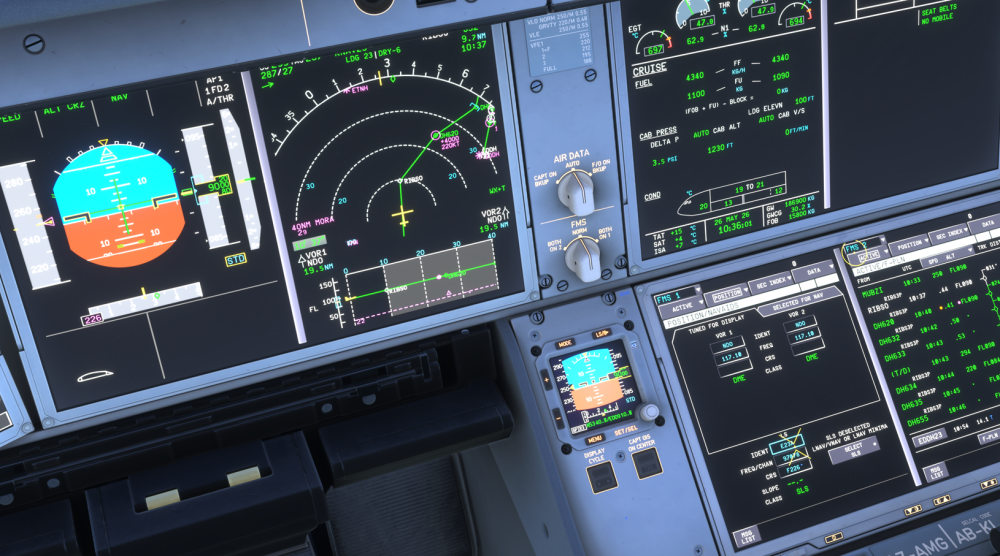
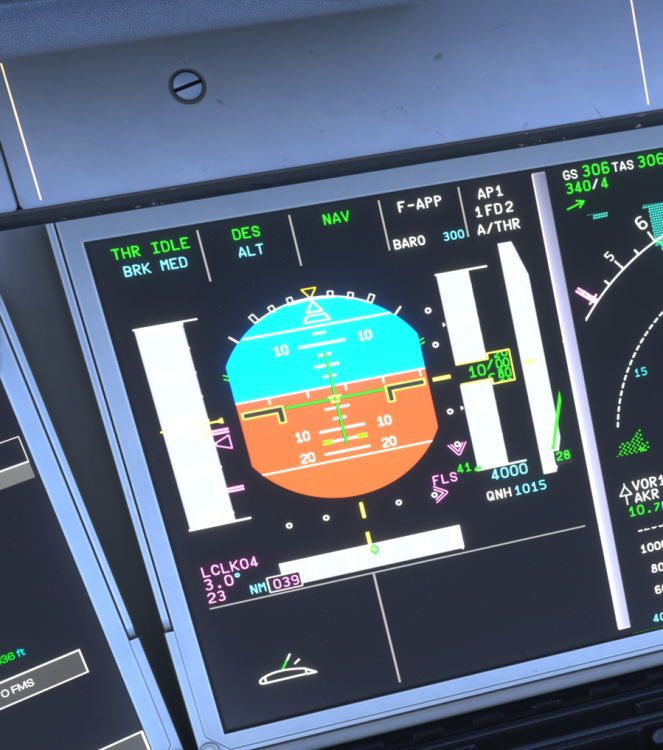
Hi, First of all, the A350 does not have a FINAL, APP NAV or FINAL APP modes. Please do not implement these. Unlike in the older Airbuses, FLS is installed by default in the A350 and it is used for RNP approaches with LNAV/VNAV and LNAV minimas. It can also create an "ILS-like" indication for some LOC and VOR approaches. As Adrian said, when you press the DESELECT SLS button, it should give you the FLS indication so that you can fly an RNP approach with LNAV/VNAV or LNAV minima. Now it seems to give you the vertical guidance of the APP DES mode, which is only meant for the RNP AR approaches. In the current version, it looks like the FLS is only available for those RNP approach procedures, which do not have a LPV SBAS approach associated with them. This is how it looks like at the moment. This approach (EDDH RNP 23) has LPV, LNAV/VNAV and LNAV approaches in the same procedure. The default is LPV (flown with SLS). When you press the DESELECT SLS button, it brings up the vertical guidance of the APP DES mode (in the screenshot). This is the FLS indication (the double diamonds) you should get after pressing the DESELECT SLS button:
-
You were trying to clear it from the exactly correct place. ATC COM/MSG RECORD should only contain messages exchanged between the aircraft and the ATC, i.e. messages you handle through mailbox = CPDLC and DCL messages. Messages in the ATC COM/MSG RECORD shouldn't trigger the COMPANY MSG MEMO. No METAR's or any other company-related ACARS messages should be there. The correct place for the company-related ACARS messages is the OIS COMPANY COM application (the one you have open in the screenshot) and they should trigger the COMPANY MSG MEMO and associated aural alert as well.
-
A small note. The GWCG setting used for the THS comes from the FQMS (based on inserted ZFW/ZFWCG and the actual fuel distribution). It is normal that there is a small discrepancy (e.g. 0.1%) between the pitch trim target and the actual pitch trim setting on the lower part of the PFD. The THS value in the ACTIVE/PERF/T.O page is not used for setting the actual pitch trim. However, it is used by the flight warning system (FWS) to crosscheck the inserted trim setting against the actual GWCG.
-
Hi, The magenta altitude constraints on PFD should only show up when the vertical guidance is managed. So it is not a bug that you see them as blue on ground. However, the magenta constraints should already appear once SRS mode activates (on take-off), since SRS is a managed vertical mode. As you said, the magenta constraints now activate with CLB mode, so this is something that should be fixed. I'm not familiar with the A320 systems, but it is highly possible, that the logic with the magenta constraints is different than in the A350.
-
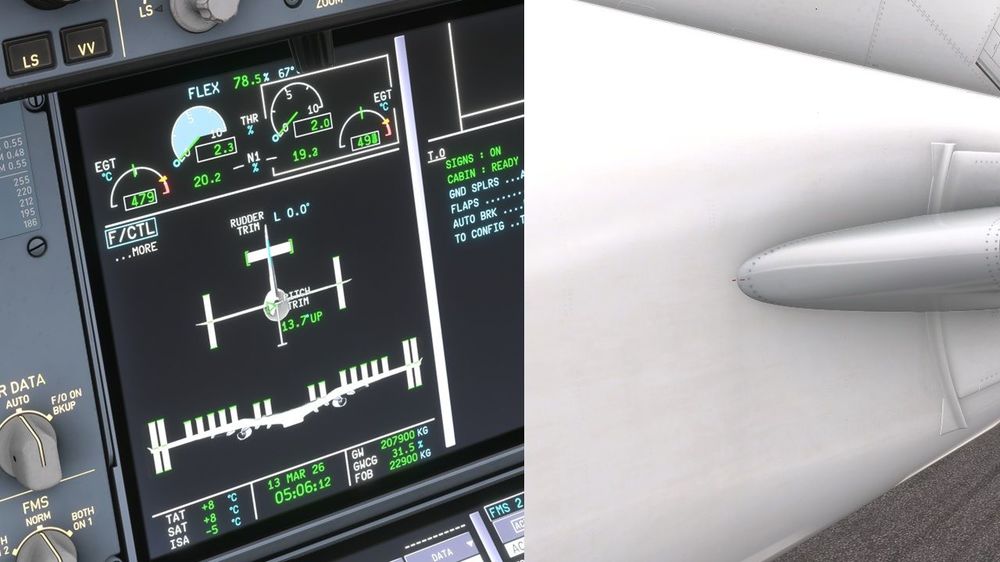
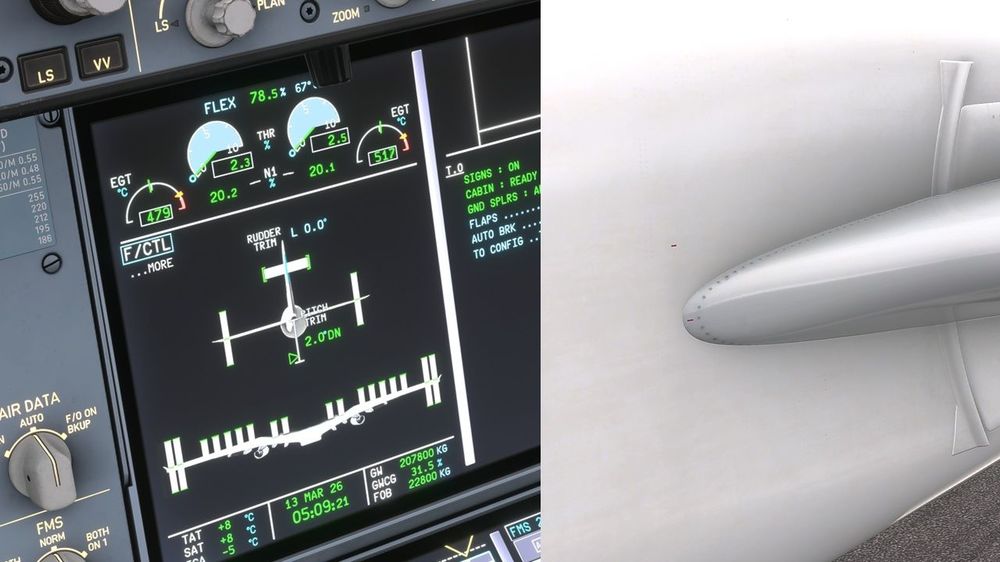
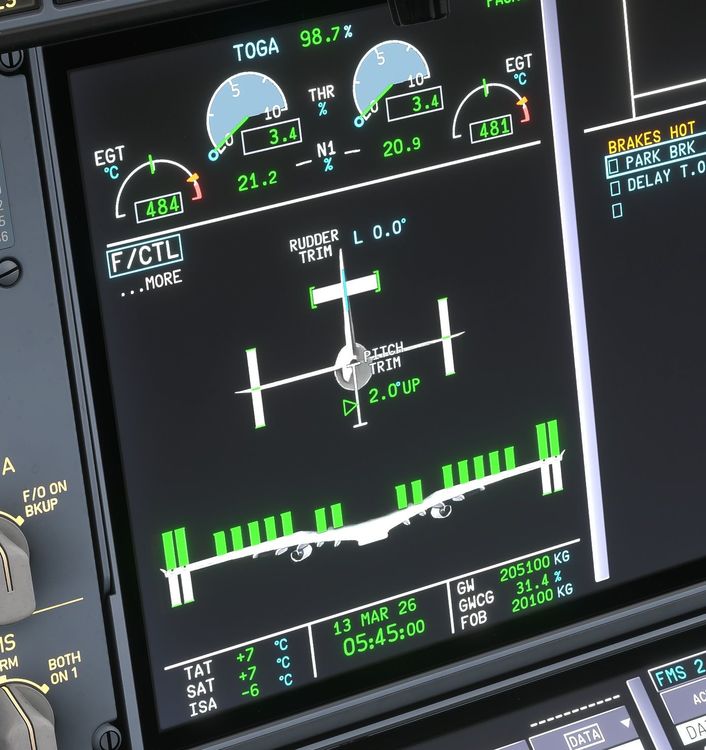
Regarding the FCOM, I'll send you a DM. The pitch trim position can be observed from the F/CTL SD page. I checked again the functioning of the THS in the sim and I noticed the following issues: The THS range is incorrect, it is from 13,7° UP to 2,0° DN. It should be from 13,7° UP to 0,8° UP. THS moves to after landing position right after touch down, it should move below 30kts. The after landing position of the THS is incorrect, 2,0° UP. It should be 0,8° UP as described in the FCOM. The pitch trim indicator on the F/CTL SD page does not reach the bottom of the scale when the trim is in the lower end of the trim scale. THS is incorrectly animated in the outside view. When the THS is in the full UP position, 13,7° UP (that means aircraft nose up, not the THS itself), the leading edge of the THS should be fully down. And vice versa: when the THS is full DOWN position, 0,8° UP or "the maintenance position", the leading edge of the THS should be fully up and the indicator lines on the left side of the tail should be aligned. This movement to maintenance position can also be observed in the Cathay video above. 1. This is pitch trim 13,7° UP and corresponding THS position in the outside view. This is how the outside view should look like when the THS is in the other end of the trim scale (0,8°UP). Also note the indicator lines aligned. 2. This is pitch trim at 2,0°DN and the corresponding THS position in the outside view. Should be the other way around as stated above. Also note the pitch trim scale on the F/CTL SD page. 3. This is the current after landing trim setting (should be 0,8°UP).
-
According to FCOM (-900 variant): After landing, the pitch trim will move to 0,8° (maintenance position) when the speed goes below 30 kt. The maximum THS deflection is between 0.8° and 13.7° nose up, so the correct after landing setting would be the lower end of the THS range (leading edge of the THS moves fully up). At the moment, the after landing setting on the Inibuilds aircraft seems to be 2.0° nose up, so there is something to be fixed there.


