




Totof
Member
-
Joined
-
Last visited
Everything posted by Totof
-
If you have Navigraph enable, please reset it and use the Sim Navadata instead. You will have to re-load the plane once the above is done on the EFB It was working for me so.... Hope it will solve this problem until an update comes out.
-
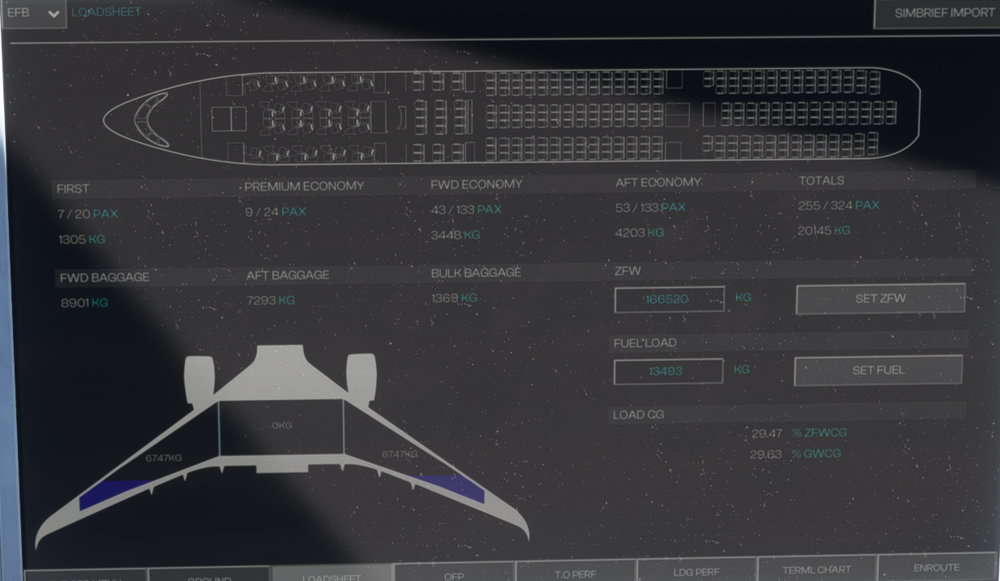
Hello, Please see the picture attached: After clicking the simbrief import the number of pax doesn't match the totals... Totals PAX : 255 but on the picture: Aft economy PAX: 53 fwd economy PAX: 43 premium economy PAX: 9 First PAX: 7 So totals should be : 112 (unless you have more than 100 crew members on that plane, including pilots..) MSFS2020 - VATSIM - Activesky - Mobiflight
-
Hello, After the retraction of the landing gear, I experienced a sudden pitch up (30°) I had to push hard on my stick lever to put back the plane at a correct value... MSFS2020 - VATSIM - Active Sky - Mobiflight
-
Hello, I experienced a strange behaviour : Just after reaching my cruise altitude (FL400) the A/THR switched off automatically... I had to push again this button on the FCU to avoid the plane to increase speed... MSFS2020 - VATSIM - Active Sky - Mobiflight
-
Guys, It looks like it is Navigraph related bug. reset your Navigraph profile and select the sim navdata instead of Navigraph inside the EFB (option/3rd party)
-
Do you have Navigraph enable ? If yes, please desactivate it and reload the plane, it may solve the issue. There is currently a big bug with Navigraph...
