



Skip to content
View in the app

A better way to browse. Learn more.

iniBuilds Forum

A full-screen app on your home screen with push notifications, badges and more.

To install this app on iOS and iPadOS
  1. Tap the Share icon in Safari
  2. Scroll the menu and tap Add to Home Screen.
  3. Tap Add in the top-right corner.
To install this app on Android
  1. Tap the 3-dot menu (⋮) in the top-right corner of the browser.
  2. Tap Add to Home screen or Install app.
  3. Confirm by tapping Install.

HerbVillers

Member
  • Joined

  • Last visited

  1. Thankx ! I had the problem with the STAR dropdown list which last entries where not selectable via mouse and scroll wheel ..but the pedestal scroll wheel works
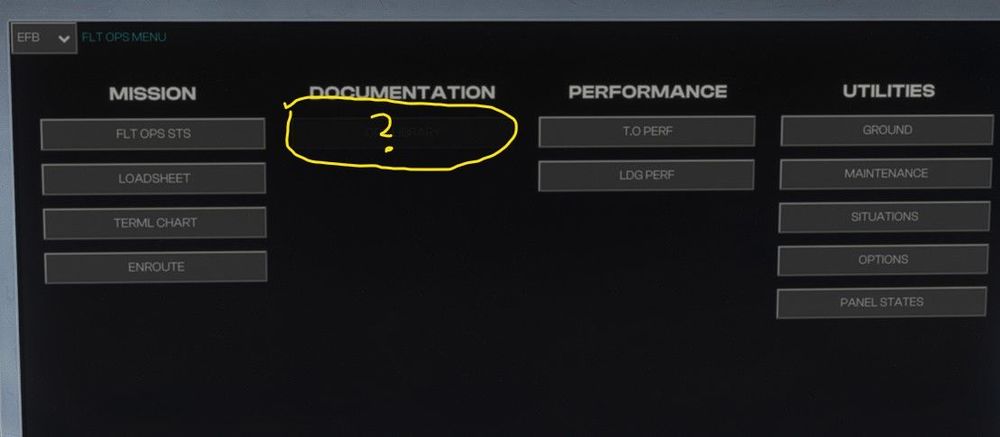
  2. 1) The Documentation button is missing 2) brightness buttons not working ... display very dark 3) Ground : stairs button missing 4) Terminal charts not indicating ( I have a valid Navigraph subscribtion ) 5) Failure simulation missing pls update the 2020 version
Account

Navigation

Configure browser push notifications

Chrome (Android)
  1. Tap the lock icon next to the address bar.
  2. Tap Permissions → Notifications.
  3. Adjust your preference.
Chrome (Desktop)
  1. Click the padlock icon in the address bar.
  2. Select Site settings.
  3. Find Notifications and adjust your preference.