BazAir
Member
-
Joined
-
Last visited
-
-
Did that (Uninstalled within MSFS2024 and confirmed A380 was now streamed) and thought all my issues were resolved. Had a great preflight setup out of YMML, although the takeoff was whindy along runway 34 ( I believe this has been reported by several youtubers that it's difficult to keep a straight line due to lag in response) the flight was up in the air and looking good for a long haul flight to KLAX. However had issues about 2 hours into the flight where the aircraft just started to rock viciously left to right. I disengaged autopilot and was able to get it back on track. Big issue there!!! Then with auto pilot re-engaged, I left the flight in the hands of my trusty co-pilot (Say Intensions Camille) (obviously not trusty enough) and when i came back in an hour i was presented with the below. This aircraft is seriously broken. Screen Recording 2026-09-22 140235.mp4 Dumped in the middle of the pacific Ocean
-
-
-
-
Now I cannot get throttle 4 to move. I have all the bindings done correctly but it wont move. Its as if with my computer shutting down it has currupted the aircraft. Tried everything with no success. Im at my whits end with this aircraft. I have the Inibuild reduced tecture pack done but the stuttering is still unbearable. Anychance to allow me to transfer the A380 from marketplace onto the Inimanager to see if that will make a difference? I think MSFS2024 is causing all these issues
-
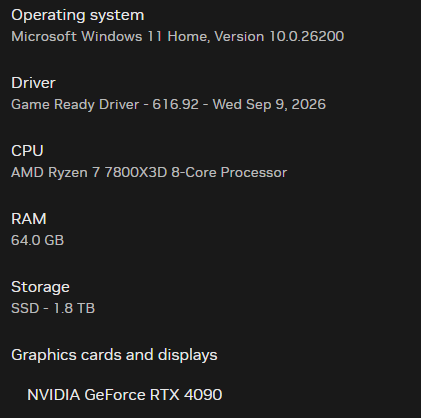
Second flight and not much better. WSSS (cloudsurfasiasim airport scenery) to VHHH (Inibuild airport scenery). Had nil issues departing out of WSSS other than the below. GSX: Yes I have the Official GSX profile for the A380. GSX constantly was freezing both in the EFB app on the A380 as well as the MSFS2024 EFB. I had to reset the Couatl engine several times. Other than this issue the flight was going well until landing in VHHH. Couple of minor things. I noticed that even at 40000ft I have nil smoke trail from any of the engines. Taxiing to gate N7 in Terminal 1, noticed some stutters but not to bad. I have a number of the sceneries at your VHHH toggled off to give me more performance when I land there since purchasing your scenery. With the A380 when I taxied into the gate everything went haywire. The game froze my VR headset got really hot and froze. Got the GPU pop up that I have reached my limits and my whole computer shut down. Hi had the A380 basic cabin on but both performance and FX Performance toggled on in the A380 settings. I use the Pimax Crystal Super 50PPD and my rig is as follows: I would have thought that my computer should be able to cope with this aircraft at one of your sceneries but I am starting to thing maybe not. I have all my settings in MSFS2024 for VR set to medium and the texture resolution at low. How can this still not be enough to stop what has happened happening. Would really like some advice on how to rectify this. Many thanks in advance. P.S As per Charts - I have logged out and back into Navigraph, as per your advice and at this stage it has rectified the issue I experienced yesterday. Had nil issues with the ILS on this flight and nice smooth landing as well. It might have had something to do with MSFS 2024 around YSSY??? Just thinking out loud.
-
Hi There Inibuild. Gotta say this aircraft looks amazing; However as most new releases my flight did not go to well. GSX APP on EFB - Continuously defaulted to blank screen with press me to menu icon that when you pressed it nothing happened. Had to restart GSX several times during flight. Charts: Aircraft icon and flight path were nowhere near each other. Steering: without any input in my steering during takeoff the aircraft was swaying left and right along the runway. Most of the flight was perfect other than the charts issue above, however ILS Approach - On approach I had everything set for a glideslope capture for 16R into YSSY and the correct frequency was showing on the screen when I clicked the appr and both autopilots selected the aircraft commenced a steep angled left turn and started flying in circles. Manual landing after that with nil issues (WHeeww) However onboard announcements started to do its takeoff spiel rather than landing and every other announcement, including failure announcements started to go all at once. I couldn't hear myself think. Taxiing to gate I was doing about 20kts along the taxiway and all of a sudden I was getting 100kts announcements and wheels started to act like the aircraft was about to takeoff and started lifting which caused the whole aircraft to commence bounce around. Am I regretting purchasing this aircraft? Absolutely not. It's great, just needs some tweaking hence why I thought I would add this post. I know you guys will get it even better, like you did with the A350's. Good Luck.
-
When will GSX allow your multi Jetways to allow passengers to be seen? GSX newest update mentioned a fix but I just started a flight from OMDB and the 3 jetways at Gate F12, only one was operating (I suspect the top one for an A380). I was in PMDG 777-300 and your multi jetway system only identified the top jetway at this gate that could connect to any door. When boarding commenced it was great not to get the stairs connecting but there were nil passengers, even though the aircraft system was counting up the 367 passengers loading. Would be good to at least get an indication that GSX are on board to assist Inibuild with resolving this.
-
I have a fairly high end system: AMD Ryzen 7 7800 x 3D 8 core processor with 64GB RAM and a Nvidia Geforce RTX 4090 graphics card. On my first flight YPAD to OMDB all was going so well until I was about 500ft from landing. I started getting really bad stutters with warnings of my GPU being at its limit however I managed to land and taxi to the gate. It was not enjoyable. Especially the fact I just purchased this scenery/airport package. On arrival to the taxi stand the VDGS does not work (On this flight I taxied to F13) and after the jetway was connected (using the GSX profile provided with this purchase, the deboarding process commenced and GSX sends the bus for all passengers to deboard from the rear stairs. Even though the jetway was attached the GSX tablet stated there was no jetway available. Very unenjoyable. Thank you.
-
So far so good. After logging out and back into Navigraph I haven't had further issues. Many thanks
-
To add to the above, in my opinion the auto-land function is also broken. I have several times brought it to inibuilds attention. It's a little better compared to when the A350 first was released but still no cigar. PMDG and Fenix has got this way over inibuild. It would be nice, especially in bad weather to get a smooth landing with the Auto-land feature in the A350 but the fact is on most occasions the aircraft pitches down and up and it's like a roller coaster ride on the glideslope.
-
I was in a 7 hour flight and exactly the same thing happened to me as well. Nothing I could do to fix it other than end my flight. Agree with you about it being frustrating. Have you logged a ticket direct with inibuild? This is obviously a continuing issue.
-
Yes, I have always used Navigraph and have never had issues until recently. On another note I just spent 7 hours flying Melbourne to Singapore on this same aircraft and all the instruments froze. I couldn't do anything to fix it other than end flight. It was bloody frustrating. Just out of the blue. I have heard about this issue in earlier versions, but it looks like it's still bubbling in the background.
-
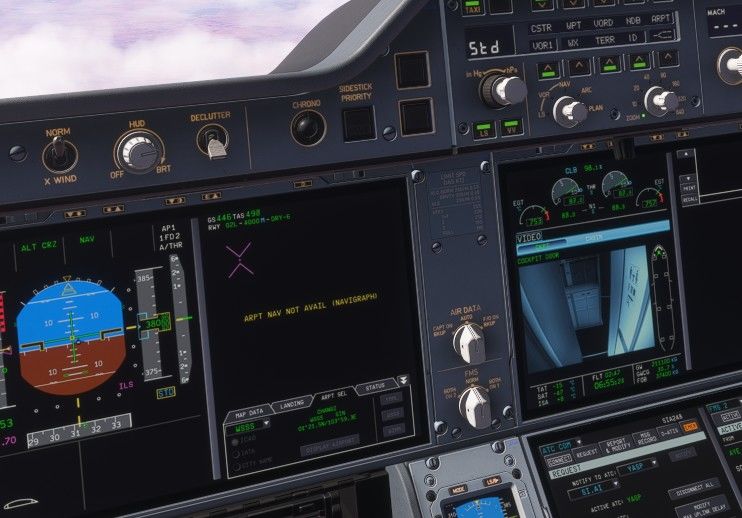
Hi, I have noticed over the last few flights the Navigraph airport information map for the arrival destination does not populate when you attempt to load on the main screen in order to setup your BTV exit off the runway. A yellow message appears stating it is not available. When on ground the departure airport is fine. Once in the air at cruise it becomes unavailable. Not sure if this has already been reported or not.