



Skip to content
View in the app

A better way to browse. Learn more.

iniBuilds Forum

A full-screen app on your home screen with push notifications, badges and more.

To install this app on iOS and iPadOS
  1. Tap the Share icon in Safari
  2. Scroll the menu and tap Add to Home Screen.
  3. Tap Add in the top-right corner.
To install this app on Android
  1. Tap the 3-dot menu (⋮) in the top-right corner of the browser.
  2. Tap Add to Home screen or Install app.
  3. Confirm by tapping Install.

Dirtyrockers

Member
  • Joined

  • Last visited

Everything posted by Dirtyrockers

  1. would really love to see inibuilds make this scenery. i've got the flytampa one, but its abandonded by them i think. no updates for the last 2 years (and it got lots of bugs) i really like how inibuilds build there scenery.
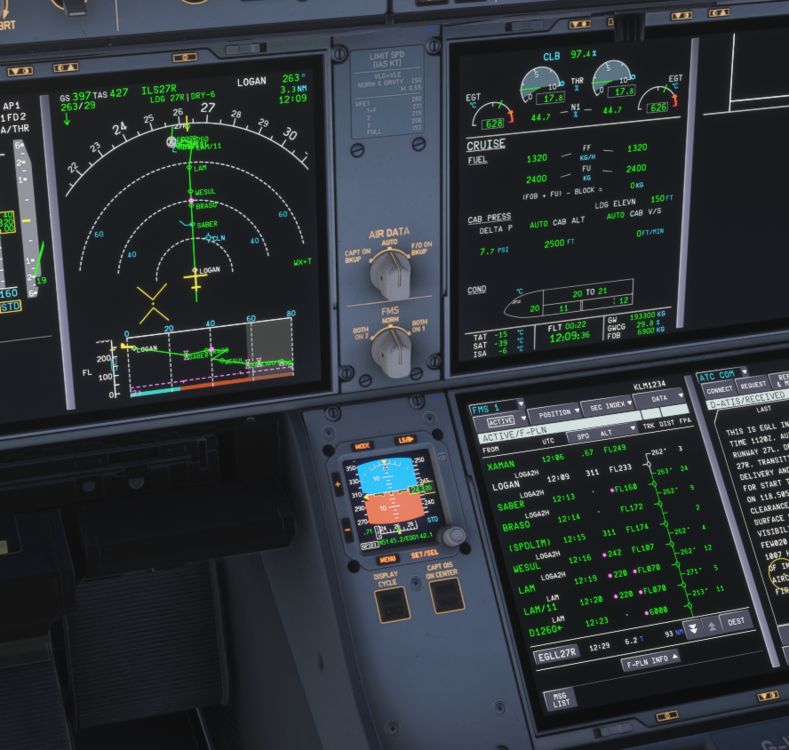
  2. Hi, Something is not right with the descend path of the loga2h star into egll see screen
  3. Dirtyrockers replied to balus's topic in Other
    remove bindings for brake axis in the sim.. then restart...

Account

Navigation

Configure browser push notifications

Chrome (Android)
  1. Tap the lock icon next to the address bar.
  2. Tap Permissions → Notifications.
  3. Adjust your preference.
Chrome (Desktop)
  1. Click the padlock icon in the address bar.
  2. Select Site settings.
  3. Find Notifications and adjust your preference.