





ChristyKrohne
Member
-
Joined
-
Last visited
Everything posted by ChristyKrohne
-
-
Yes, I did the update. And you're Correct. The SU7 did fix it. Thank you, and Happy Flying... While I have your attention on this matter😁😇😊, any news from your team on scenery development for FYWH(Hosea Kutako International Airport)
-
Content Manager, as in "My Library." If so, then yes, I already did that. It is not working. I'm streaming the aircraft. So, I Disabled it. Then quit the sim altogether. Then I ran the sim again. Then ENABLED the aircraft again from My Library. It didn't work. But I'll try again tonight.
-
Before you start: 1. On your Xbox · Go to Store > Search > Xbox Insider Hub > Install it (it's free). Open Xbox Insider Hub. · Press Previews (left menu). Find Microsoft Flight Simulator Beta > Select Join. · Then select Manage. You'll see a list of groups. Pick Microsoft Flight Simulator 2024 - Sim Update 7 (it always says the latest Sim Update number; right now it's 7) > Save. · Wait until it says Joined. Can take up to 15 min.3. · Restart to get the beta. Very important on Xbox: Hold the Xbox button on the controller. · Restart console. After restart, go to My games & apps > Manage > Updates. MSFS 2024 should start updating to the beta build. Current Beta is 1.9.10.0 (SU7 Beta). Size is usually 3- 15 GB, not a full reinstall. · Launch it — in the main menu top right, you'll see the "Beta" tag. If you don't see an update: Settings > System > Updates > Check. Or go to the Microsoft Store app on Xbox > Search MSFS 2024 > it will say Update. To leave Beta later and go back to the normal version: Open Xbox Insider Hub > Previews > Microsoft Flight Simulator Beta > Manage > Leave preview > Continue. Restart the console again. Launch MSFS 2024 — it will prompt you to install a ∼3.5GB rollback update to the public version (1.8.x.x)
-
Yes, it is completely unusable as it stands. As for an official acknowledgment by the IniBuilds Team? One guy on YouTube said that he attended the FSimUK event. He met up with some IniBuilds Team members and inquired about it. According to him, IniBuilds is aware of the A380 problem on Xbox and is working on a fix that will be available in an Update coming out in the next few days.
-
-
Apparently, this is the solution. I haven't tested it myself yet. I can't remember where I got it from. Somebody posted on another post here, "The MSFS Marketplace is a nightmare. The update functions don't work properly. There are two ways to update the A380 without issues, depending on whether you have it installed or are streaming it: 1. If it is being streamed, completely deactivate and then reactivate it. You can find the options for this in the bottom-right corner of the Marketplace after selecting the add-on. 2. If it is installed, please uninstall it completely; then, place the aircraft somewhere using the streamed version before downloading and installing it again. As long as the aircraft isn't managed via the iniManager, there are no local WASM files, because they are precompiled for consoles. Consequently, you cannot delete WASM files from the usual locations. However, if you wish, you can delete the "work" folder to reset all settings, persistence data, etc. Don't forget to check the IniManager for updates to the LowRes textures and liveries as well."
-
How about on Xbox? What is the solution for Xbox? It seems more and more Xbox gamers like me are having this problem for the first time, Only after Update 1.0.3.
-
The same here. It seems it is only an Xbox problem after update 1.0.3. I don't understand why IniBuilds haven't said anything about this so far.
-
I have the same problem after the A380 to 1.0.3 Update. I must add, though, that I STREAM only. Meaning I don't do the Download and Install process, as I want to save space on my Xbox Series X. Apparently, this is the best way for the IniBuilds A380 to operate smoothly. This is what META AI is suggesting in order for me to resolve the Orange Screens problem. I haven't had time yet to test it; META AI - range = ADIRS not aligned / no IRS data. The displays can't get attitude, so they go amber. Why you're getting it now (at FYWH especially): FYWH is high + sometimes you spawn with ADIRS switches in OFF because MSFS cold & dark is buggy. At low altitude airports you can get away with it longer, at FYWH it shows instantly.Quick fix, 30 seconds: Overhead — check the 3 ADIRS knobs (top left of overhead, above Captain)They must be on NAV — not OFFIf OFF, turn all 3 to NAVEFB — Instant AlignTablet > Aircraft > Settings / StatusHit ALIGN IRS or INSTANT ALIGN — FYWH takes 7+ minutes real align, so use instantIf still orange:Check BAT 1 + 2 are ONExternal power button on overhead — EXT PWR on? If not, turn on and click AVAIL light. Or just start APU: APU MASTER ON > START. Brightness knob — sometimes the screens are not orange, just dim. Under each PFD/ND there's a brightness knob — roll it to the middle. The order that works 100% at FYWH: BAT ON > EXT PWR ON > ADIRS 1-2-3 to NAV > EFB INSTANT ALIGN > Wait 10 sec > Screens turn blue/white. If you did ADIRS to NAV and it's STILL orange after 10 sec, do a full restart: MCDU > EFB > Reset IRS > ADIRS OFF, then back to NAV.
-
-
I Approve of this message.
-
-
More detail, please. What are Developer Settings? Thanks.
-
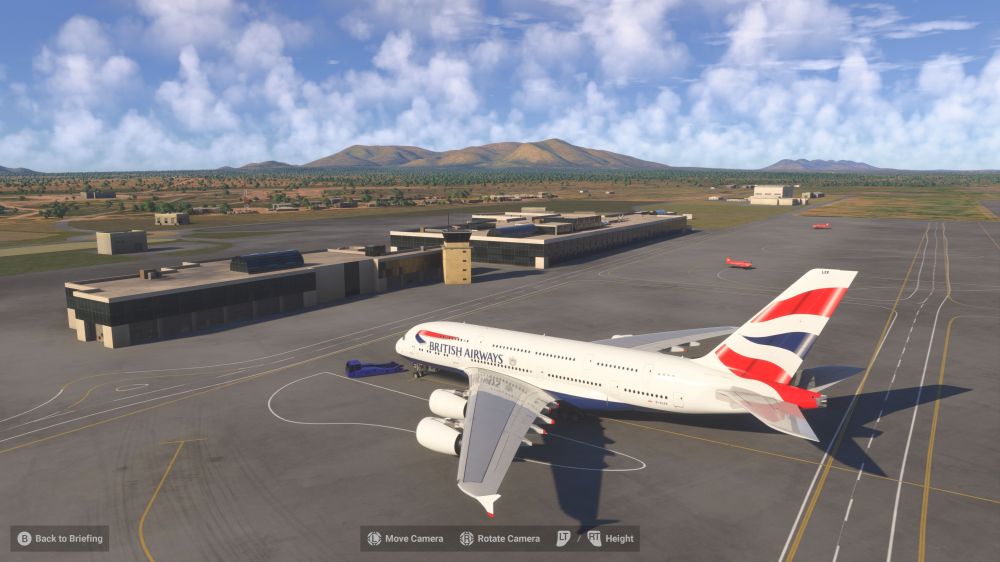
Look at this: the Most Beautiful airliner, IniBuilds A380, has to sit at an airport like this......This is not right. This airport does not do justice to such a well-crafted airliner. This plane needs a handcrafted FYWH airport😊, which will be the Home of this IniBuilds A380. On Xbox, we literally have nothing for FYWH - the FSDG one and the Flightsim.to one are PC only. So we're stuck with generic while flying your study-level bus. And wow, the contrast is rough. Your incredibly detailed A380 sitting on the default FYWH looks completely out of place. Any chance you can bump FYWH up the priority list? It would be the first proper Namibian hub in the Marketplace for Xbox. I've attached a screenshot. Thank you, IniBuilds Team. C.KROHNE
-
This a possible solution according to META AI: on Xbox Series X, that combination = the sim running out of memory. It's super common with the iniBuilds A380 right now, especially after the 1.0.1 update. Missing tail / black screens are the same problem: Black/dark cockpit = WASM avionics crashed from memoryMissing tail / invisible parts = textures didn't load to save VRAM"Memory Loss" message = Xbox hit its limitThis is what fixes it for most Xbox users:1. Fix the tail first - it's a livery bug in 1.0.1:Delete ALL your A380 liveriesUninstall the A380 itselfFully quit MSFS - Press Menu on MSFS icon > Quit, don't use Quick ResumeRestart Xbox, reinstall A380 from MarketplaceReinstall liveries fresh from Marketplace - old liveries from before 1.0.1 will cause invisible tail/fuselage forum.inibuilds. If you can choose: pick Streamed, not Downloaded - iniBuilds said streaming helps rendering right now.2. Fix the black screen/memory: On Xbox, you can't install the Reduced Texture Pack from iniManager, so you have to save memory elsewhere: ALWAYS fully quit the sim after a flight. Don't do 2 flights in a row. That leak is what causes black screens to get worse each flight. Clear Rolling Cache: Options > General > Data > Delete Rolling Cache File (then turn it OFF for the A380). Before flying A380: World Map > Options > set AI Traffic OFF, Airport Ground Vehicles 0, Ships 0. Spawn at a small DEFAULT airport to start, not an add-on airport like EGLL/JFKDon't touch external drone cam too much on final - that's when most black screens happen. Enable the new WASM crash reporting when it asks after 1.0.1 - it helps iniBuilds fix the Xbox crashes
-
Hi iniBuilds Team, I would like to formally request FYWH - Hosea Kutako International Airport, serving Windhoek, Namibia. Why FYWH would be a great fit for iniBuilds: Major Gap in Africa: Southern Africa is massively underserved. FYWH is the main international gateway to Namibia, one of the most stunning countries for VFR and bush flying. Perfect for your fleet: It's a real-world destination for Eurowings Discover A330, Qatar Airways, Ethiopian, TAAG, and Airlink - all aircraft you develop. Ideal for long-haul A330/A350/A380 operations. Interesting Airport: Single 4532m runway at 5,640ft elevation with a challenging high-altitude performance factor, modern terminal with recent expansions, and beautiful surrounding desert terrain. No quality version exists: Currently, there is no high-fidelity FYWH for MSFS 2020/2024, only low-quality freeware, and it is PC ONLY. So far I've bought three of your products: Inibuilds A380, Hong Kong International Airport, as well as Heathrow(EGLL) Thank you for considering this iconic African gateway. I believe many simmers exploring Africa would love to have a study-level FYWH. Best regards, Christy Krohne
-
Thank everybody. I managed to get the Liveries. Still have to find a way around the Mappings. Haven't really had time to spend with the A380.
-
Hi. Thanks for the reply. However, I just went through the aircraft manual twice. Unfortunately, there are no Bindings/Mappings for the Xbox controller, Keyboard, and Mouse.
-
As an Xbox user reading all these comments I feel so much better. Just maybe Xbox isn't powerful enough to handle such a gigantic complex airplane such as the IniBuilds A380. I think the fact that my internet speed of 35 MB per second adds to my problems with this plane. Stuttering all over and screens dissappearing. I can't wait for Project Helix coming out next year. If true it should be a breeze playing MSFS2024 with the A380, as according to rumours the Helix easily handle PC games.
-
Hi guys. I bought this awesome A380 three days ago. Haven't had time to check it out until today. Three r3asons for this post; 1.First thing should be the Mappings. Any guide available on the mappings/bings for Xbox Controller,Mouse and Keyboard will be much appreciated. This is the only hardware I have. 2.Liveries only two; IniBuilds one and a White one. How come? I thought a liveries pack is part of the buy,right? 3.Is there anything else appart from mappings I need to do before flying this plane? Sim settings/changes ecetera? Thank you. Christy.


