ChrisPUA320
Member
-
Joined
-
Last visited
-
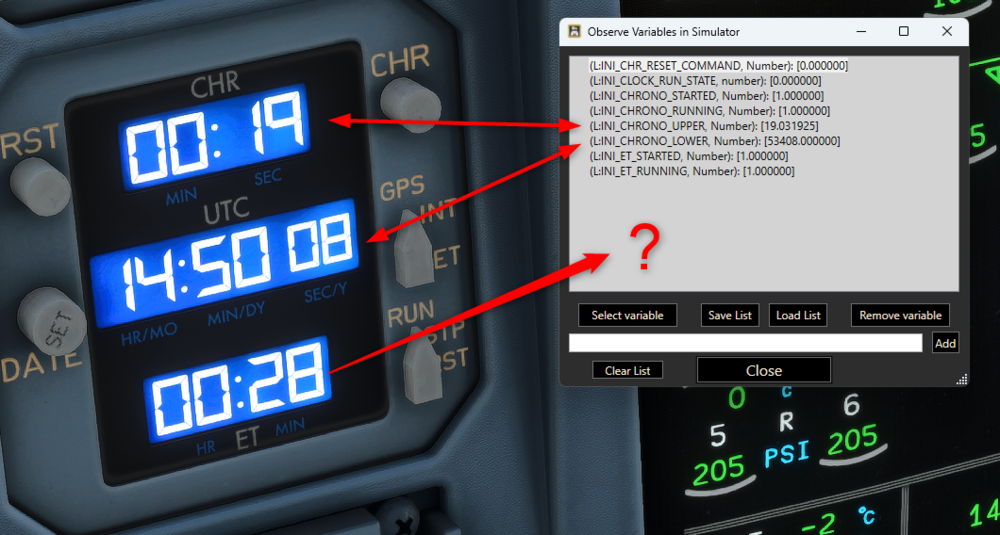
Hi Steve, thx for reply. But these I have already found as you can see in the screenshot. Would be nice if this Var would be available in the next updates. keep up the good work thx Chris
-
-
Hi all, I am looking for a variable that gives me the value of the ElapsedTime (CHRONO ET). I found Vars for the Upper and "lower" (actually it is in the middle) clock/chrono displays. But there is none for the ET. Maybe I haven't found it yet. Any help is deeply appreciated. RGDS Chris
-
Hi, I figured that various Vars regarding the MCDU (FMS) stay at 0 (zero) even when values are entered in the MCDU. The following are affected: (L:INI_V1, Number) (L:INI_V2, Number) (L:INI_VR, Number) (L:INI_FMS_MDA, Number) These Vars are needed for script writing and addons for the excellent A340-300! Could you confirm and maybe fix this? Thanks and keep up the good work!
-
Hi, as I was programming some SD profiles for the community I found some issues that needs to be fixed: - the DOT Variable for FCU SPD Display (L:INI_FCU_SPD_DOT) stays at "0" - the Variable for opening EXIT 2R (A:EXIT OPEN:5, Percent Over 100) stays at "0" - RMP1 ON/OFF switch switches power of both RMP1 AND 2 (L:INI_RMP1_STATE) I hope you can reproduce those issues and will fix them with the next update. Thx!Keep up the good work! Rgds Chris
-
Hi, there ARE Vars for the blue dot. Using these: L:INI_ENGINE1_TLA_N1, Number L:INI_ENGINE2_TLA_N1, Number At least the values change accordingly to the movement of the blue dot. Cheers
-
Hi, I just figured that the function of the Rudder Trim Knob works opposite. That means when you turn the knob to the right (supposed to turn rudder/nose right), the nose and indication turn left and vice versa. Please fix this. Rgds Chris
-
Hi, I just figured that the LVar for "blue dot" for ENG 2 is not present. While the LVar for ENG 1 is working fine (L:FG_N1_TGT, Number): Would be nice if you could fix this. best regards Chris
-
I am using the A300 with AAO (and a VRi MCP Combo connected) and SD/SD+ working fine. I am one of the creator of the profiles. What exactly is the issue? Do your rotaries produce inputs in AAO for both directions?
-
I did that too, but obviously it does nothing except you hear that „click“… The button in the cockpit does not move with that LVar. I wrote a script that holds the button for 1 second and then releases it again. But maybe that second is too short.
-
As I am constructing and constantly enhancing various SD profiles I found and issue with the TO CONFIG TEST BUTTON. It is unfortunately NOT possible to trigger this button by using the given LVar (INI_TAKEOFF_CONFIG_PRESSED). Obviously it is for reading purposes only, if this button is pressed but internally it does nothing. Is there a BVar I am missing or how is it possible to trigger this button externally? Any help is deeply appreciated. Keep up the great work! rgds chris
-
DISREGARD: They ARE active!!! Post can be deleted/closed Thank you
-
Hi, there are LVars which are supposed to show the remaing aligning time for the IRS's. (L:INI_IRS1_TIME_REMAIN, number) (L:INI_IRS2_TIME_REMAIN, number) (L:INI_IRS3_TIME_REMAIN, number) But when starting to align the IRS system they still remain at a value of "0". As I am programming scripts and SD profiles to replicate all the functions to use them with different hardware, it would be very nice if you could fix thsi and make them "active". best regards Chris
-
The program is called AAO (axis and ohs). Wonder that you don’t know it. That’s the number one program for scripting, using external hardware and much more for flightsim. THE swissknife 😉 the vars you mentioned are none existent. cheers Chris
-
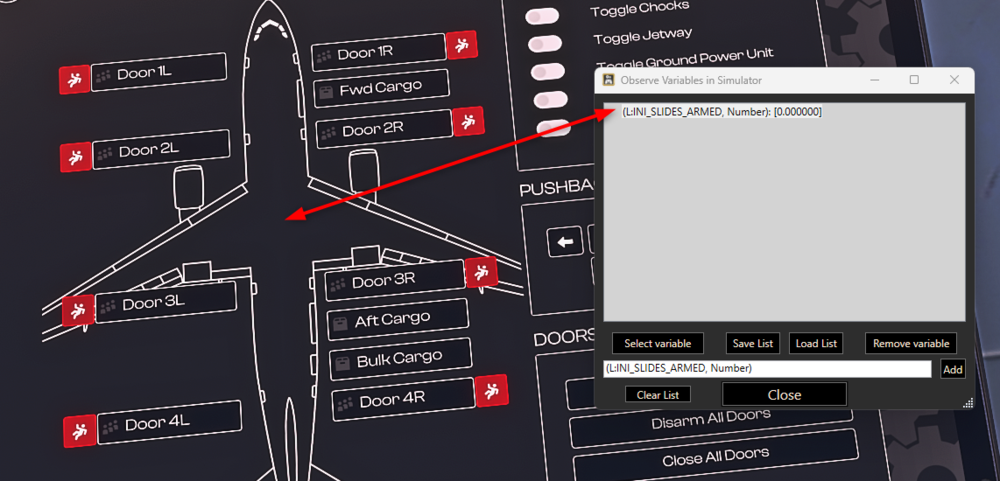
Hi all, I just figured that the LVAR for "Slides armed" stays at "0" all the time and doesn't change although if all Slides are armed. (see screenshot) As this LVar is obiously present why doesn't it change to "1" if all slides are armed? Due to I am programming Streamdeck Profiles for the community it would be very nice if you could make this Value/LVar active as this is needed for the implementation for operating the slides (handles). Or is there an index I have to add like "L:INI_SLIDES_ARMED:1, Number" ? Thank you guys for such a great product and I am really looking forward to the next update hopefully coming soon 😉