




sedec
Member
-
Joined
-
Last visited
Everything posted by sedec
-
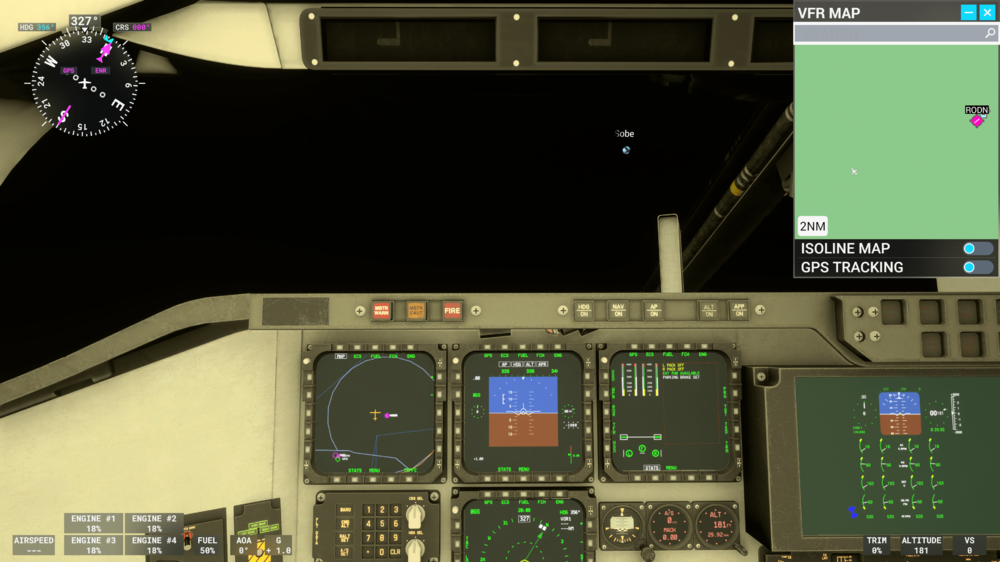
I noticed a bug with the Xbox Marketplace version of the Spirit (not sure if the bug affects PC users). When using it, the VFR map only shows green, except for waypoints and airspace lines. The map on the leftmost MFD on the pilot's side of the cockpit also shows all black except for waypoints and airspace lines. No water is shown, no elevation differences are shown, and no airport surfaces (taxiways and runways) are shown. This only happens when I am using the Spirit. Attached is a screenshot showing what I mean.
-
Currently, there is no cockpit lighting in the Bf 108 Taifun, which makes it hard to see anything other than the EFB at night. I would like to suggest a toggleable cockpit floodlight. It can be toggled via the EFB in the Settings page, and when toggled on, a knob somewhere in the cockpit can be used to adjust the brightness and turn it off. If it is toggled off in the EFB, the floodlight will not appear.

