




gcs7e7
Member
-
Joined
-
Last visited
Everything posted by gcs7e7
-
-
Hi guys! Could you give more specific description about this point please?
-
I thought, but it was worth a try.😀
-
-
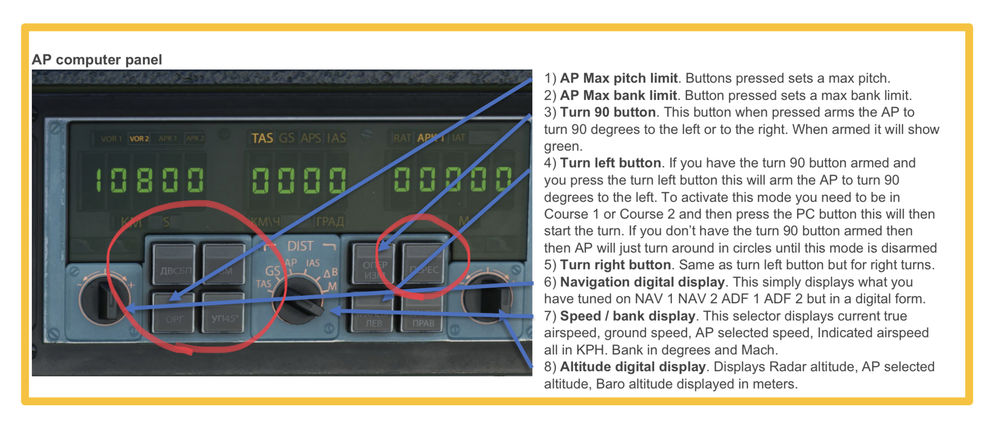
Hey guys! Could you please explain more deeply the following buttons functions and behaviors? For nr. 1 and 2 overall of the left side “4 pack”. The top right button on the right side “4 pack”. Thanks in advance!
-
You can’t. There’s no aircraft.cfg available in the Marketplace addons.
-
After the A310 release, there was a conversarion started about the 300, cargo variant, etc. and since then the 300F in the works… So I was thinking: What about the little brother guys?😅

-
Oh, didn’t know about that! Then, just the first 2, those are irritating a bit.😅
-
Hey guys! There is a few issue in the (for the end user) non existing aircraft.cfg: icao_type_designator should be “A225” instead of “AN225”. atc_id should be “UR-82060” (for the 4 real liveries at least except Aviators, XBox and white), if I’m correct now it’s “N225”. - Because of these 2, flight trackers like Volanta always picking up a new wrong aircraft for a flight even if you’ve created a correct one. atc_airline should be “Antonov Bureau” insted of “Antonov”. - This one for the in-game ATC to work correctly.
-
Would be nice if we could pull the loadsheet (passengers, cargo and fuel) on the payload screen on the EFB from SimBrief and load it directly without adjusting the numbers.


