



Skip to content
View in the app

A better way to browse. Learn more.

iniBuilds Forum

A full-screen app on your home screen with push notifications, badges and more.

To install this app on iOS and iPadOS
  1. Tap the Share icon in Safari
  2. Scroll the menu and tap Add to Home Screen.
  3. Tap Add in the top-right corner.
To install this app on Android
  1. Tap the 3-dot menu (⋮) in the top-right corner of the browser.
  2. Tap Add to Home screen or Install app.
  3. Confirm by tapping Install.

Iridium

Member
  • Joined

  • Last visited

  1. Iridium replied to Iridium's topic in Suggestions
    well I guess over time by time will get enough people wanting it, looking forward to it 🙂
  2. Iridium posted a topic in Suggestions
    probably this make unrealistic to AN225 but for convenience probably it will be good if got GTN (PMS50 and/or GTN750Xi) panel integration (maybe make a option switch on EFB) and it can be placed where original MAP/WXR device placed (besides GNS530) that currently INOP.
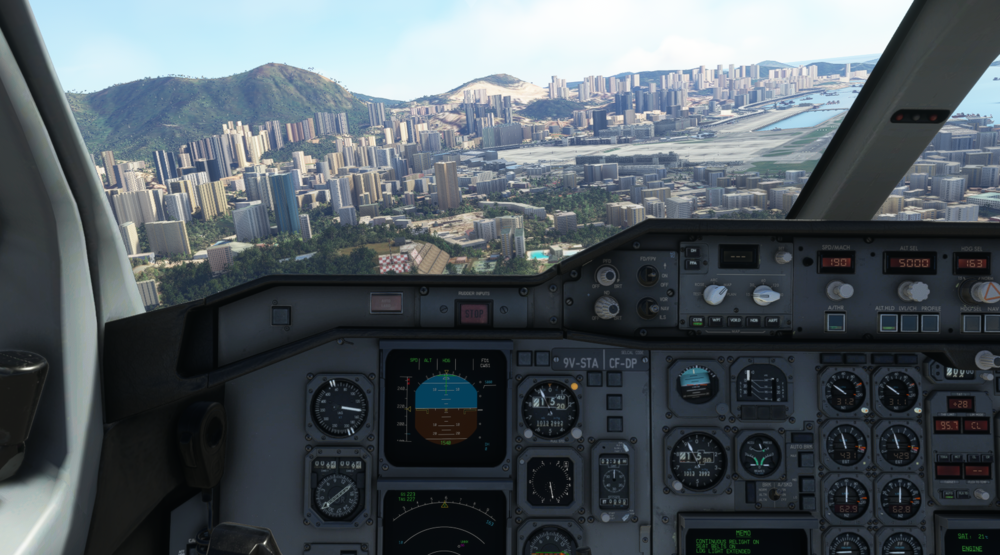
  3. hi, maybe this is looks like one-way report system freeze upon entering arrival on VHHX (default), possibly due to database not correct or else whole digital and most analog panel not responding and freeze, including MCP (AP AT), flaps not extending. but aircraft still flyable and also can extend landing gear to land safely maybe can be fixed or something soon, anyway big thanks and congrats for INIBUILDS releasing A310 on MSFS platform, hope can fly beluga here too 👍
Account

Navigation

Configure browser push notifications

Chrome (Android)
  1. Tap the lock icon next to the address bar.
  2. Tap Permissions → Notifications.
  3. Adjust your preference.
Chrome (Desktop)
  1. Click the padlock icon in the address bar.
  2. Select Site settings.
  3. Find Notifications and adjust your preference.