




AlexEDLE
Member
-
Joined
-
Last visited
-
After carefully reading the new development update, we all understand that you have a lot to do and will surely release some great new aircraft. What I don't understand, however, and what gives me a bad feeling about new releases, is that the A300 cargo version is still unflyable. You wrote that a lot of knowledge, including from the A300, has been incorporated into the new developments. I'm curious to know if the current state of the A300 cargo version meets the quality standards of inibuilds?
-
The issue of poor performance in the Cargo variants has unfortunately been known for some time. Unfortunately, there has been no comment from IniBuilds yet or any information that they're working on it (apart from the standard responses, such as deleting the community folder, sending screenshots, etc.). It's really sad, and we're talking about a "premium" variant here.
-
So, I've now updated to 1.03, but the stutters in the PW version are still there. I'd also like to test whether deleting the WASM folder helps. Could I just ask what I need to do to achieve this?
-
Thank you, Fornax, for your detailed comparison. I hope we're finally past the "it could be your PC, send us this and that" advice from support. But I'm sure they're working on the A300 in the background. Hopefully.
-
Of course. It's also relatively easy to reproduce. Jump into the cargo with PW engines, spawn on a runway, and press Esc. You can see the stutters in MSFS's custom tracking shot around the plane.
-
I'm now wondering if I've been scammed with the "premium" version. Why is no one on the team responding to this issue anymore, and why are there no more updates?
-
I also find it really bad that no updates or fixes have been released for months. This is despite the fact that the Cargo PW variant is clearly buggy (there's a forum thread about it). If this were a freeware aircraft, I would understand, but it's absolutely incomprehensible why the A350 gets one update after another and we have to live with bugs for months on end for a paid product. Perhaps someone from the inibuilds team would like to comment on this?
-
-
i9-13900K - RTX 4090 - 64GB DDR5 6400 MT/s I closed all unnecessary apps in the background. To better illustrate the problem, here is a video: https://drive.google.com/file/d/1_4eK0dPHXaKiUkrZOQM_V5lF9ZNQS5K3/view?usp=drive_link
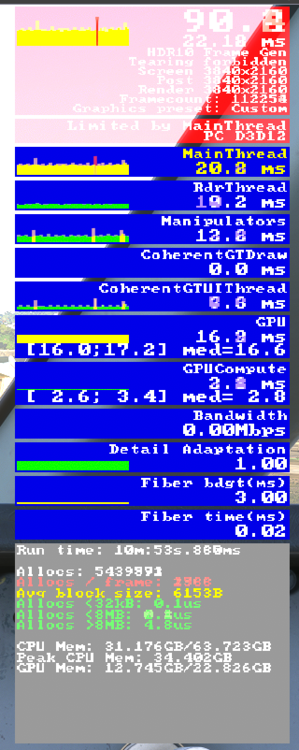
-
Are you using an external community folder and msfs addons linker and have perhaps forgotten to tick the boxes there?
-
Edit: Same with the Cargo GE, with Passenger GE no regular stutters.
-
With the Cargo PW Premium, I have graphics performance drops every second or so. This can be clearly seen in the FPS viewer in the Developer Mode in the upper graph with high red spikes. The effect is a stutter every second, which is really very unpleasant. The frequency and intensity of the spikes change depending on the camera settings. It is very present in the external view. I don't have this phenomenon in the A310 or Passenger PW, for example. What could be the reason? System: i9-13900K - RTX 4090 - 64GB RAM

-
Solved. I entered the Pilot ID (Number) and it worked.
-
I have the same question/error, but I entered my correct SimBrief alias (username). I also did a complete reinstall, but it seems to have remembered my previous SimBrief username entry somewhere. Is there a way to delete all the settings for the A300 in the sim? Perhaps a clean entry from scratch will solve the problem.
-
Hello everyone! Since the A300-600 is already of very high quality, I don't want to mess anything up with mods. There is an "External Lights Fix" on the well-known add-on website and my question is whether it is really "necessary" to download. I assume the lights adjusted by the mod are also fixed in the original version? Or will be?


