Beppan
Member
-
Joined
-
Last visited
Everything posted by Beppan
-
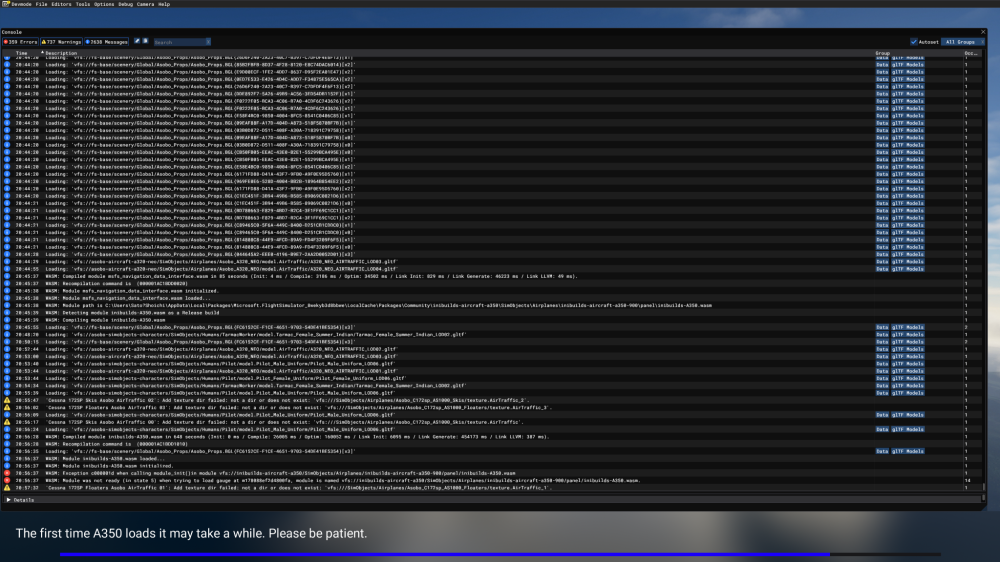
Hello, I am having a reproducible WASM crash when loading the iniBuilds A350-900 in Microsoft Flight Simulator 2020. The WASM module compiles successfully and is then loaded and initialized, but immediately afterwards I get a c000001d exception during module_init(). The relevant part of the Developer Mode console is: WASM: Compiled module inibuilds-A350.wasm in 648 seconds WASM: Module inibuilds-A350.wasm loaded... WASM: Module inibuilds-A350.wasm initialized. WASM: Exception c000001d when calling module_init() in module vfs://inibuilds-aircraft-a350/SimObjects/Airplanes/inibuilds-aircraft-a350-900/panel/inibuilds-A350.wasm WASM: Module was not ready (in state 5) when trying to load gauge at m178088ef2d4800fa This happens every time I try to load the A350-900. I have already tried the following: Completely emptied the Community folder. Removed FSLTL and other Community add-ons. Completely reinstalled MSFS 2020. Reinstalled the iniBuilds A350. Let the A350 WASM compilation finish without interrupting it. Confirmed that I am using DX11. The default Boeing 787-10 loads normally, but the A350-900 consistently crashes with the same WASM error. I also previously experienced a similar state 5 WASM issue with the iniBuilds A320neo. System specifications Aircraft: iniBuilds A350-900 Simulator: Microsoft Flight Simulator 2020 MSFS version: 1.39.12.0 CPU: Intel Core i7-11700 GPU: NVIDIA GeForce RTX 3070 RAM: 32 GB OS: Windows 11 GPU driver: 32.0.16.1060 Graphics API: DX11 I have attached screenshots of the Developer Mode console showing the WASM error. Could anyone help me identify what could be causing this c000001d exception? Thank you.