



Skip to content
View in the app

A better way to browse. Learn more.

iniBuilds Forum

A full-screen app on your home screen with push notifications, badges and more.

To install this app on iOS and iPadOS
  1. Tap the Share icon in Safari
  2. Scroll the menu and tap Add to Home Screen.
  3. Tap Add in the top-right corner.
To install this app on Android
  1. Tap the 3-dot menu (⋮) in the top-right corner of the browser.
  2. Tap Add to Home screen or Install app.
  3. Confirm by tapping Install.

Nightarcc

Member
  • Joined

  • Last visited

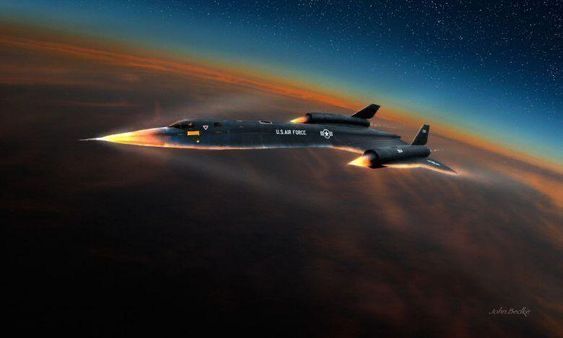
  1. Hi KwikFlight team! I have a small feature request for the Archangel in MSFS 2024. It would be amazing if you could add a visual heat/plasma glow effect around the nose and leading edges of the aircraft when reaching extreme speeds, especially around Mach 5 and above. Something similar to an atmospheric re-entry glow would make high-speed flights much more dramatic and immersive, especially at high altitude. I’m flying the Archangel on PS5 and would absolutely love to see an effect like this added in a future update. Thanks for the awesome aircraft!
Account

Navigation

Configure browser push notifications

Chrome (Android)
  1. Tap the lock icon next to the address bar.
  2. Tap Permissions → Notifications.
  3. Adjust your preference.
Chrome (Desktop)
  1. Click the padlock icon in the address bar.
  2. Select Site settings.
  3. Find Notifications and adjust your preference.