



Skip to content
View in the app

A better way to browse. Learn more.

iniBuilds Forum

A full-screen app on your home screen with push notifications, badges and more.

To install this app on iOS and iPadOS
  1. Tap the Share icon in Safari
  2. Scroll the menu and tap Add to Home Screen.
  3. Tap Add in the top-right corner.
To install this app on Android
  1. Tap the 3-dot menu (⋮) in the top-right corner of the browser.
  2. Tap Add to Home screen or Install app.
  3. Confirm by tapping Install.

ajfoxy

Member
  • Joined

  • Last visited

Everything posted by ajfoxy

  1. Make sure you have installed City update 10, its listed as a requirement. sorted my issues.
  2. ajfoxy replied to ajfoxy's topic in Support
    As far as i know i only installed the one from the ini manager. Where would the folder be located and i can take a look?
  3. ajfoxy posted a topic in Support
    I appear to have two, the working one buried inside the terminal? what am i doing wrong here? Thanks,Adam
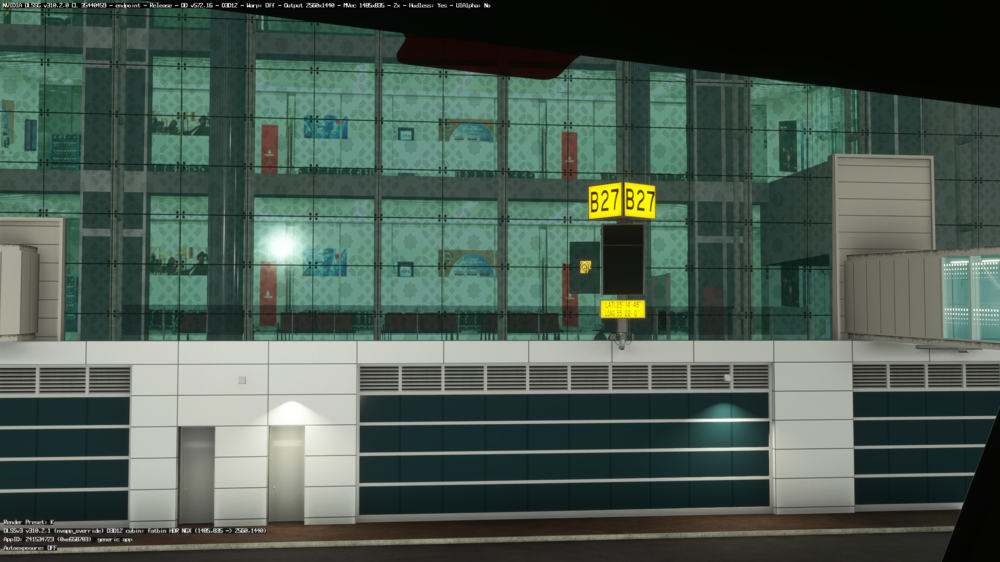
  4. Ive attached a photo of how the VDGS appears to be inside building/ not showing correctly. Appears to be like this gates 301 - 307. is it just me with this issue? Thanks Adam
Account

Navigation

Configure browser push notifications

Chrome (Android)
  1. Tap the lock icon next to the address bar.
  2. Tap Permissions → Notifications.
  3. Adjust your preference.
Chrome (Desktop)
  1. Click the padlock icon in the address bar.
  2. Select Site settings.
  3. Find Notifications and adjust your preference.