




Everything posted by V1Rotate
-
-
-
I can confirm this (on the PC version, purchased on Marketplace, running on the ultra preset).
-
I really hope this gets fixed soon. Proper handling of holding patterns is an essential part of flight planning for airliners, and I'd consider this one of the highest-priority items to address, TBH.
-
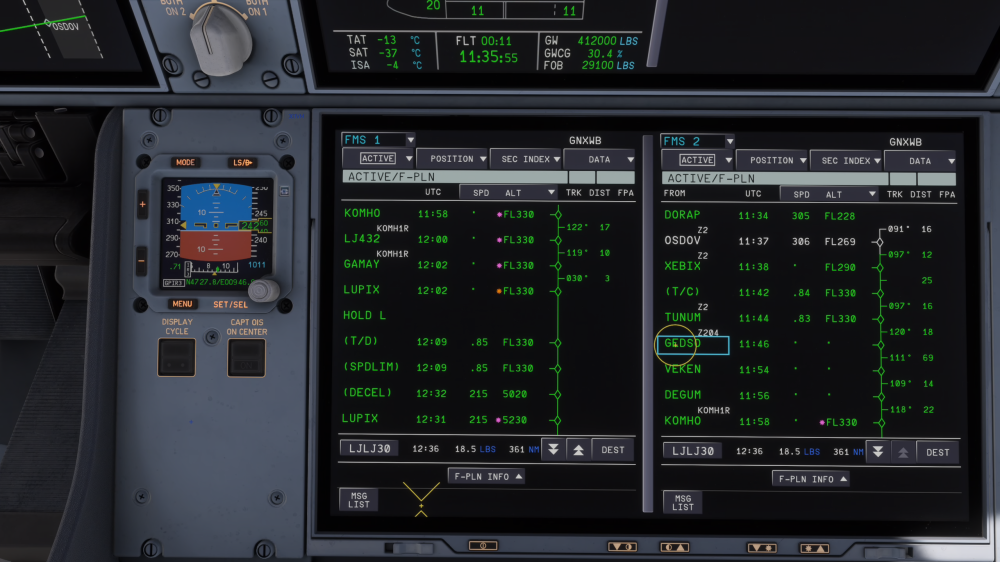
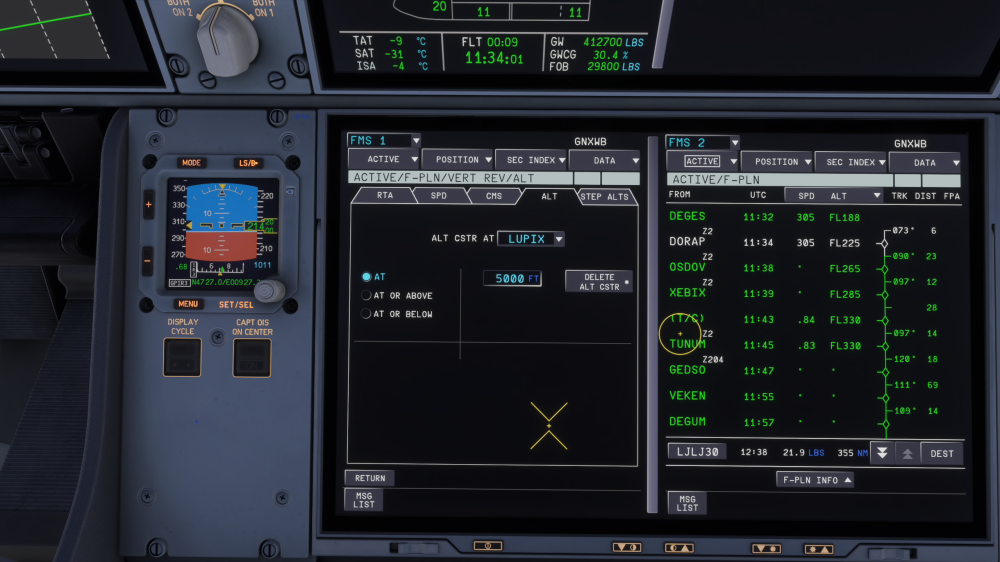
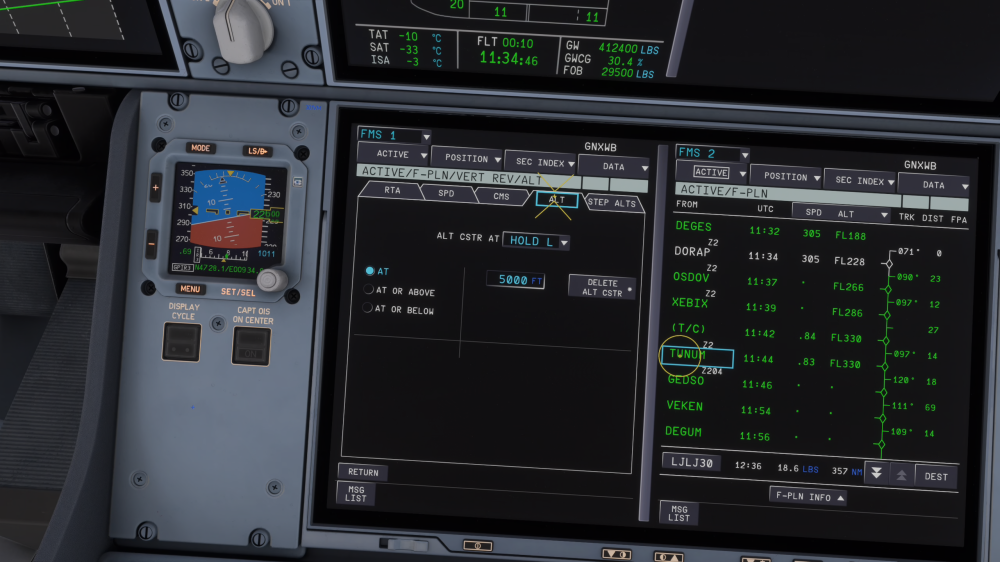
I've run into what appears to be a bug (or at least very unexpected behavior) in the A350 FMS regarding vertical profile calculation when a holding pattern is inserted into the flight plan. I'd appreciate it if someone could confirm whether this is a known issue or if I'm misunderstanding how the FMS is supposed to handle this. Setup: Aircraft: iniBuilds A350 (MSFS 2024) Route includes a holding pattern at LUPIX (HOLD L), with LUPIX being the IAF/approach transition for the arrival into LJLJ (LJLJ30 STAR) Cruise altitude: FL330 What I did: I entered altitude constraints via VERT REV / ALT on the F-PLN page: LUPIX: AT 5000 FT (see screenshot 2) HOLD L: AT 5000 FT (see screenshot 3) The intent is obvious - I want the aircraft to be down at 5000 ft by the time it reaches LUPIX so it can enter the hold at the published altitude, then continue the approach. What the FMS does: Despite both constraints being entered and visible on the VERT REV pages, the F-PLN page still shows: LUPIX at FL330 (with the magenta constraint indicator, but the predicted altitude is FL330) (T/D) appearing AFTER the holding pattern, at 12:09 / FL330 LUPIX (the second occurrence, after the hold) showing 215 kts / 5230 ft A (DECEL) point at 12:32 / 215 / 5020 So the FMS is essentially planning to cruise at FL330 right through the hold and only start the descent AFTER exiting the holding pattern. This makes no sense operationally - you cannot enter a published hold at FL330 when the hold is part of an arrival/approach procedure at a much lower altitude. Expected behavior: The FMS should calculate the T/D such that the aircraft reaches the constrained altitude (5000 ft) at or before LUPIX, so the hold is flown at the constrained altitude. The constraint at LUPIX/HOLD L should drive the descent profile, not be ignored. Screenshots attached: 1. F-PLN page showing FL330 predicted at LUPIX and T/D placed after HOLD L 2. VERT REV/ALT page confirming AT 5000 FT constraint at LUPIX 3. VERT REV/ALT page confirming AT 5000 FT constraint at HOLD L Questions: Is this a bug with how the FMS handles altitude constraints in conjunction with holding patterns? Has anyone else encountered this and found a way to get the FMS to compute a sensible descent profile with a hold in the route? Thanks in advance for any insight. Otherwise loving the aircraft - just want to understand if I'm doing something wrong or if this is genuinely broken. Cheers
-
There’s an ongoing thread on the MSFS forums about general stuttering in SU5. One of the suggested solutions was disabling DLSS Frame Generation and switching to FSR 3 (I’m on an RTX 5080). So, I did the same, and in addition to making the sim smooth in general and the A350 in particular, I had the 'Simulation paused' message appear only once for a fraction of a second during several hours of various flights! Otherwise, the A350 was running silky smooth! Truly impressive performance considering the complexity of the aircraft! And this was after several flights in a row on Ultra settings over highly detailed areas like the Alps - places where the message used to appear constantly with DLSS Frame Generation, particularly during approach. I hope this information proves helpful for the iniBuilds team! P.S. And thank you for the A350, it’s my favorite aircraft in the entire sim. The textures, modelling, sound, animations, systems, and performance (especially after switching to FSR) are all top-notch. You’ve done a fantastic job, and it keeps getting better with every update.


