




maskedferrert2
Member
-
Joined
-
Last visited
Everything posted by maskedferrert2
-
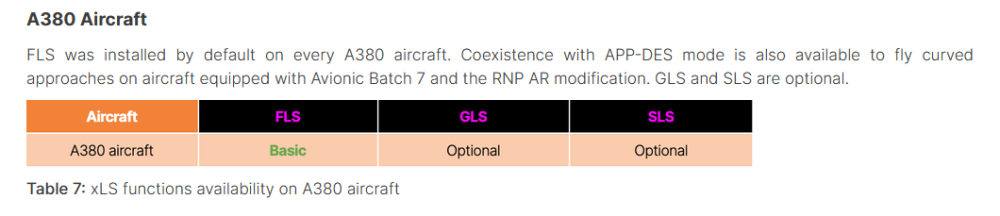
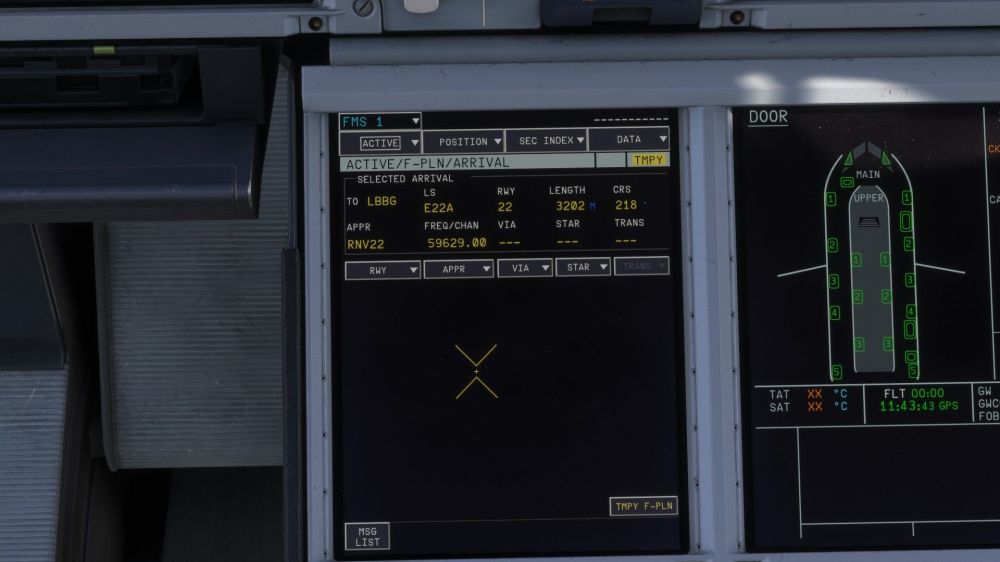
Hello, I was attempting to replicate the SBAS approach into LBBG onto runway 22 and noticed that the aircraft had resorted to FLS guidance rather than SLS. I have checked that I am using a Batch 7 fitted aircraft and set up the approach correctly. The approach shows up in the MCDU and with the correct EGNOS frequency Extract taken from https://safetyfirst.airbus.com/lets-use-xls/
-
Hello, I would like to see the implementation of the Autopilot TCAS system. The A350 has the feature equipped as standard and is a major part of the Airbus TCAS philosophy. This is also a feature I would love to see on the upcoming A380 as it has the same system.
-
-
Hello, I have an issue with the AP always causing the plane to roll rightwards regardless of the horizontal guidance mode selected. I am sure that the INS system is correctly set up as the distances/ times between way points decrease as the plane flies. I have both INS/Radio switches set to INS. The plane exhibits the same behaviour in Heading mode as well. I have tried flying with just 1 INS aligned and with all 3 aligned but still get the same issue. I have tried different variants/ liveries. 2026-04-07 18-47-12.mp4


