




Rodolfo Becerra Vargas
Member
-
Joined
-
Last visited
-
No, I gave up... it seems to me to be a visual only bug
-
Aircraft: A350-900 Default Cabin (JA01XJ) v1.2.6 Simulator: FS2024 SU5.1 Navdata Method: Sim Default OFP: I wasn't able to powerup the aircraft. WASM Error: Orange screen in the autopilot module... the only thing displaying something for some reason since the aircraft was cold and dark Specs: Ryzen 5 7500F, 32 GB of RAM at 6000 MT/s, 1TB of Samsung 990 Pro, Radeon RX 9070 16GB of VRAM. (System has operated without issues before and framerate is around 50 FPS in 4k medium-high settings with aircraft) Autosave file: Unavailable from the flight I just loaded, attaching the last ones I had that occurred a few days ago. Observation I had a WASM crash while just loading the aircraft in RJFF gate six using the SamScene3D airport. This is an airport I constantly fly, so I think is unrelated. What I think is related and maybe how the WASM may had been affected is that the previous flight I had swapped to a secondary flight plan to divert to RKPK (Gimhae) due to weather and failed landing attempt at RJFF (Fukuoka). A few minutes later after landing in the alternate (RKPK), I created a new flight plan to the original destination (RJFF) and proceeded as normal. Another thing to note, before this flight, the aircraft had already handled 3 flight plans (2 short legs of 1-2 hours around Japan and 1 long leg of 7.5 hours from Heathrow to Toronto Pearson). The aircraft never presented any symptoms of the WASM deteriorating (as I have experienced other times). Next Steps. Maybe replicate a flight like this to see if that deteriorates the WASM enough to have a crash after a session like this. Below I am attaching the RJTT to RJFF initial planned route and then the one I did to return to RJFF after landing at my alternate from Simbrief and from the flight plan folder of the WASM module of the aircraft. Load the flight plan from RJTT to RJFF as normal. Create the engine out procedure out of RJTT in 1st secondary flight plan. Create the alternate in the 2nd secondary flight plan. Make the flight from RJTT to RJFF as planned until you reach 3000 ft approaching Runway 34R of RJFF. Go around up to 4000 ft 2 minutes after initiating the go around phase, review the secondary flight plans Initially almost swap the current flight plan for the 1st secondary flight plan. Cancel the action. Choose correctly the 2nd secondary flight plan that has the alternate route. Deviate and land at RKPK. Wait around 30 minutes (the time I waited for RJFF weather to be nice). Load the flight plan from RKPK to RJFF Fly it normally and land in RJFF runway 34R. My apologies for not recording the Debug menu... I forgot and now I can't really prove it. Additional Information A few things I want to note on what addons I have: FlyTampa CYYZ SamScene3D RJFF Drzewiecki Design EPRA IniBuilds KMKE ACO Design ROAH I do not have any other airplane or anything else that interfaces with the WASM besides what the default sim has. 1783312043.bin RJTTRJFF_PDF_1783297068.f14cad5e.pdf RKPKRJFF_PDF_1783307661.a4cc3e9c.pdf RJTTRJFF_INA_1783297068.fpl RKPKRJFF_INA_1783307661.fpl
.thumb.png.bd96c050b53a3bcf95b5264d102153ff.png)
.thumb.png.7d4a1d40d594b97d509efd7165ad92b5.png)
-
Yeah... good luck solving your issue
-
@C. Schaffhausen Thank you, I have tried clearing the WASM folder multiple times and even a clean install of Windows very recently (24th of March, 2026), it hasn't worked. About the package reorder tool, I don't use the package reorder tool for any of my addons, including the A350, I allow the respective installer to put everything in my Community folder as it defaults on most installers. Also, before the issue and during the issue, I have never had a Navigraph subscription or any Navigraph software besides Simbrief. When the issue began I uninstalled Simbrief and any software that interacted with MSFS (except the installers) and still the issue has not gone away. And in my new clean install of Windows, I do not have any other software besides the installers that interact with MSFS. The addons I have install besides the Inibuilds A350 (From iniManager), are: Aerosoft Paderborn Airport (From MSFS Marketplace) Drzewicki Design Radom (From MSFS Marketplace) Everything included in my Microsoft Flight Simulator license and additional free Asobo and Microsoft Aircrafts, Missions and World updates (except the Dune and Halo aircraft) FlybyWire A32NX (From the FlybyWire Installer) 4 flightsim.to airports Microsoft ATR Inibuilds Milwakee (From the iniManager) I have tried the ini A350 with all of these addons not installed right after my clean installation of Windows and the issue is present no matter at what airport I spawn the A350.
-
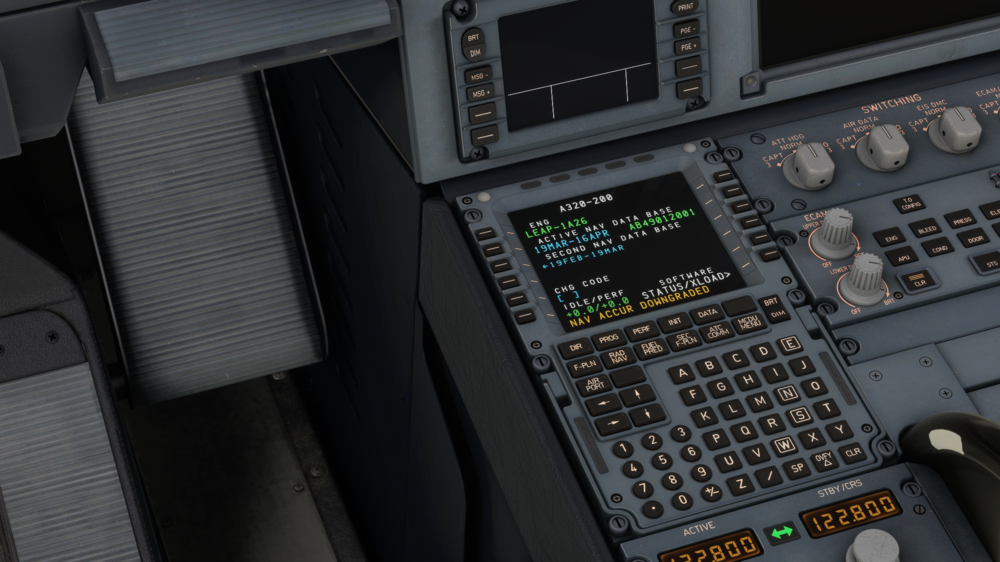
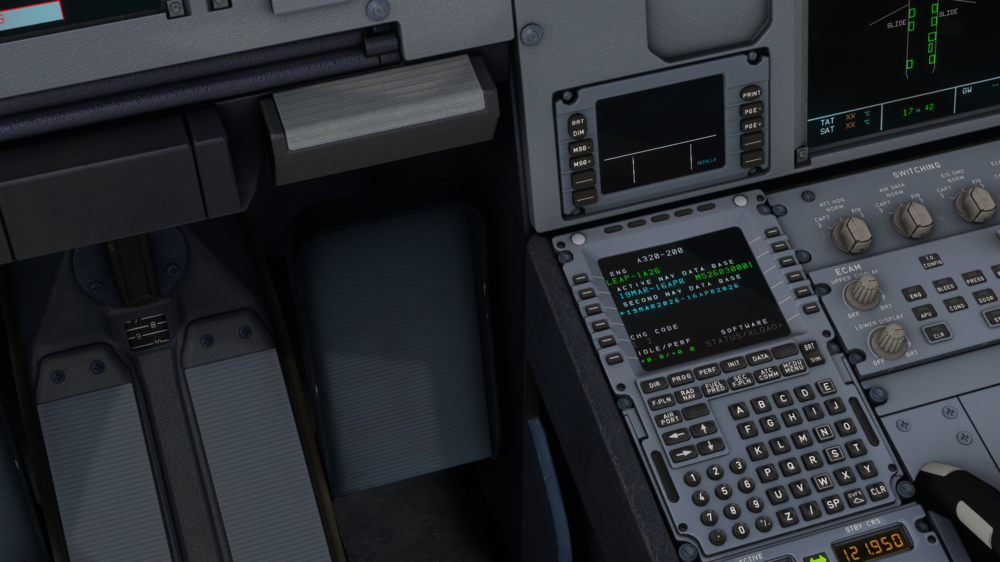
The remaining photos, confirming the default MSFS is current and different to what the ini A350 is using
-
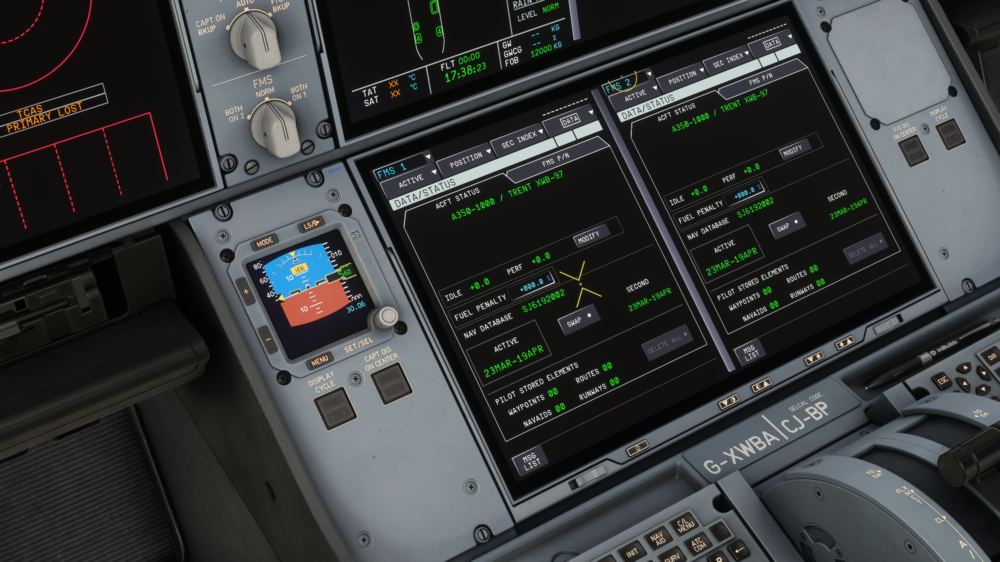
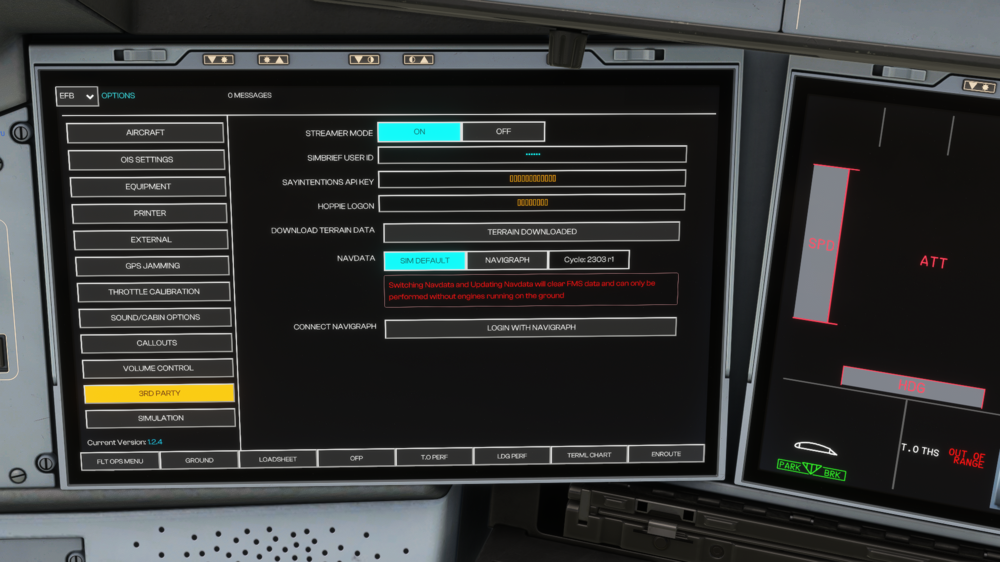
As the title says, I am unable to use the "Sim Default" Nav Data or at least confirm I am using it. On the OIS I have the "Sim Default" Nav Data selected, and on the FMS is saying I am using SJ6192002 which is ARINC 2303 revision 1. I can confirm this because on my WASM file fo NAVDATA and OIS part of settings at 3RD party says "Cycle:2303R1". This was not the case a couple of months ago, and it isn't on other planes (Default MSFS 2020 A320 neo v2 and Flybywire A32NX). I have cleared my WASM folder multiple times (in fact, 3 times just today), and nothing has resolved this issue. This error begun when I wanted to see what would happened if I switched the Nav Data from "Sim Default" to Navigraph, as I was thinking of buying a Navigraph subscription. Ever since then this issue has not disappeared. I have even re-install Windows 11 from scratch 2 weeks ago, nothing has fixed the issue. I need your help in the following way: 1. I need to know if this is a visual bug or a bug that is preventing me from using the default msfs 2020 Nav Data. 2. I wish to know how to fix it. Below I am attaching: 1. A screenshot of how the problem is looking (A350 FMS and OIS 3RD Party section selected) 2. My WASM folder through a link to my Google Drive (https://drive.google.com/file/d/1FgFJZd7fqgmlQ0X6dgqWOyYdmaDsi-TK/view?usp=sharing) On the following post: 3. A screenshot of the MCDU of the default a320 neo v2 MCDU confirming ARINC 2603 is current in my sim 4. A screenshot of the MCDU of the FlyByWire A32NX MCDU confirming the default sim ARINC is the one provided by Microsoft and it is ARINC 2603
.png.5250a4af61f4ac6b5a6641a3f338c376.png)
.png.a9f6cf27c9ec2a48e2fbe3a703b6b260.png)


