



Skip to content
View in the app

A better way to browse. Learn more.

iniBuilds Forum

A full-screen app on your home screen with push notifications, badges and more.

To install this app on iOS and iPadOS
  1. Tap the Share icon in Safari
  2. Scroll the menu and tap Add to Home Screen.
  3. Tap Add in the top-right corner.
To install this app on Android
  1. Tap the 3-dot menu (⋮) in the top-right corner of the browser.
  2. Tap Add to Home screen or Install app.
  3. Confirm by tapping Install.

19Frost79

Member
  • Joined

  • Last visited

  1. 19Frost79 changed their profile photo
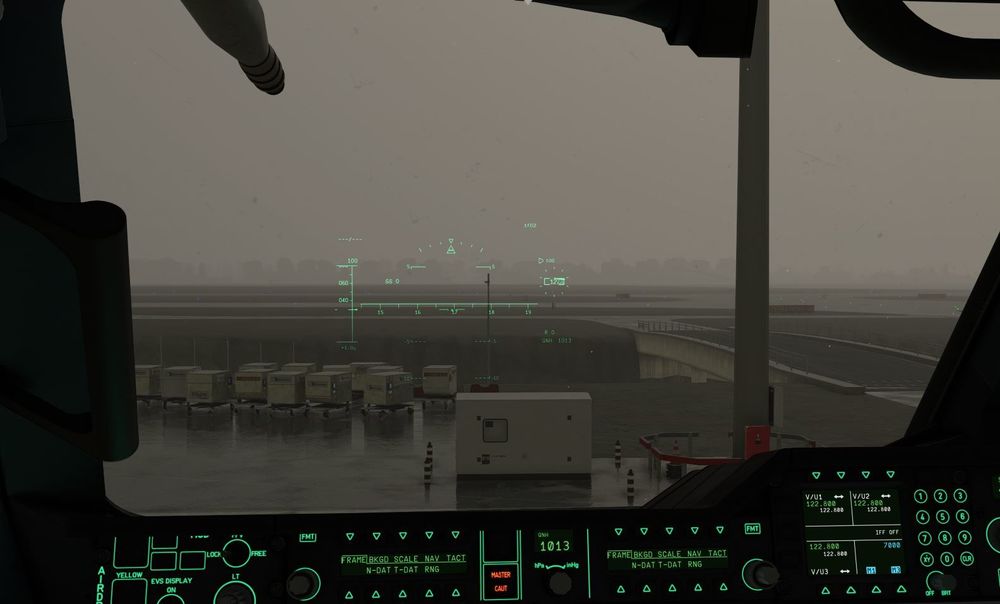
  2. Hallo inibuilds-team, i'm extremely happy, that you(or Microsoft, or however) decided to make the A400M available for MSFS 2020 customers. I love turboprops big and small and this aircraft is one of the most magnificent representatives of its kind. I have only one problem with it, or rather with a bug it has. Namely with the HUD, which is basically on from the moment you switch the ground power on and regardless if the combiner is in the lowered position, or stowed. It just sits there, projected onto the windshield. Is there something I could do in the settings in order to change that, or is this something that has to be fixed via a patch? And if so, will the A400M in MSFS 2020 receive any patches in the future? Best regards Thomas
Account

Navigation

Configure browser push notifications

Chrome (Android)
  1. Tap the lock icon next to the address bar.
  2. Tap Permissions → Notifications.
  3. Adjust your preference.
Chrome (Desktop)
  1. Click the padlock icon in the address bar.
  2. Select Site settings.
  3. Find Notifications and adjust your preference.