





Francesco Genti
Member
-
Joined
-
Last visited
Everything posted by Francesco Genti
-
Hi Kyle. Understood, but, as the A21N is an inibuilds marked plane, can’t you at least put some pressure on asobo so that they treat this plane in a decent way? Can you report them the issues and the need to fix them? This would be very helpful. We simmers have been trying to do so on the official forum but after months and various sim updates nothing has been touched. I’m sure that if you directly contact them they’ll listen. Can you please tell the team to do so? Please. It’s an amazing modern plane. We cannot absolutely enjoy it enough right now. Thanks Francesco
-
-
Sorry but, this means you’re not working yet on sending new liveries to Microsoft??? We were told by inibuilds itself that more liveries would have probably come. And a “liveries request list” was opened. Can we expect more liveries with the V2? The lack of liveries is an absolute SCANDAL!!!!
-
Dear iniBuilds Team, I am writing to express some concerns regarding the performance of the Airbus A321neo (A21N) on Xbox Series X in Microsoft Flight Simulator 2024. While the A320neo V2 and the A330-900 run flawlessly and feel incredibly stable on the Xbox platform, the A321neo currently suffers from two major issues that deeply impact the simulation experience: Payload and Fuel Sync Bug: When importing operational flight plans via SimBrief on the EFB, the values are correctly read by the system, but the actual fuel and weight are not applied to the aircraft, forcing Xbox users to rely on immersion-breaking manual workarounds via the MSFS weight menu. Flight Model & Over-sensitivity to Turbulence: The aircraft feels disproportionately nervous and unstable during manual flight. Even with low turbulence settings, it suffers from severe wing rocking and excessive sensitivity to wind/CFD forces compared to the other default Airbus aircraft in MSFS 2024. Since this aircraft is highly anticipated and loved by the community, could you please provide a valid, concrete update on whether a definitive fix is actively being worked on for the Xbox platform, and what the expected timeline for these core system updates might be? Thank you for your time and for your continuous hard work. Best regards, Francesco
-
Hello ini team, I’m writing this ticket hoping to get some kind of new response from you guys, and not the usual “we don’t know”. I understand this has been asked a lot but please it’s serious. The amazing A350 loses 50% of its potential and beauty without the MANY and IMPORTANT (ESSENTIAL) liveries that are NOT present via marketplace. It is not acceptable that we still not have ITA, EDELWEISS, SWISS, some of the most amazing world special liveries, the new KLM PH-ZNA, and so on. Please add them with the V2 update and if you can reply to this ticket with some infos about it. Me, like many others, have not bought the aircraft due to the lack of liveries.
-
Thank you so much !! Now everything works !! Thanks guys
-
Hello iniBuilds team! Some time ago, when I was completely new to Discord, I accidentally sent a message in the #dont-use channel, without realising that doing so would result in a soft ban. Since then, I’ve only been able to see the #welcome and #dont-use channels, with no access to the rest of the server. I believe my account may have been automatically restricted because of that accidental message. My Discord username is jokerrwise_24095. I sincerely apologise for the mistake. I’m an active MSFS 2024 player on Xbox Series X and would really appreciate it if a moderator could review my account and restore my access. Thank you very much for your help!
-
-
Is V2 gonna come out within the next month or so? More or less?
- 7 replies
-
- a350
- liveries
- livery
- marketplace
-
Tagged with:
-
Hi iniBuilds team, I wanted to ask if there are any updates regarding additional A350 livery packs for Xbox/Marketplace users. I know this has been requested quite a lot already, and I saw previous replies from the team mentioning that requests for additional A350 liveries had been passed on internally and that a list of requested liveries had been created. Since some time has passed, I was wondering if there is now any news about whether we might eventually see new A350 livery packs released on the Marketplace. There are still quite a few major operators missing, such as ITA Airways, as well as newer and special liveries that would be great to have, for example SWISS and the SWISS Wanderlust A350, the Lufthansa 100 Years liveries, JAL’s A350-1000, and others. For Xbox users this is particularly important because we don’t have access to the same third-party livery options available on PC, so additional official iniBuilds packs would really expand the possibilities with the A350. Are there currently any plans to release new A350 livery packs on the Marketplace, even if there isn’t an ETA yet? Thanks!
- 7 replies
-
- a350
- liveries
- livery
- marketplace
-
Tagged with:
-
Hello! Thanks for the reply! Do you have any sort of idea of when things are likely to be solved, also considering the fact that the two beta patches released after SU5 have been absolutely terrible? It feels it’s something that should improve really really soon, because it’s affecting the whole sim, most of simmers and 3d part add ons. But things don’t look so promising right now.
-
Hello, I would like to ask whether iniBuilds is currently aware of the significant stability and performance issues that many Xbox Series X users have been experiencing since Sim Update 5. In my case, the impact has been particularly noticeable on iniBuilds aircraft, including the A320neo and A330 family. Since SU5, I have experienced: Increased stuttering, especially during approach, landing and taxi. Occasional black screens and display failures. Memory-related warnings after arrival. General performance degradation compared to previous simulator versions. Reduced confidence when operating longer flights due to concerns about stability. What makes the situation confusing is that some other complex aircraft appear to be less affected, which makes me wonder whether there are specific interactions between the simulator changes introduced in SU5 and the iniBuilds aircraft systems. My questions are: Is iniBuilds aware of these issues? Have you been in contact with Asobo regarding the problems introduced after SU5? Have any root causes already been identified? Are there any planned updates, workarounds, or optimizations currently being worked on? Do you believe the majority of these issues need to be resolved by Asobo, or is there anything that can be addressed from the aircraft side? I understand that some of these problems may originate from the simulator itself, but many Xbox users would appreciate any information regarding the current status of the investigation and any cooperation between iniBuilds and Asobo. Thank you for your time.
-
Hello Platform: Xbox Series X Aircraft: iniBuilds A330 variants Simulator: MSFS 2024 I’ve been trying to use the Aerotone add-on by SoFly, specifically the ATC Chatter feature. The strange thing is that ATC Chatter works correctly in other aircraft, including the iniBuilds A320neo and A321neo, but it does not work in any A330 variant I have tested. What makes me wonder if this might be related to the A330 itself is that the radio behaviour seems different from other aircraft. Things I have tested: Autoplay ON and OFF. COM frequencies changed manually. UNICOM 122.800. Multiple airports. Multiple flights. Offline mode. Multiplayer OFF. Traffic OFF. Simulator restarts. Aerotone profile resets. In the A330, whenever I try to use frequencies required by Aerotone, they often revert automatically to another frequency, and ATC Chatter never plays. The rest of Aerotone works normally (cockpit sounds, cabin ambience, pilots, etc.), and ATC Chatter works in other aircraft. Could there be an issue with the way COM radios or frequency handling are implemented in the A330 that prevents third-party audio systems from detecting the active frequency correctly? Has anyone else experienced similar behaviour with Aerotone or other radio-dependent add-ons on the A330? Any help would be appreciated.
-
Can we expect it to be solved anytime soon? It’s a major issue guys
-
Thanks! Also other simmers are facing the same issue: https://forums.flightsimulator.com/t/a321lr-fuel-load-in-efb-does-not-equal-fob/749981/8 ! Some had this problem even before SU5. I personally started encountering it after SU5, even on beta. A20N & A330 are fine.
-
Thanks!
-
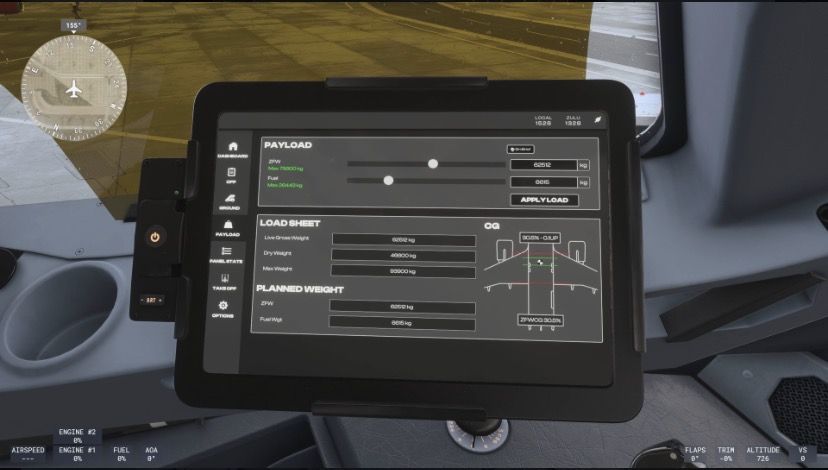
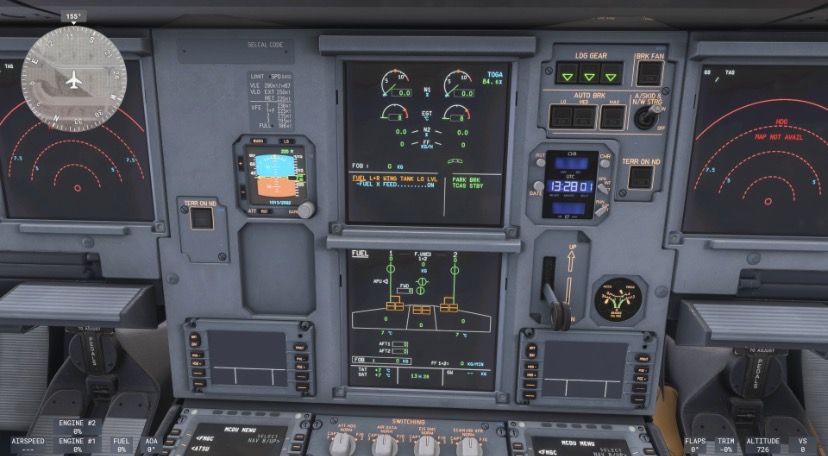
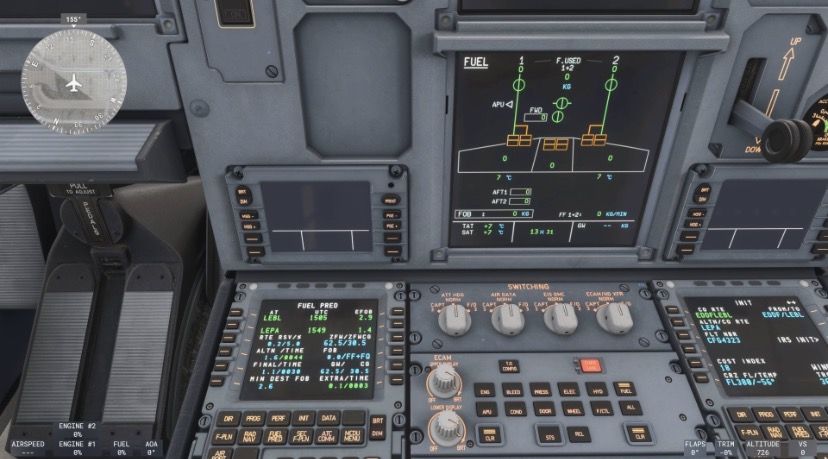
Hi Ini team, I would like to report a bug affecting the iniBuilds A321neo on Xbox Series X after Sim Update 5, including the current SU5 beta/hotfix. When importing payload/fuel through the iniBuilds EFB using SimBrief data, the values appear correctly inside the MCDU: BLOCK fuel, FOB predictions, ZFW/ZFWCG, etc. However, the aircraft itself does not actually receive the fuel. On the ECAM FUEL page: all tanks remain at 0 FOB stays at 0 KG fuel flow remains at 0 fuel warnings appear as if the aircraft is empty At the same time, the MCDU clearly shows the imported fuel values and calculations correctly. Important details: this happens only with the iniBuilds A321neo the iniBuilds A320neo works correctly the iniBuilds A330 works correctly if fuel is set manually through the default MSFS tablet/interface, it applies correctly to the aircraft the issue seems specifically related to the EFB → SimBrief → aircraft fuel synchronization process after SU5 Platform: Xbox Series X Version: Sim Update 5 current SU5 beta/hotfix I attached screenshots showing: EFB payload/fuel correctly loaded MCDU fuel predictions correctly calculated ECAM fuel page still showing 0 fuel everywhere Thank you very much for your work and support.
-
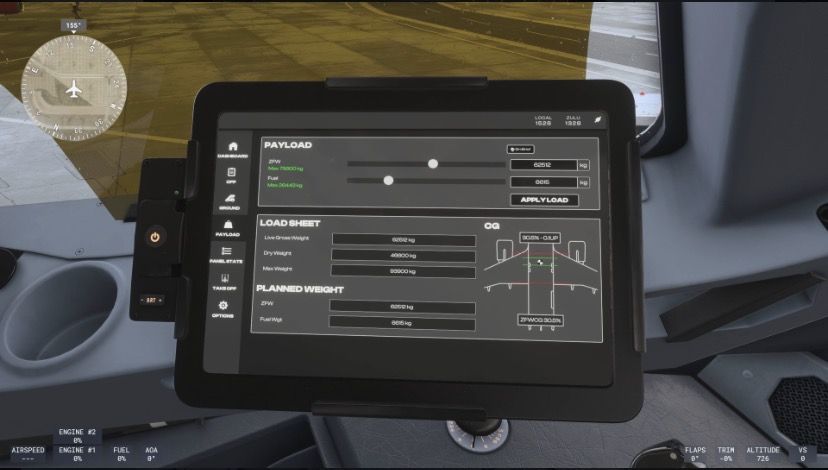
Hi Ini team, I would like to report a bug affecting the A321neo on Xbox Series X after Sim Update 5, including the current SU5 beta/hotfix. When importing payload/fuel through the iniBuilds EFB using SimBrief data, the values appear correctly inside the MCDU: BLOCK fuel, FOB predictions, ZFW/ZFWCG, etc. However, the aircraft itself does not actually receive the fuel. On the ECAM FUEL page: all tanks remain at 0 FOB stays at 0 KG fuel flow remains at 0 fuel warnings appear as if the aircraft is empty At the same time, the MCDU clearly shows the imported fuel values and calculations correctly. Important details: this happens only with the iniBuilds A321neo the iniBuilds A320neo works correctly the iniBuilds A330 works correctly if fuel is set manually through the default MSFS tablet/interface, it applies correctly to the aircraft the issue seems specifically related to the EFB → SimBrief → aircraft fuel synchronization process after SU5 Platform: Xbox Series X Version: Sim Update 5 current SU5 beta/hotfix I attached screenshots showing: EFB payload/fuel correctly loaded MCDU fuel predictions correctly calculated ECAM fuel page still showing 0 fuel everywhere Thank you very much for your work and support.
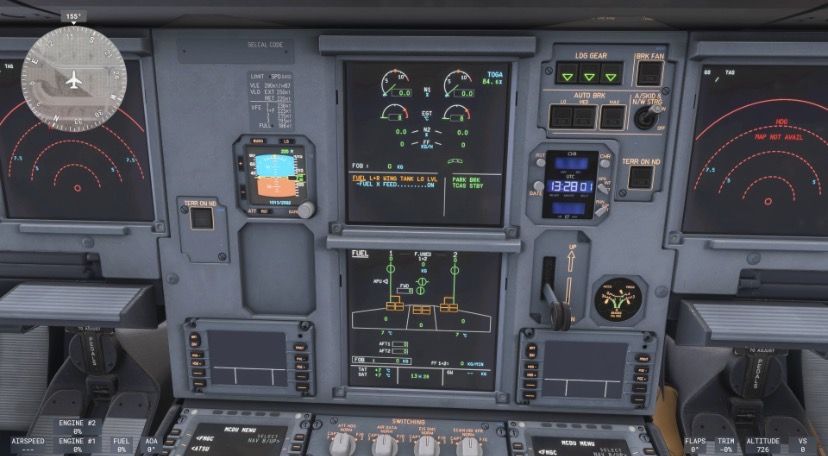
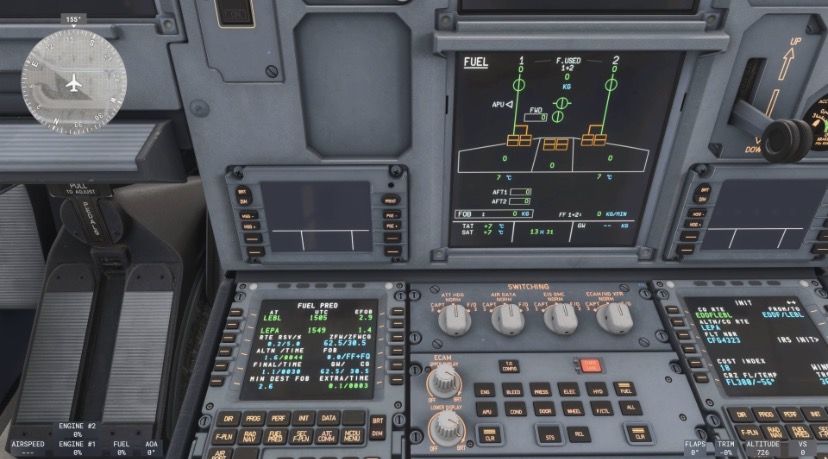
-
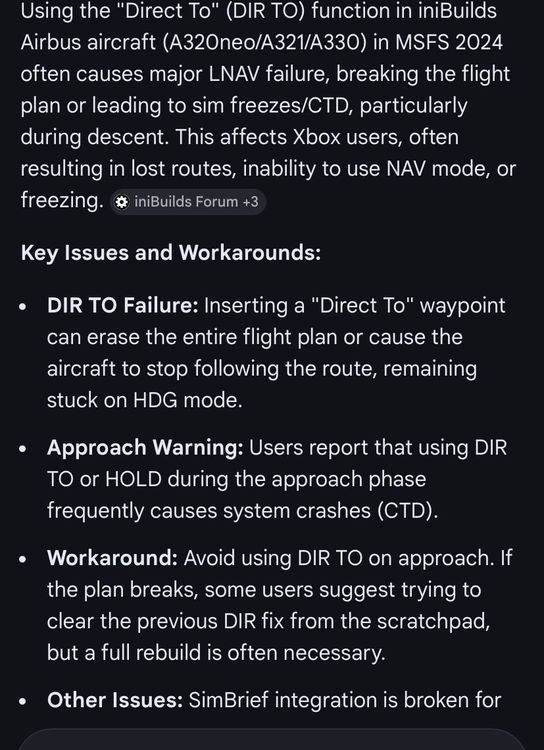
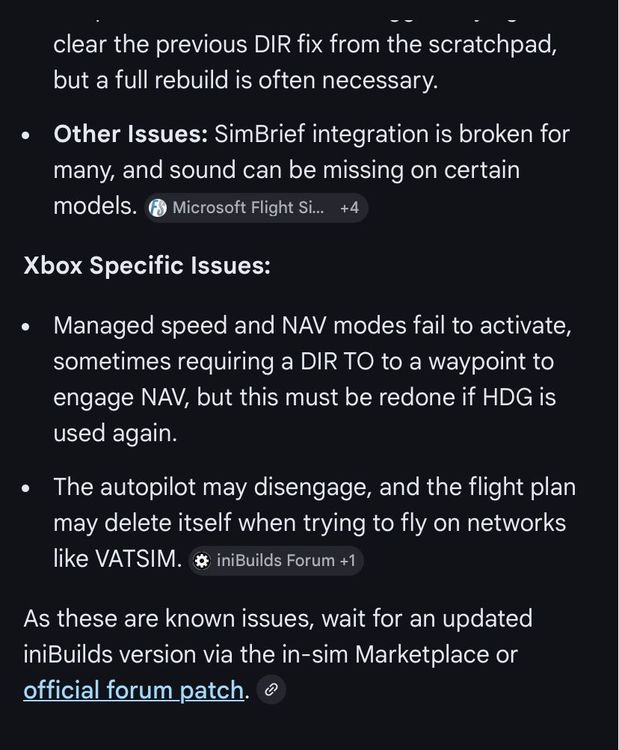
Then it’s really so weird. I’m absolutely not on vatsim and I experience exactly the same issue is described on the pics I attached in the previous post. Could it be related to a bug inside the simulator itself, which affects inibuilds aircraft’s?! I really do not know how to solve this issue. On the 2020 version I had no problem with ini A320neo V2. On the 2024 with both the A320neo and A21neo it’s all messed up when I have to use DIR TO and so on. Again, exactly what is described in the pics I sent previously. I’m really concerned because I love Airbus and I love ini aircraft’s.
-
Nope. It’s a known issue since the sim has been released…
-
Hello, I am flying on Xbox Series X using MSFS 2024 with the iniBuilds Airbus aircraft (A320neo / A321neo), and I would like to report a recurring audio issue. During flights, especially when switching between camera views (cockpit ↔ external), the sound can suddenly change or break: Cockpit engine sound becomes extremely quiet or almost disappears External engine sound volume drops significantly Sounds related to switches (e.g. seatbelt sign, cockpit interactions) are also affected It feels as if the overall audio mix is suddenly reduced or “muted” This issue can happen randomly and affects the whole aircraft audio environment until the flight is restarted. It seems to be triggered mainly by: switching camera views or general camera transitions during flight This makes the experience quite inconsistent and unrealistic, especially on longer flights. I would like to ask if this issue is already known and whether a fix is planned. Thank you for your support. Best regards, Francesco
-
Hello, I am flying on Xbox Series X using MSFS 2024 and the iniBuilds Airbus family (A320neo and A321neo), and I would like to report some major issues that are consistently affecting my flights. The main problems are: Using DIR TO often breaks the flight plan completely. The route may still appear correctly on the navigation display, but the aircraft no longer follows it. LNAV/NAV mode becomes unreliable after certain inputs. Even when NAV is shown as active, the aircraft does not properly follow the programmed route. After using HDG mode, switching back to NAV often does not work correctly. The aircraft may remain in a sort of “stuck” behavior despite indicating NAV on the PFD. Once these issues occur, the flight is usually no longer recoverable without rebuilding the route or restarting the flight. These problems are quite critical and seem to affect normal Airbus operations (especially DIR TO and mode management). I wanted to ask if these issues are already known and if a fix is planned in upcoming updates. Thank you for your work and support. Best regards, Francesco


