



Skip to content
View in the app

A better way to browse. Learn more.

iniBuilds Forum

A full-screen app on your home screen with push notifications, badges and more.

To install this app on iOS and iPadOS
  1. Tap the Share icon in Safari
  2. Scroll the menu and tap Add to Home Screen.
  3. Tap Add in the top-right corner.
To install this app on Android
  1. Tap the 3-dot menu (⋮) in the top-right corner of the browser.
  2. Tap Add to Home screen or Install app.
  3. Confirm by tapping Install.

Shaman3110

Member
  • Joined

  • Last visited

  1. Shaman3110 replied to Shaman3110's topic in Systems
    I am using A350 via iniMenager on PC
  2. Shaman3110 posted a topic in Systems
    Hello there I was wandering about the CPDLC D-ATIS from beyond atc when i request it it just stays as requested and nothing happens is this an issue on my end or was that feature just not yet implemente. Best regards
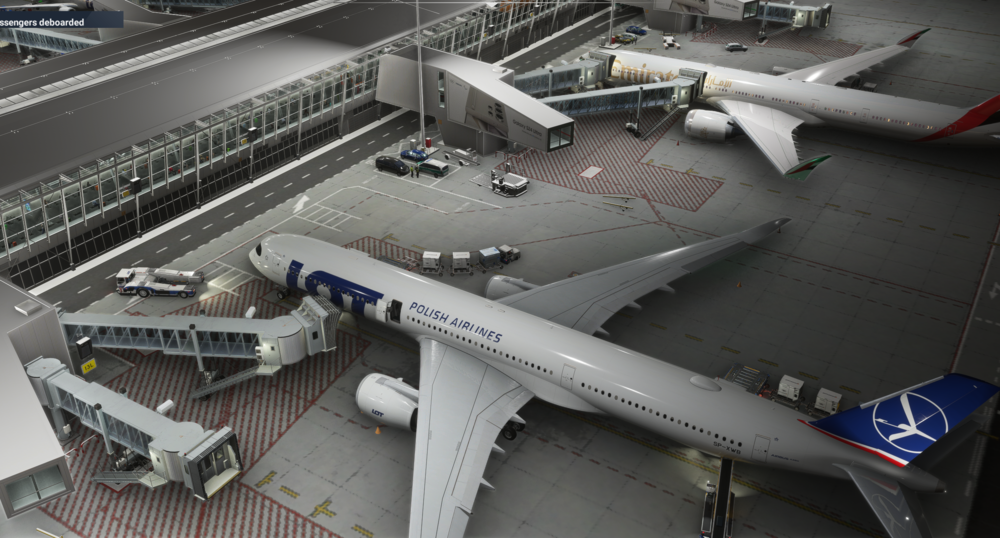
  3. Hi there. I have no idea how many people before me wrote about this however this is an issue that only started occuring recentyly and it realy hurts the eyes. Used to jetways always went for the closest door with L2 preference meaninig if it had range to both it chose L2. However recently no matter what jetway tries to connect to L2 eaven though it has no range. For example on the img (EPWA with a scenery) below the jetway was clearly closer to L1 but it still tryed to get to L2 i tried to fix it via GSX to no effect. This behaviour is observabel on any airport.
Account

Navigation

Configure browser push notifications

Chrome (Android)
  1. Tap the lock icon next to the address bar.
  2. Tap Permissions → Notifications.
  3. Adjust your preference.
Chrome (Desktop)
  1. Click the padlock icon in the address bar.
  2. Select Site settings.
  3. Find Notifications and adjust your preference.