



Skip to content
View in the app

A better way to browse. Learn more.

iniBuilds Forum

A full-screen app on your home screen with push notifications, badges and more.

To install this app on iOS and iPadOS
  1. Tap the Share icon in Safari
  2. Scroll the menu and tap Add to Home Screen.
  3. Tap Add in the top-right corner.
To install this app on Android
  1. Tap the 3-dot menu (⋮) in the top-right corner of the browser.
  2. Tap Add to Home screen or Install app.
  3. Confirm by tapping Install.

EmmetNemesis

Member
  • Joined

  • Last visited

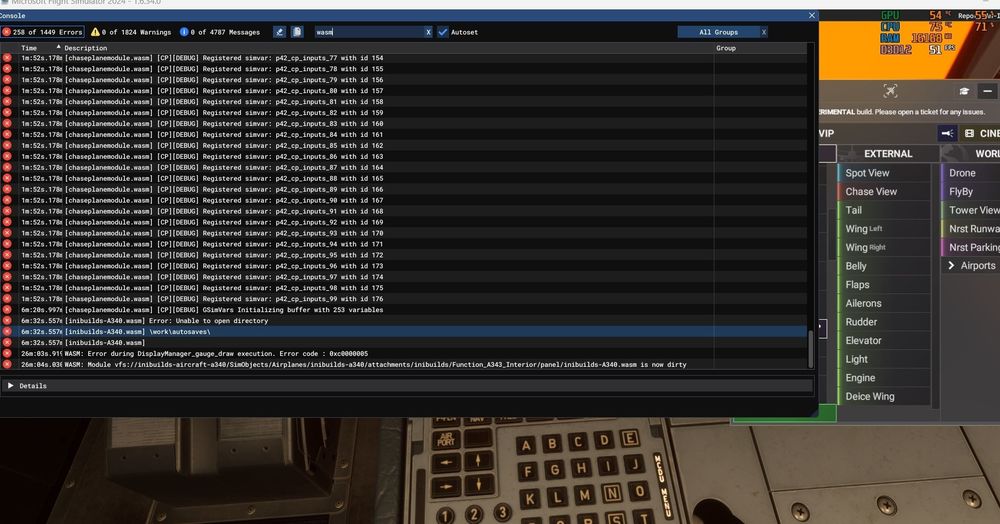
  1. Tried twice to fly using this flight plan, both times same thing happened screens all went red with WASM error. Aircraft: A340-300 Simulator: FS2024 Navdata Method: NAVIGRAPH OFP: EDDFKBOS Flightplan attached WASM Error: [inibuilds-A340.wasm] Error: Unable to open directory [inibuilds-A340.wasm] \work\autosaves\ [inibuilds-A340.wasm] WASM: Error during DisplayManager_gauge_draw execution. Error code : 0xc0000005 WASM: Module vfs://inibuilds-aircraft-a340/SimObjects/Airplanes/inibuilds-a340/attachments/inibuilds/Function_A343_Interior/panel/inibuilds-A340.wasm is now dirty Specs: i5-8400, Intel Arc B570, 32 GB DDR4 Autosave File: No Autosave folder available, was still sitting on the ground when error occurred and was my first flight in it. EDDFKBOS_PDF_1768593086.pdf
Account

Navigation

Configure browser push notifications

Chrome (Android)
  1. Tap the lock icon next to the address bar.
  2. Tap Permissions → Notifications.
  3. Adjust your preference.
Chrome (Desktop)
  1. Click the padlock icon in the address bar.
  2. Select Site settings.
  3. Find Notifications and adjust your preference.