




wertyu1234
Member
-
Joined
-
Last visited
-
Bought the A380 today and have been trying to fly from Heathrow (Inibuilds scenery). Spent all morning trying to get the jetways to move. Tried everything: multijetway tool, GSX jetway operation, EFB jetway operation, changing stands, etc. Reinstalled everything I could think of at least once. Stand 563 for most of the testing, if anyone cares. Ini A359 has no issues at the same stand. Jetways move as expected. So seems to be something with A380. Help! :)
-
Just a heads up to all following this thread including @iniSteven and @IniJamir, transferring to the IniManager version did solve the problem. Beautiful!
-
Hi @iniSteven and @IniJamir. I'd really like to get this resolved since I paid good money for this scenery and it is the ONLY scenery out of dozens that I have purchased to have this problem. Many of those sceneries are from Inibuilds. Is it possible this is related to the Marketplace version since I purchased through the Marketplace? If so, could you potentially provide me with a copy directly through Inibuilds? I have started making all of my purchases directly through you all at this point, but this was one of my very first scenery purchases a year or so ago. Thanks in advance.
-
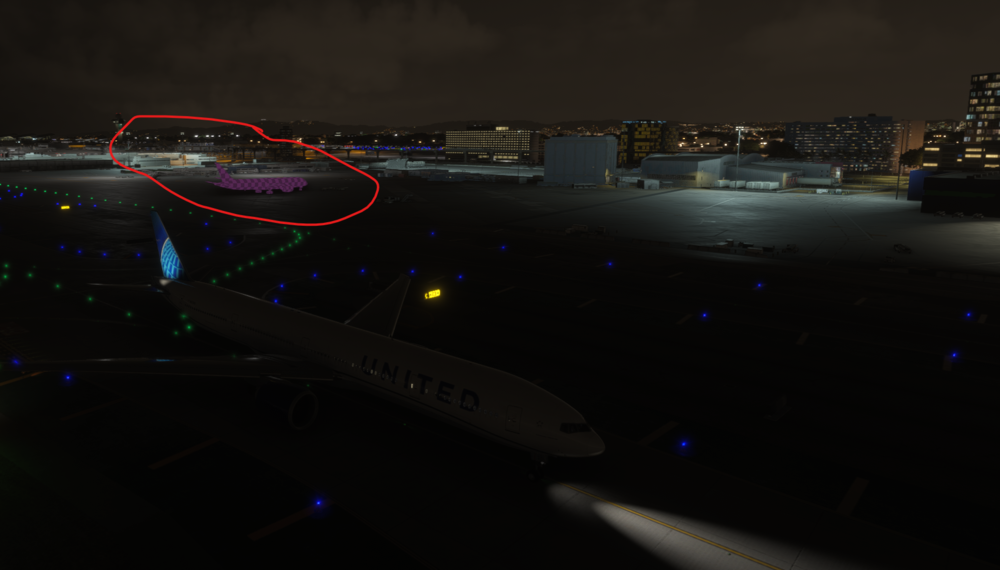
Any help? Here is a picture of what we're talking about.
-
Any updates @iniSteven?
-
PC
-
I bought your LAX scenery in 2020 marketplace, then when I switched to 2024, I paid the “upgrade fee” of $5 or something to get the 2024 marketplace version. I think OP did the same and we’re both getting these pink planes in 2024.
-
I have the exact same problem. Help appreciated.
