



Skip to content
View in the app

A better way to browse. Learn more.

iniBuilds Forum

A full-screen app on your home screen with push notifications, badges and more.

To install this app on iOS and iPadOS
  1. Tap the Share icon in Safari
  2. Scroll the menu and tap Add to Home Screen.
  3. Tap Add in the top-right corner.
To install this app on Android
  1. Tap the 3-dot menu (⋮) in the top-right corner of the browser.
  2. Tap Add to Home screen or Install app.
  3. Confirm by tapping Install.

thatsnutss

Member
  • Joined

  • Last visited

Everything posted by thatsnutss

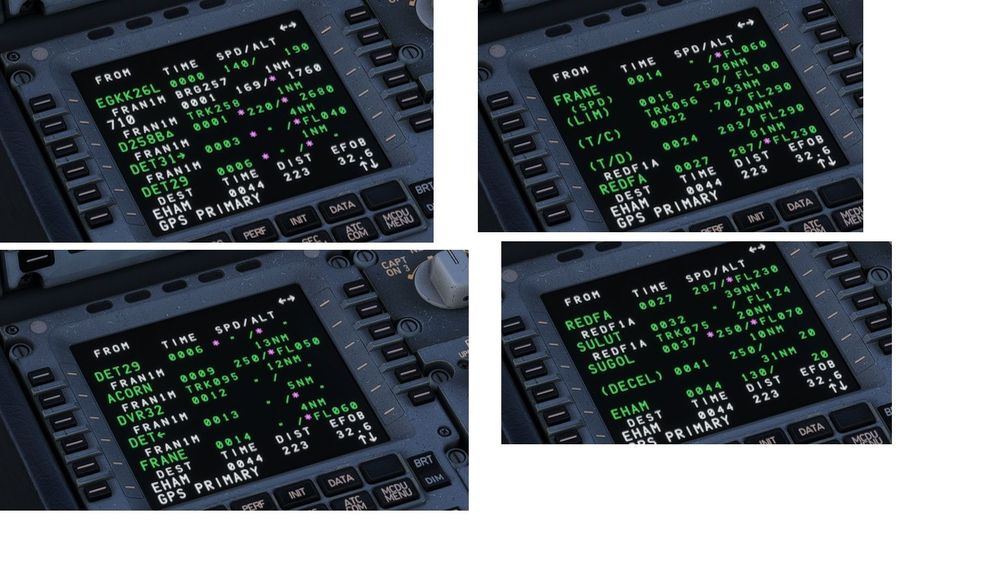
  1. Flight plan below: FRANE1M FRANE M604 GASBA M197 REDFA REDFA1A Imported to the MCDU, but contains no VOR's other than the SID and STAR. Missing M604, GASBA, M197 (see attached). I really love flying this aircraft and hope we get an a330-900 soon but this issue prevents me from flying on VATSIM as I would just be flying direct after the SID to the STAR which would be ideal, but ATC can't always support. Please let me know suggestions. Thank you Ryan
Account

Navigation

Configure browser push notifications

Chrome (Android)
  1. Tap the lock icon next to the address bar.
  2. Tap Permissions → Notifications.
  3. Adjust your preference.
Chrome (Desktop)
  1. Click the padlock icon in the address bar.
  2. Select Site settings.
  3. Find Notifications and adjust your preference.