



Skip to content
View in the app

A better way to browse. Learn more.

iniBuilds Forum

A full-screen app on your home screen with push notifications, badges and more.

To install this app on iOS and iPadOS
  1. Tap the Share icon in Safari
  2. Scroll the menu and tap Add to Home Screen.
  3. Tap Add in the top-right corner.
To install this app on Android
  1. Tap the 3-dot menu (⋮) in the top-right corner of the browser.
  2. Tap Add to Home screen or Install app.
  3. Confirm by tapping Install.

Max Holton

Member
  • Joined

  • Last visited

  1. Having the same issue, how do I change the cabin Alt
  2. Max Holton started following iniKyle
  3. Max Holton replied to LLg's topic in General Discussion
    That’s great to hear! I was told by someone on the Inibuilds team that it wouldn’t, Thankyou for the confirmation that it will
  4. On their store page for the A380 they don’t show the difference graph between Xbox and PC like they did they A350, so what I’m getting at is that the A380 on pc and Xbox are identical
  5. Regarding BTV on Xbox will we get ANF? And what fantastic news about the Cabin being on Xbox, cannot wait to to try out the A380
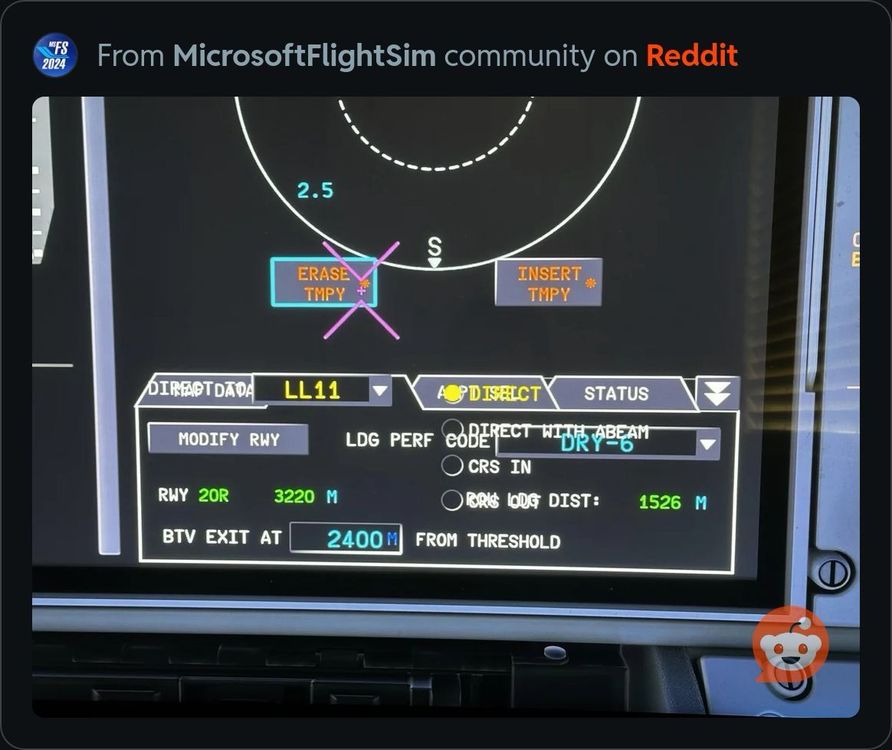
  6. I’m having a similar issue the ANF has the way point overlay when trying to enter my BTV
Account

Navigation

Configure browser push notifications

Chrome (Android)
  1. Tap the lock icon next to the address bar.
  2. Tap Permissions → Notifications.
  3. Adjust your preference.
Chrome (Desktop)
  1. Click the padlock icon in the address bar.
  2. Select Site settings.
  3. Find Notifications and adjust your preference.