Benutzer
Member
-
Joined
-
Last visited
Everything posted by Benutzer
-
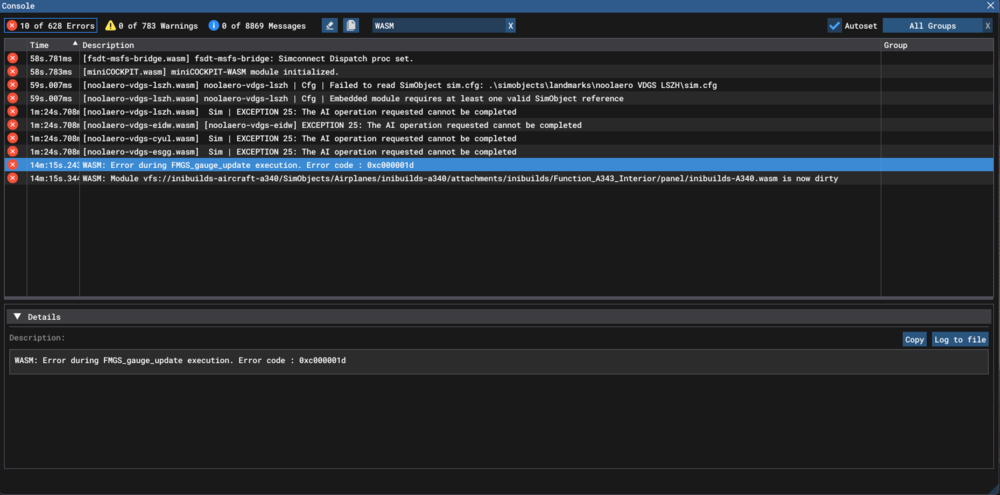
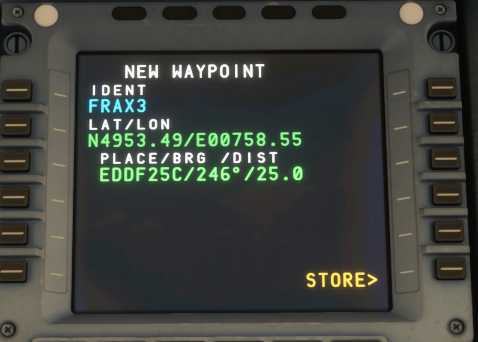
WASM: Error during FMGS_gauge_update execution. Error code : 0xc000001d I wanted to create a pilot waypoint for my EOSID on the secondary. So I typed in FRAX3 on the secondary which then popped up the "NEW WAYPOINT" page with "FRAX3" pre-entered for IDENT, then I entered "EDDF25C/246/25" into "PLACE/BRG /DIST" and it filled it, so far so good, but then when I tried to store it, by clicking "STORE>" I noticed that nothing happened anymore. Aircraft: A340 EIS 1 Passenger D-AIGU Simulator: FS2024 Navdata Method: NAVIGRAPH CYCLE: 2510 R2 OFP: EDDF/25C OBOK6N OBOKA Z29 TORNU DCT GALSO Q63 KOPUL DCT ENHAQ DCT GAJIT DCT BAPHU DCT ARKIL DCT SOMAX DCT 50N020W 49N030W 46N040W 44N050W DCT BOBTU DCT JAROM N54G KANNI DCT EURRO OOSHN5 KBOS/04R WASM Error: "WASM: Error during FMGS_gauge_update execution. Error code : 0xc000001d" Specs: AMD Ryzen 7 9800X3D, NVIDIA GeForce RTX™ 5070 Ti Autosave File: 1759918547.bin 1759918547.bin