



Skip to content
View in the app

A better way to browse. Learn more.

iniBuilds Forum

A full-screen app on your home screen with push notifications, badges and more.

To install this app on iOS and iPadOS
  1. Tap the Share icon in Safari
  2. Scroll the menu and tap Add to Home Screen.
  3. Tap Add in the top-right corner.
To install this app on Android
  1. Tap the 3-dot menu (⋮) in the top-right corner of the browser.
  2. Tap Add to Home screen or Install app.
  3. Confirm by tapping Install.

yourfastjetfix

Member
  • Joined

  • Last visited

Everything posted by yourfastjetfix

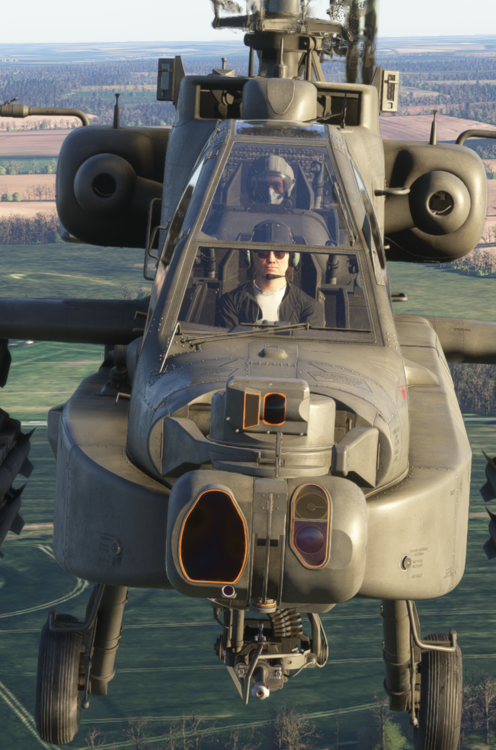
  1. Hey! in MSFS24 you have the ability to change pilots, there are no military options for the co pilot, can make screenshots a little bit.. yucky! As you can see, any chance of a default pilot with Apache gear on or the option to at least have it?
  2. Absolute shame, The actual aircraft model is great looks awesome.. but it flies awful, the systems within are either not working or work just about enough that it still doesn't work and is probably worse than it not working at all.. Please... Sort out the flight model Sort out the Autopilot and it's functions Sort out the sound package Make the afterburner look at least somewhat life like.. not just a blob stuck to the end of the engines.

Account

Navigation

Configure browser push notifications

Chrome (Android)
  1. Tap the lock icon next to the address bar.
  2. Tap Permissions → Notifications.
  3. Adjust your preference.
Chrome (Desktop)
  1. Click the padlock icon in the address bar.
  2. Select Site settings.
  3. Find Notifications and adjust your preference.