



Skip to content
View in the app

A better way to browse. Learn more.

iniBuilds Forum

A full-screen app on your home screen with push notifications, badges and more.

To install this app on iOS and iPadOS
  1. Tap the Share icon in Safari
  2. Scroll the menu and tap Add to Home Screen.
  3. Tap Add in the top-right corner.
To install this app on Android
  1. Tap the 3-dot menu (⋮) in the top-right corner of the browser.
  2. Tap Add to Home screen or Install app.
  3. Confirm by tapping Install.

Max Weight

Member
  • Joined

  • Last visited

Everything posted by Max Weight

  1. @davidboyd187 Great news, sorry its taken so long for you to get it sorted. Happy flying 🙂
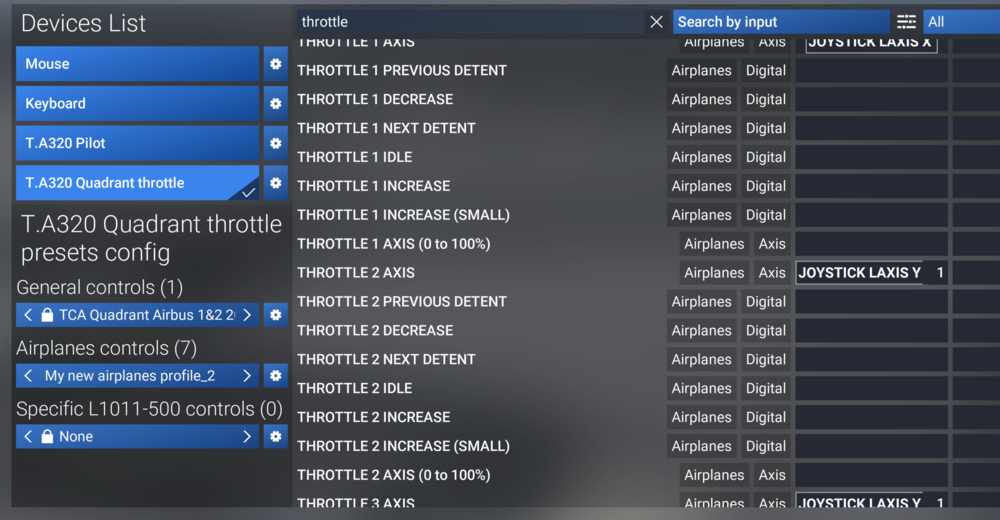
  2. @davidboyd187 The TCA throttle is a bit of a pain at times, I just tried mine and its working OK, do you have the same MSFS controller settings as the pic? You may need to fiddle the axis a little to avoid it detecting the airbus detents as a button, if it detects the throttle movement as a button just hit the delete button in the Throttle setting so it says scanning again and move the throttle again, took me a few attempts, as per the vid. Screen Recording 2026-04-17 210837.mp4
Account

Navigation

Configure browser push notifications

Chrome (Android)
  1. Tap the lock icon next to the address bar.
  2. Tap Permissions → Notifications.
  3. Adjust your preference.
Chrome (Desktop)
  1. Click the padlock icon in the address bar.
  2. Select Site settings.
  3. Find Notifications and adjust your preference.