Skip to content
View in the app

A better way to browse. Learn more.

iniBuilds Forum

A full-screen app on your home screen with push notifications, badges and more.

To install this app on iOS and iPadOS
  1. Tap the Share icon in Safari
  2. Scroll the menu and tap Add to Home Screen.
  3. Tap Add in the top-right corner.
To install this app on Android
  1. Tap the 3-dot menu (⋮) in the top-right corner of the browser.
  2. Tap Add to Home screen or Install app.
  3. Confirm by tapping Install.

Andrew M

Member
  • Joined

  • Last visited

Everything posted by Andrew M

  1. Andrew M posted a topic in Systems
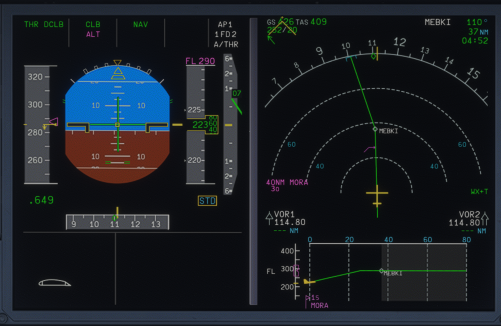
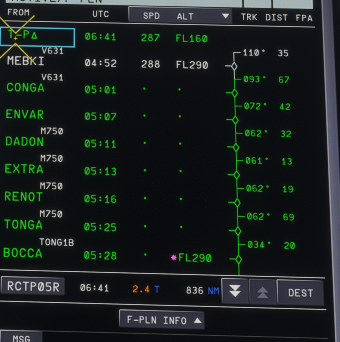
    Flying a HKG-TPE sector today I noticed an inconsistency with FM altitude constraints. A common constraint was input at BOCCA at FL290 however in the climb this constraint was also adhered to, which it should not have been. See attached images.
  2. Going to the SU4 beta is fine, but then inibuilds also announced they weren't going to provide any product fixes based on beta's, because it may not reflect the final version.
  3. Also happening to me. Bumping thread. How has inibuilds not replied to this yet?

Account

Navigation

Configure browser push notifications

Chrome (Android)
  1. Tap the lock icon next to the address bar.
  2. Tap Permissions → Notifications.
  3. Adjust your preference.
Chrome (Desktop)
  1. Click the padlock icon in the address bar.
  2. Select Site settings.
  3. Find Notifications and adjust your preference.