



Skip to content
View in the app

A better way to browse. Learn more.

iniBuilds Forum

A full-screen app on your home screen with push notifications, badges and more.

To install this app on iOS and iPadOS
  1. Tap the Share icon in Safari
  2. Scroll the menu and tap Add to Home Screen.
  3. Tap Add in the top-right corner.
To install this app on Android
  1. Tap the 3-dot menu (⋮) in the top-right corner of the browser.
  2. Tap Add to Home screen or Install app.
  3. Confirm by tapping Install.

Crosswind

Member
  • Joined

  • Last visited

  1. You may reset MSFS controls setting to default, espacial keyboard setting
  2. Are polar routes ever gonna be fixed on msfs2024? Weird stuff happens on the simulator when you are crossing the North Pole, with the entire scenery circling around the plane.
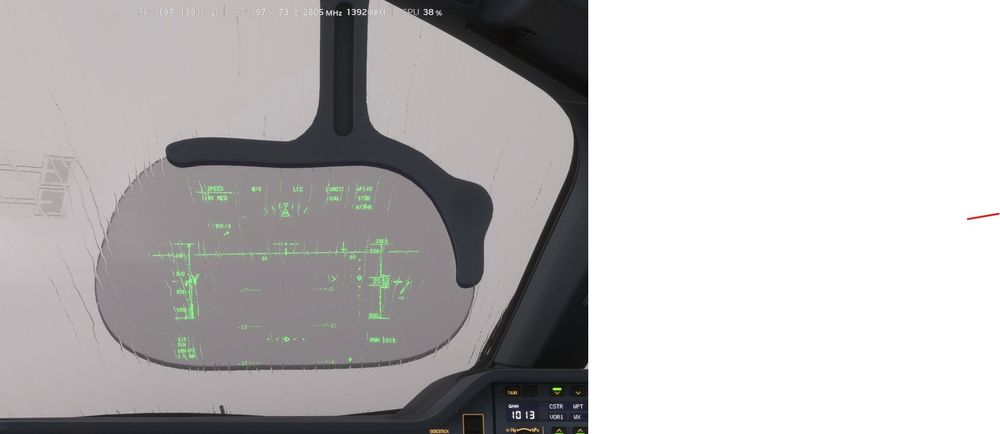
  3. The rain effect on the windshield appears on the HUD glass. As shown in the image, the rain effect appears in front of the HUD glass layer.
Account

Navigation

Configure browser push notifications

Chrome (Android)
  1. Tap the lock icon next to the address bar.
  2. Tap Permissions → Notifications.
  3. Adjust your preference.
Chrome (Desktop)
  1. Click the padlock icon in the address bar.
  2. Select Site settings.
  3. Find Notifications and adjust your preference.