



Skip to content
View in the app

A better way to browse. Learn more.

iniBuilds Forum

A full-screen app on your home screen with push notifications, badges and more.

To install this app on iOS and iPadOS
  1. Tap the Share icon in Safari
  2. Scroll the menu and tap Add to Home Screen.
  3. Tap Add in the top-right corner.
To install this app on Android
  1. Tap the 3-dot menu (⋮) in the top-right corner of the browser.
  2. Tap Add to Home screen or Install app.
  3. Confirm by tapping Install.

Cam757

Member
  • Joined

  • Last visited

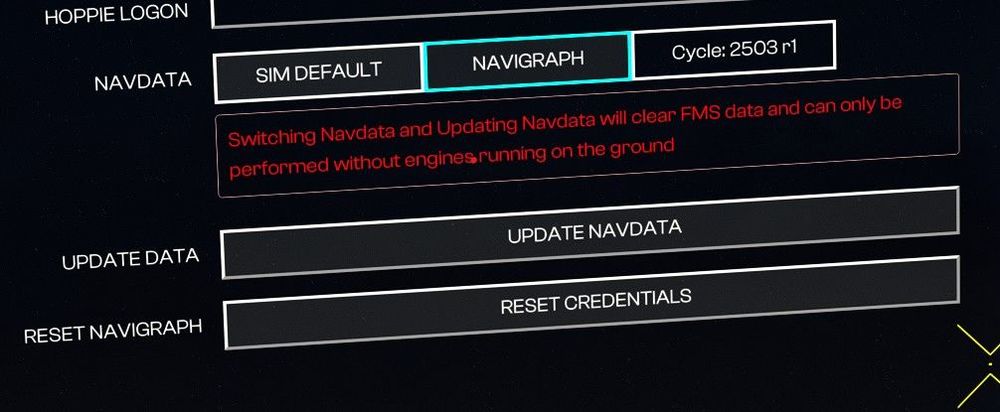
  1. I have linked and updated Navigraph for the A350, however it is only updating to Cycle 2503 r1, when the current version on the Navigraph app is showing AIRAC Cycle 2503 rev.4. I have unlinked and linked it, tried updating it again, restarted the sim. The simulator is updated with the latest Navdata. I attached photos for the example. I am on version 1.07, and have already deleted the WASM folder and performed the steps mentioned above again to see if it would fix it. Is this an issue or is it up to date?

Account

Navigation

Configure browser push notifications

Chrome (Android)
  1. Tap the lock icon next to the address bar.
  2. Tap Permissions → Notifications.
  3. Adjust your preference.
Chrome (Desktop)
  1. Click the padlock icon in the address bar.
  2. Select Site settings.
  3. Find Notifications and adjust your preference.