




kato217
Member
-
Joined
-
Last visited
Everything posted by kato217
-
Hi As you are updating the HUD for the upcoming A350 V2, would it be possible to leverage some of that work to provide an optional HUD for the A380? That would be chef's kiss. Thanks for listening.
-
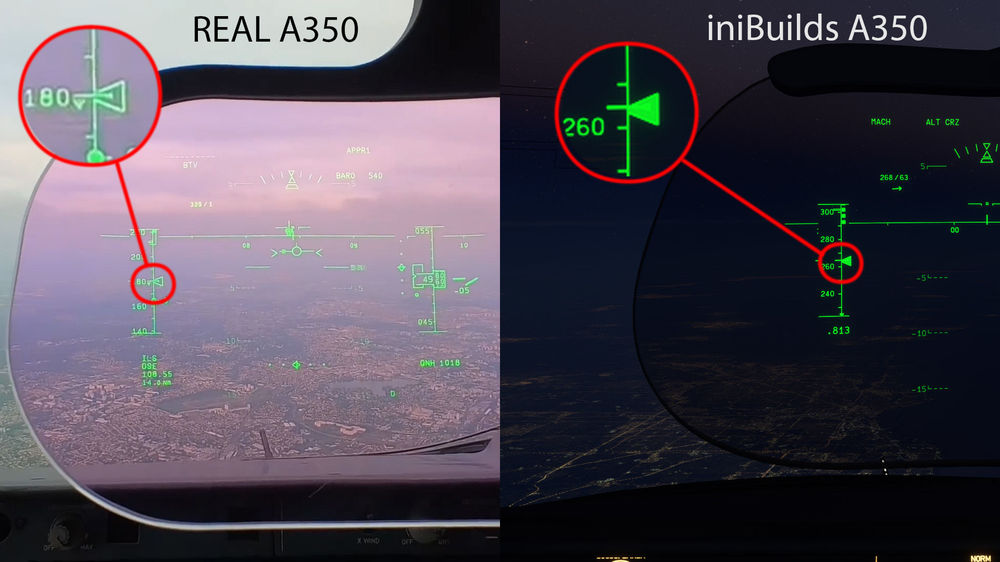
The HUD airspeed caret in the iniBuilds A350 is filled in with solid green, however the airspeed caret in the real aircraft is not filled in, as it is made up of 3 lines in a triangle shape. This is important because the current airspeed line is not visible inside the caret with the solid color, making it hard to discern whether you are at the correct airspeed or not - see pics. For reference, the iniBuilds A350 PFD does have the caret drawn correctly with 3 blue lines making up the caret triangle - thanks!
-
Same issue here in VR
-
I had the same issue - would also like ot know how to clear it.

