



Skip to content
View in the app

A better way to browse. Learn more.

iniBuilds Forum

A full-screen app on your home screen with push notifications, badges and more.

To install this app on iOS and iPadOS
  1. Tap the Share icon in Safari
  2. Scroll the menu and tap Add to Home Screen.
  3. Tap Add in the top-right corner.
To install this app on Android
  1. Tap the 3-dot menu (⋮) in the top-right corner of the browser.
  2. Tap Add to Home screen or Install app.
  3. Confirm by tapping Install.

Claviateur

Member
  • Joined

  • Last visited

  1. Hello, Since I did not receive any feedback from IniBuilds tech support on this one here or on Discord and I had also posted this question on the MSFS forums but without any feedback either. I am wondering where can we get tech support from IniBuilds on default MSFS aircraft? Thanks
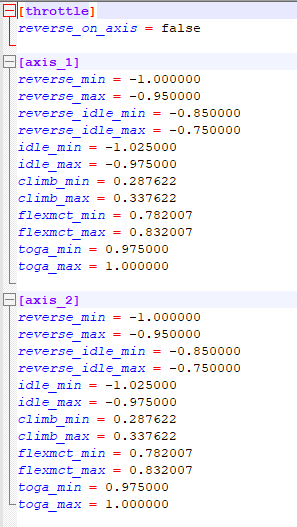
  2. Hello, For some reason, even if I disable the Reverse on Axis in the A330 throttle calibration, the thrust reversers still activates on IDLE. I use the Thrustmaster Hotas Worthog and my reverse thrust is a button in MSFS2024 control settings. Also, I confirm that the Reverse On Axis = False in the ThrottleData.ini Any idea why this is happening? Thanks
Account

Navigation

Configure browser push notifications

Chrome (Android)
  1. Tap the lock icon next to the address bar.
  2. Tap Permissions → Notifications.
  3. Adjust your preference.
Chrome (Desktop)
  1. Click the padlock icon in the address bar.
  2. Select Site settings.
  3. Find Notifications and adjust your preference.