




Ueeeee
Member
-
Joined
-
Last visited
Everything posted by Ueeeee
-
When i posted this ive used version 1.09 or 1.08. I´ve tryed my reported error now in version 1.11 and its still the same problem.
-
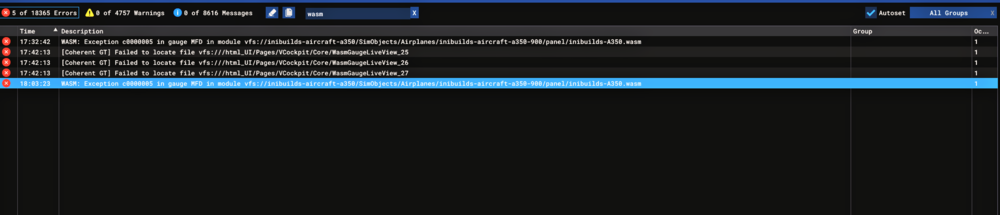
I did a normal climb out with the A350-900 and than swapp the FPlan with SEC 1. Than I had a WASM crash. I had this issue now sevral times and its really anoying cause i cant use the sec Fplan seriously cause I allways have to fear a WASM crash. SIM: MSFS 2020 NAVDATA: SIM DEFAULT WASM: Exception c0000005 in gauge MFD in module vfs://inibuilds-aircraft-a350/SimObjects/Airplanes/inibuilds-aircraft-a350-900/panel/inibuilds-A350.wasm
-
I´ve noticed that the bank angel protection isnt working correct. In normal law the bank angel should not exceed 30° when letting go the stick. But thats not the case. In turns the bank stay at 40° or even more without touching the stick.
-
On the N1 gauge, there should be a dial/indication, which is located behind the main dial, this dial should show how much power is set on the thrust levers. This dial is there in the A300 but is missing in your A310. It should be nice to ad this in a new update. Pls think of it cause its sometimes rather annoying.
-
When you turning of the Packs for Takeoff, you get a warning that the packs are off. This shouldn’t be when turning off the Packs on Ground. Pls fix that cause this is rather annoying

