




Wonhee
Member
-
Joined
-
Last visited
-
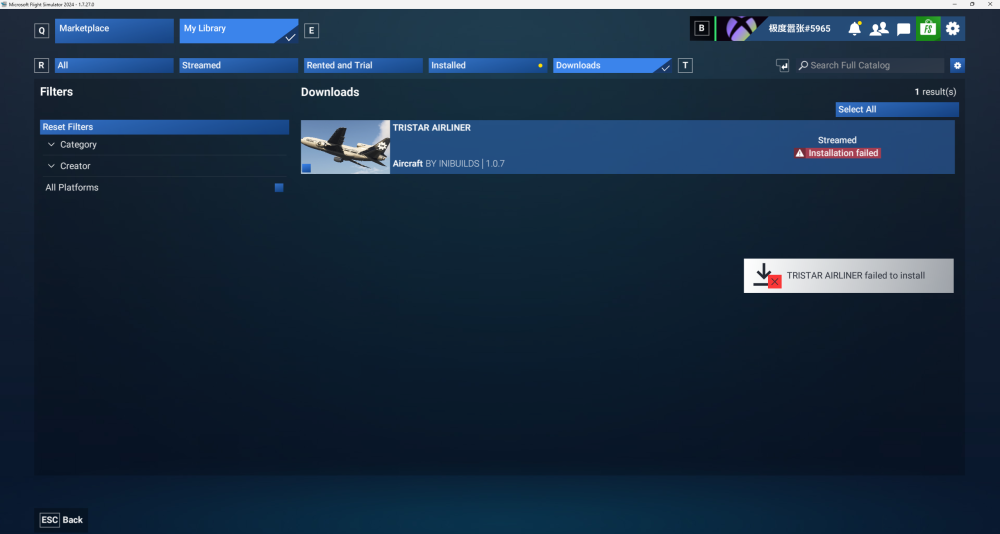
With all due respect, the In-Game Marketplace is absolutely awful to use — especially the update function. I constantly have to re-download files over and over, close and restart the game repeatedly, yet it always keeps showing installation failed. It’s unbelievably clunky and such a torture to deal with.
-
I’ve finally found the root cause: Navigraph. Navigraph has released two separate sets of navigation data for FS20 and FS24 respectively. FS20 uses navigraph-navdata and navigraph-navdata-base. FS24 uses navigraph-nav-base and navigraph-nav-jepp. I still have FS20 installed on my computer. To save SSD space before, I set FS20 and FS24 to share the same Community folder. That’s why all four navigation data packages ended up inside it together. I’ve now disabled the two FS20 nav data packages in FS24, and everything is working properly again. ILS is now fully functional at VHHH and EGLL.
-
I’ve now recorded a new video, where I tested five airports: ZSPD (Shanghai) ✕ ZBAA (Beijing) ✓ ZUCK (Chongqing) ✓ ZGGG (Guangzhou) ✓ VHHH (Hong Kong) ✕ Besides, EGLL, EGKK and RKSI are also among the airports I’ve tried where the ILS still can’t connect.
-
I’m genuinely shocked that all your gauges respond as soon as you enter the ILS frequency, while absolutely nothing happens on my end. Earlier today, I landed on Runway 25C using the Aerosoft A340-600. After pressing the APPR button, the entire ILS system engaged and started working. As for the L-1011(1.0.4), the only airport where I’ve ever successfully activated ILS is ZUCK (samscene3d). At that time, I didn’t even check whether I was in VLOC mode. That’s because I’ve never turned on GPS or INS+GPS in the PFB before — I’ve always been using pure INS mode only.
-
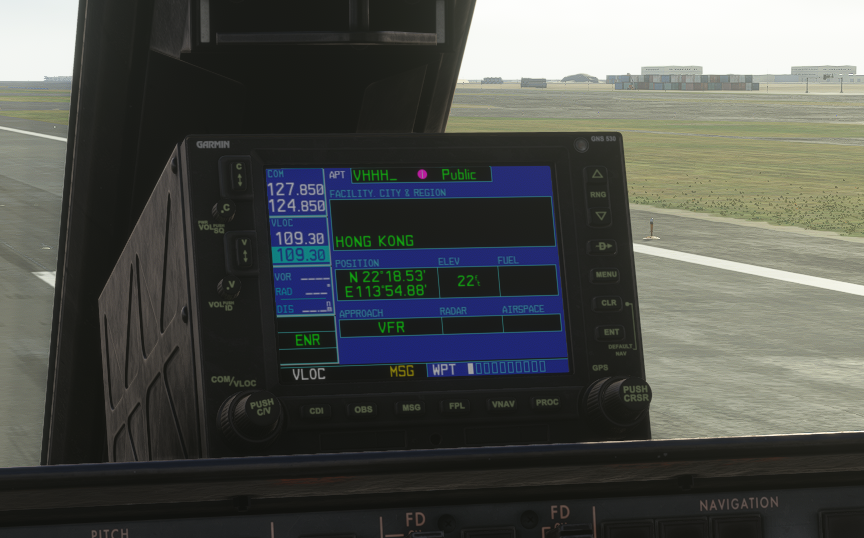
I relaunched the game and spawned on Runway 25C. I confirmed I was in VLOC mode, but none of the other data showed up at all. It seems entering the ILS frequency doesn’t load any additional ILS information for me, so my ILS button still won’t light up normally.
-
Actually, the HSI flickered at around 9:26 in my video — that was me pressing my custom-bound shortcut key.
-
I've recorded a complete full flight along the VMMC–VHHH (Runway 25C) route. I uploaded the video to YouTube using some alternative methods. My recording setup and procedures weren’t very standardized or professional, and the video might be a bit longer than usual, so please bear with me. Also, could you help me figure out why the ILS approach was unavailable?
-
Then these two standalone instruments are definitely not working either. The DME always shows 0000, and the HSI stops functioning once INS navigation ends. However, after activating the VOR, the HSI displays a straight line pointing toward the 254 heading. I’m really sorry, but uploading videos to YouTube isn’t possible from my current region.
-
I've confirmed I entered 109.30 and switched the radio mode correctly. Both FD have been switched on since before takeoff. In your video, once you press the ILS and LOC buttons, they stay illuminated, and it shows ILS ARM or LOC ARM until fully capturing and engaging the ILS/LOC signal. But on my end, the ILS and LOC buttons pop off and turn off immediately right after I press them. Because of this, my VOR/DME indicator and HSI won’t respond or engage with the ILS at all. The only place I can successfully capture and engage the ILS just like in your video is at SS3D Chongqing Airport (ZUCK). The L1011 doesn’t have a separate Navigraph data folder to install navigation data like the A350 does. Could this be caused by an issue with my Navigraph navigation data? I installed both nav-base and nav-jepp through Navigraph Hub.
-
Due to today's wind direction, I'm using Runway 25C with the frequency 109.30 and heading 254°, exactly as shown on the aeronautical chart. I can't get the ILS and LOC buttons to light up/activate at all, let alone have other related systems work properly.
-
I flew a leg from RCTP to VHHH, but it didn't help at all. My ILS and LOC buttons still pop back up and turn off immediately after I press them. I can't get into the LOC ARM or ILS ARM state at all, so I still can't engage the ILS.
-
So far, I’ve only managed to get the ILS working successfully at ZUCK with the SS3D version. I cannot activate the ILS at any other airport — including iniBuilds’ VHHH, EGLL, and third-party RKSI, among others. I’ve completed all the steps that I can did: entered the ILS frequency and magnetic runway heading, switched to RADIO mode, used HDG to line up with the runway, and descended below the glideslope. Yet at the vast majority of airports, the ILS and LOC buttons simply won’t light up no matter what I do. I want to figure out the reason for this issue, please help me.


