EilidhP
Member
-
Joined
-
Last visited
Everything posted by EilidhP
-
-
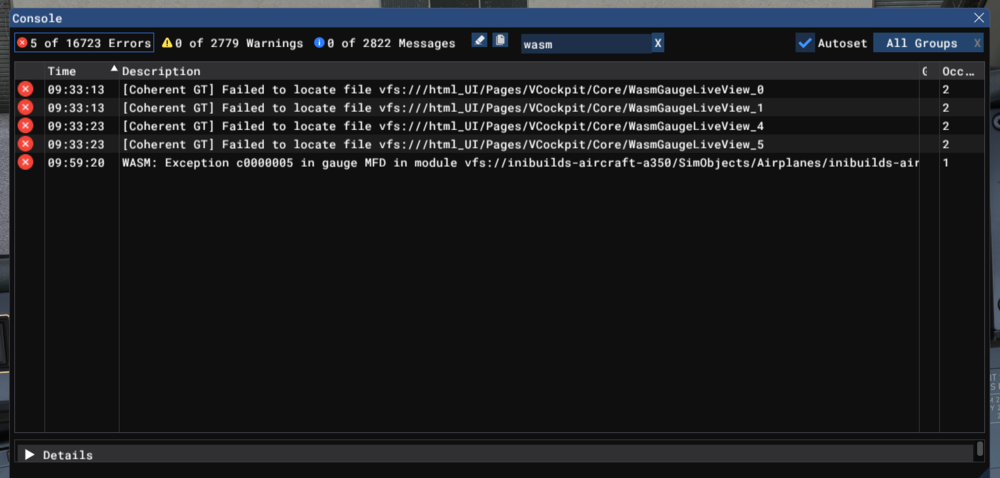
My fourth WASM crash in a row (I have only attempted four flights in this aircraft). Aircraft: A350-900 Simulator: FS2020 Navdata Method: Navigraph OFP: LFBO/14R FIST7A FISTO POI PEPAX UT182 KEPER KEPE9P LFPG/08R WASM Error Codes: [Coherent GT] Failed to locate file vfs:///html_UI/Pages/VCockpit/Core/WasmGaugeLiveView_0 [Coherent GT] Failed to locate file vfs:///html_UI/Pages/VCockpit/Core/WasmGaugeLiveView_1 [Coherent GT] Failed to locate file vfs:///html_UI/Pages/VCockpit/Core/WasmGaugeLiveView_4 [Coherent GT] Failed to locate file vfs:///html_UI/Pages/VCockpit/Core/WasmGaugeLiveView_5 WASM: Exception c0000005 in gauge MFD in module vfs://inibuilds-aircraft-a350/SimObjects/Airplanes/inibuilds-aircraft-a350-900/panel/inibuilds-A350.wasm Specs: Intel i7-12700H; NVIDIA GeForce RTX 3070 Laptop GPU; 40GB RAM. Screenshot: Screenshot included Reproduction of error: All four times the WASM crash has occurred when manipulating the MCDU. This time, I was trying to insert a new route after swapping the nav database. You've built a beautiful aircraft, and I'm really impressed with everything else I've seen of the aircraft, but the fact that I have a 100% WASM crash rate is incredibly disappointing.