



Skip to content
View in the app

A better way to browse. Learn more.

iniBuilds Forum

A full-screen app on your home screen with push notifications, badges and more.

To install this app on iOS and iPadOS
  1. Tap the Share icon in Safari
  2. Scroll the menu and tap Add to Home Screen.
  3. Tap Add in the top-right corner.
To install this app on Android
  1. Tap the 3-dot menu (⋮) in the top-right corner of the browser.
  2. Tap Add to Home screen or Install app.
  3. Confirm by tapping Install.

coryb15

Member
  • Joined

  • Last visited

  1. coryb15 posted a topic in Other
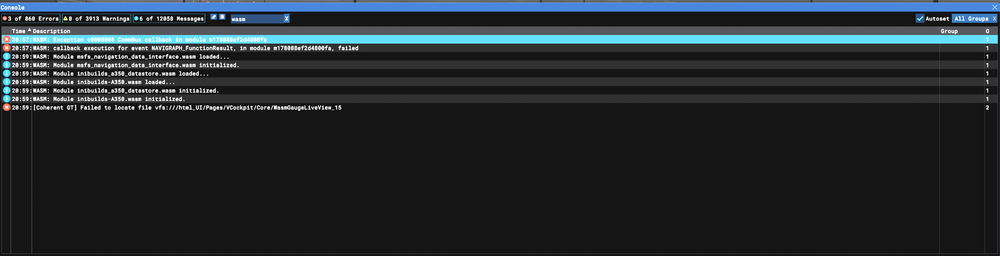
    Got a WASM crash on descent into EFHK from RJTT. I had not done anything to cause the crash...the STAR and approach were already loaded with a discontinuity between the end of the STAR and the approach. The crash happened at about 11000ft on the LUSEP5A arrival with the ILS 22L previously loaded. I was not even interacting at all with the sim when the panels froze and WASM crashed. Aircraft: A350-900 (v1.0.1) Simulator: FS2020 Navdata Method: NAVIGRAPH OFP: Attached WASM Error: WASM: Exception c0000005 CommBus callback in module m178088ef2d4800fa WASM: callback execution for event NAVIGRAPH_FunctionResult, in module m178088ef2d4800fa, failed Specs: Intel i7-10700K, EVGA RTX 3080, 32GB RAM RJTTEFHK_PDF_1741139771.pdf
Account

Navigation

Configure browser push notifications

Chrome (Android)
  1. Tap the lock icon next to the address bar.
  2. Tap Permissions → Notifications.
  3. Adjust your preference.
Chrome (Desktop)
  1. Click the padlock icon in the address bar.
  2. Select Site settings.
  3. Find Notifications and adjust your preference.