



Skip to content
View in the app

A better way to browse. Learn more.

iniBuilds Forum

A full-screen app on your home screen with push notifications, badges and more.

To install this app on iOS and iPadOS
  1. Tap the Share icon in Safari
  2. Scroll the menu and tap Add to Home Screen.
  3. Tap Add in the top-right corner.
To install this app on Android
  1. Tap the 3-dot menu (⋮) in the top-right corner of the browser.
  2. Tap Add to Home screen or Install app.
  3. Confirm by tapping Install.

darkplay

Member
  • Joined

  • Last visited

Everything posted by darkplay

  1. Hi, thanks for the reply. You mean replace only these files from the paintkit right? Do I need to do something else, like work with Blender or is it just about replacing files?
  2. Come on guys, at least tell us what we can do so that the liveries that are not from iniBuilds can work again!
  3. Same here, no airport maps anymore
  4. Yeah, I reported this issue a month ago also. Cruise alt: FL390 Winds aloft data in A350: till FL300 and these winds are used for calculations!! Such as ETA, Fuel predictions
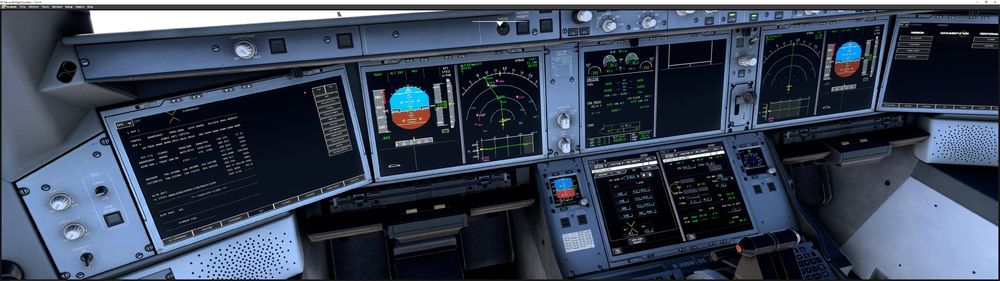
  5. I am flying at FL390 and then FL410. Winds aloft data is not loading for my current altitude but for lower as seen below. This messes up the DEST ETA and EFOB. Is this a known bug or a new one?
Account

Navigation

Configure browser push notifications

Chrome (Android)
  1. Tap the lock icon next to the address bar.
  2. Tap Permissions → Notifications.
  3. Adjust your preference.
Chrome (Desktop)
  1. Click the padlock icon in the address bar.
  2. Select Site settings.
  3. Find Notifications and adjust your preference.