Skip to content
View in the app

A better way to browse. Learn more.

iniBuilds Forum

A full-screen app on your home screen with push notifications, badges and more.

To install this app on iOS and iPadOS
  1. Tap the Share icon in Safari
  2. Scroll the menu and tap Add to Home Screen.
  3. Tap Add in the top-right corner.
To install this app on Android
  1. Tap the 3-dot menu (⋮) in the top-right corner of the browser.
  2. Tap Add to Home screen or Install app.
  3. Confirm by tapping Install.

Grizzly404

Member
  • Joined

  • Last visited

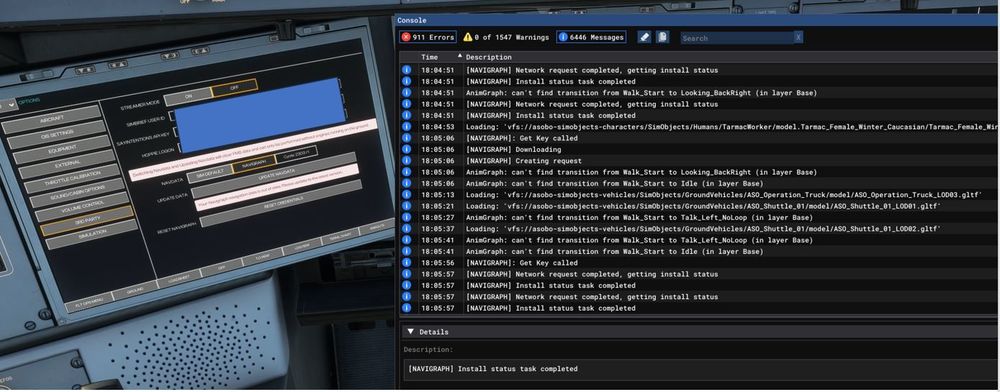
  1. Hello, After WASM clean process and with V1.0.2 installed I'm still unable to update Navigraph navdata. I had this message in the console apparently a WASM issue. I already tried airplan reinstallation twice & a full (& painfull) MSFS2020 reinstallation for the same results thanks for your help.
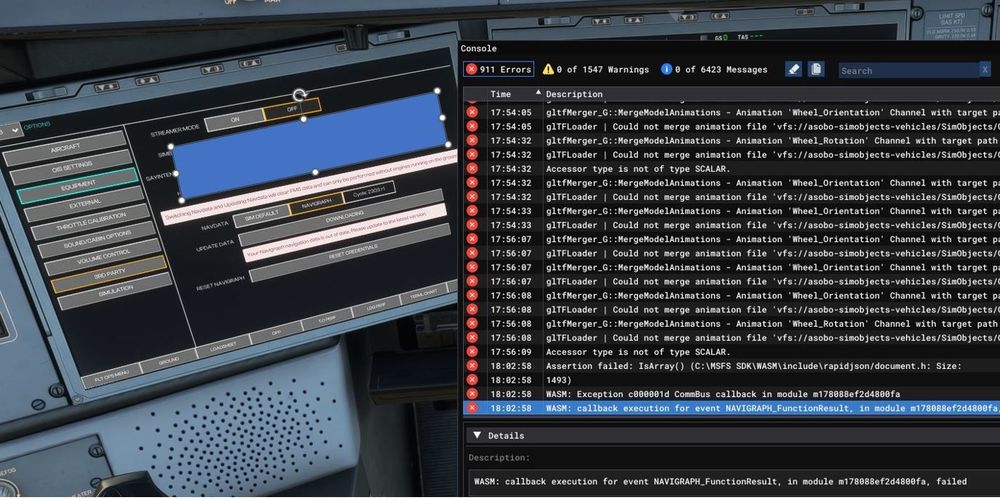
  2. Hello, I have the same issue also, process starts but nothing is downloaded. Best regards Alexandre

Account

Navigation

Configure browser push notifications

Chrome (Android)
  1. Tap the lock icon next to the address bar.
  2. Tap Permissions → Notifications.
  3. Adjust your preference.
Chrome (Desktop)
  1. Click the padlock icon in the address bar.
  2. Select Site settings.
  3. Find Notifications and adjust your preference.